If you have ever searched for your own business on Google and wondered whether the listing you see is actually under your control, you are asking the right question. A Google Business Profile (GBP, formerly Google My Business, or GMB) only unlocks its full power once it is verified, and the fastest way to know your status is to sign in to the Google account that manages the profile and look for one signal: a verified profile shows a full management dashboard with no “Get verified” prompt, while an unverified one pushes you to verify before you can edit much of anything. Verification is not a vanity badge. Google reports that people are far more likely to visit a business whose profile is complete and active, so an unverified listing quietly leaves calls, clicks, and foot traffic on the table.
You will need the Google account that created or manages the profile, your exact business name and address, and about five minutes. No technical skill is required, but you do have to be signed in to the correct account. If you are not sure which account manages the listing, note that down, because the wrong account is the single most common reason owners think they are not verified when they actually are.
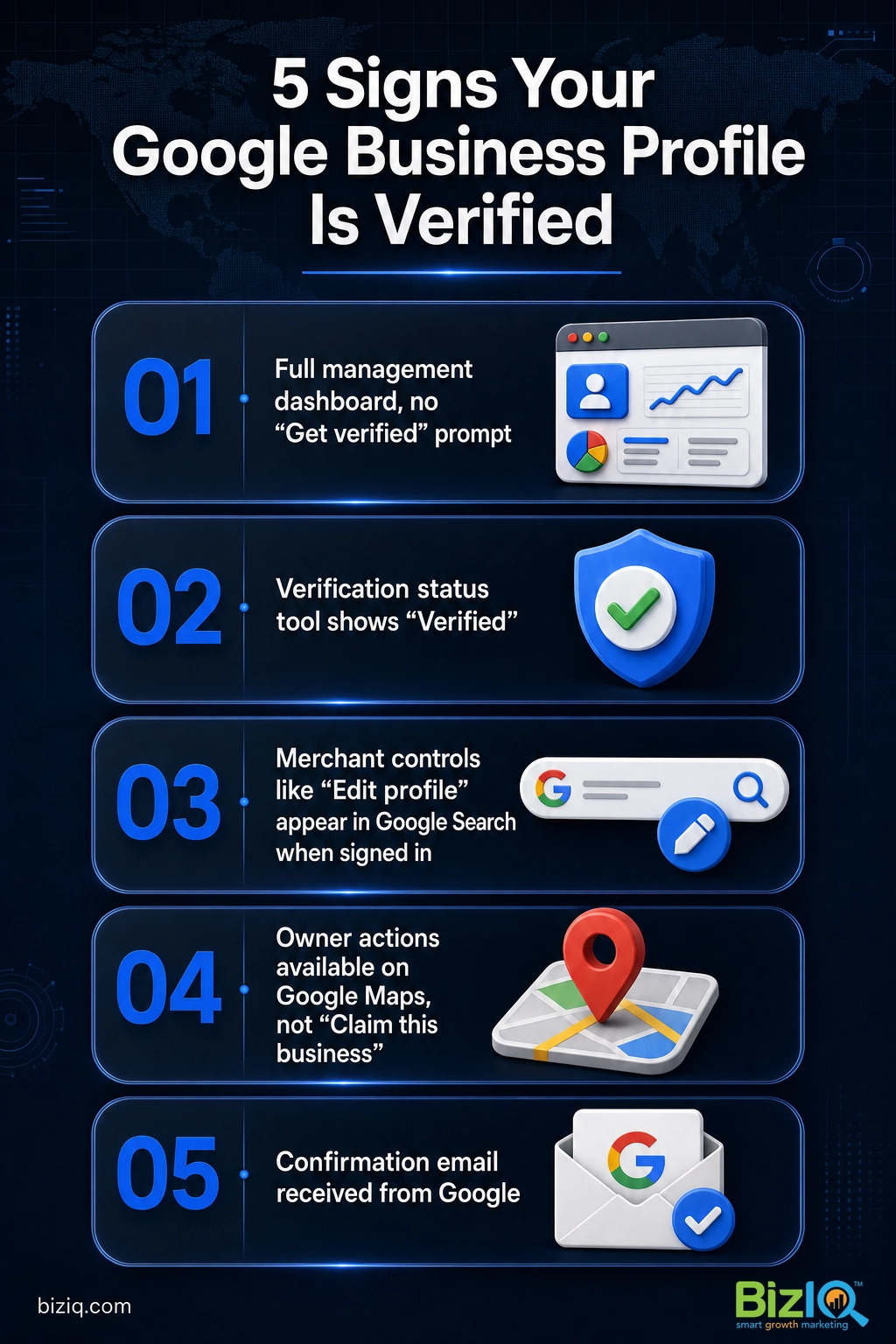
- A verified GBP shows a full management dashboard with no “Get verified” prompt; an unverified one blocks most edits.
- The fastest checks are the Business Profile dashboard, Google’s verification status tool, or searching your business name while signed in.
- “Verified” is not the same as “visible.” Seeing your listing on Google proves it exists, not that you control it.
- Verification can lapse after major edits or a guideline issue, so it is worth rechecking a profile you have not touched in a while.
- A verified, complete profile drives measurably more visits, direction requests, and calls than an incomplete one.
What’s in This Guide
- What a Verified Google Business Profile Really Means
- 5 Ways to Check If Your Profile Is Verified
- What Each Verification Status Means
- Why Verification Matters for Getting Found
- When to Call a Professional
- Troubleshooting Common Verification Problems
- How to Keep Your Profile Verified and Working
- Frequently Asked Questions
What a Verified Google Business Profile Really Means
Verification is Google’s way of confirming that you are who you say you are and that you have the right to manage a specific business listing. Until a profile is verified, Google treats it as unclaimed or unconfirmed: it may still appear in search and on Maps, but you cannot reliably edit your hours, respond to reviews, add photos, or publish updates. Once verified, the listing becomes a true marketing asset you control from a management dashboard.
This is the distinction that trips up most owners. A listing being visible on Google is not the same as it being verified by you. Google can generate a basic listing on its own, a former employee or agency may have claimed it years ago, or a competitor or data provider may have created a duplicate. So the real question is not “does my business show up,” it is “can I open the dashboard and manage it.” That is what the checks below confirm.
A complete, verified profile also makes people trust you faster. Google’s research found that shoppers are 2.7 times more likely to consider a business reputable and 50 percent more likely to consider buying from it when its Business Profile is complete. None of that is available to you while the listing sits unverified, which is why confirming your status is step one of local marketing, not an afterthought.
Source: Google Business Profile | Google’s Business Profile Help
5 Ways to Check If Your Profile Is Verified
You do not need all five of these. Start with the first one, and move down the list only if you are locked out of the managing account or cannot get a clear answer. Each method looks at the same thing from a different angle, so they are useful for confirming a result or working around a lost login.
Method 1: Open Your Business Profile Dashboard
What to do: Sign in to the Google account that manages the profile and go to your Business Profile. The simplest route is to search your business name directly in Google while signed in, or open the profile from the Business Profile Manager if you handle several locations. Look at what Google shows you.
Why it matters: The dashboard is the single clearest answer, because only a verified owner or manager sees the full set of management tools.
What success looks like: A verified profile shows editing controls for your info, photos, reviews, and posts, with no “Get verified” banner. If you instead see a “Get verified” button and most editing is blocked, the profile is not verified under this account.
Method 2: Use Google’s Verification Status Tool
What to do: Use Google’s verification status tool, sign in with the managing account, and select the business you want to check. Google reports the status directly.
Why it matters: This is the most direct, official answer when you are unsure, and it distinguishes “verified” from “pending” so you know whether you are waiting on Google or need to start over.
What success looks like: The tool labels the business as verified. If it shows a pending state, your request is still under review; if it prompts you to verify, the profile is not verified yet.
Method 3: Search Your Business Name on Google While Signed In
What to do: With the managing account signed in, type your exact business name into Google Search. If the account manages the listing, Google shows a merchant panel with quick controls above or beside the normal result.
Why it matters: This is the fastest at-a-glance check and needs no separate tool, which makes it handy when you just want a quick read.
What success looks like: You see controls such as “Edit profile,” “Promote,” or “Customers.” Those appear only for a verified, managed profile. If you instead see “Own this business?” or “Get verified,” the listing is not verified under your account.
Method 4: Check on Google Maps
What to do: Open Google Maps on the same account, find your business, and look at the options under the listing.
Why it matters: Maps and Search share the same profile, so Maps is a useful second opinion, especially on mobile where many owners manage their listing.
What success looks like: A managed listing offers owner actions. An unverified one shows a “Claim this business” or “Own this business?” link, which is Google’s way of telling you no one has verified control yet.
Method 5: Look for Google’s Confirmation Email
What to do: Search the inbox of the managing account for a message from Google confirming the profile is verified.
Why it matters: Google sends a confirmation when verification completes, so the email is a durable record even if you are between devices or cannot reach the dashboard right now.
What success looks like: A dated confirmation email from Google. No email, combined with a “Get verified” prompt in the dashboard, points to an unverified profile.
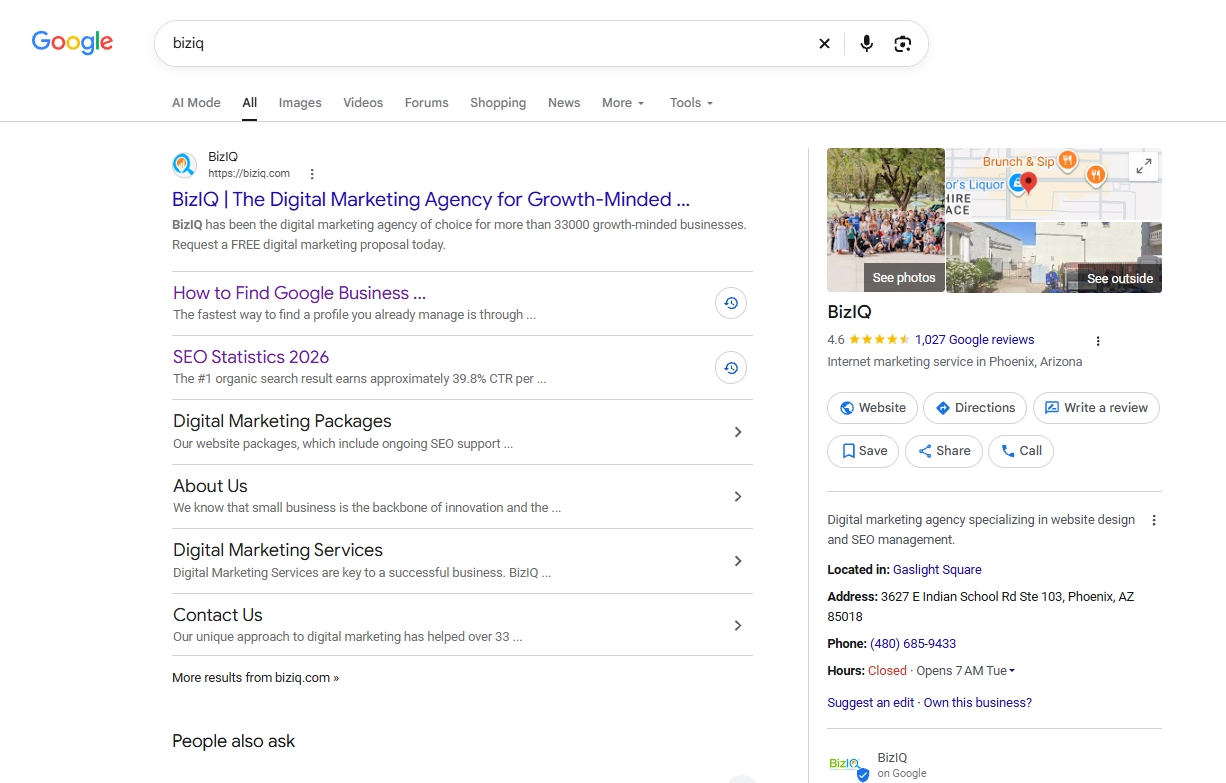
“If I can see my business on Google, it must be verified.” Not true. Visibility and verification are separate things. Google often creates or displays basic listings that no one has claimed, and a profile someone else manages will still show up when you search. The only proof you control a profile is being able to manage it from the dashboard under your account.
If any method shows you are not verified yet, the fix is to start verification, and our step-by-step Google Business Profile verification guide walks through every method Google may offer. Cannot even find the listing to check it? Our guide on locating your Business Profile will help you track it down first.
Source: Google’s Business Profile Help
What Each Verification Status Means
When you run the checks above, you will land on one of four states. Knowing which one you are in tells you whether to celebrate, wait, or take action.
| Status | What you see | What it means | What to do |
|---|---|---|---|
| Verified | Full dashboard, edit controls, no “Get verified” prompt | You own and control the listing | Keep it complete and post regularly |
| Unverified | “Get verified” button, editing blocked | The listing exists but no one has confirmed ownership under your account | Start verification |
| Pending | “Verification in progress” or a waiting message | Google is still reviewing your request | Wait, then recheck the status |
| Needs reverification or suspended | “Verification required” reappears, or the profile is hidden | Google flagged the profile or needs you to confirm again | Fix the issue, reverify, or appeal |
If you are stuck on “pending,” the timing depends on the method you used. Our companion guide on how long Google Business Profile verification takes breaks down what to expect for video, phone, and postcard verification so you know when to follow up instead of starting over.
Why Verification Matters for Getting Found
Checking your status is worth the five minutes because an unverified profile cannot do the work that drives local customers. Once verified and filled out, your profile can carry photos, hours, services, posts, and review responses, and Google rewards that completeness with more visibility in local results and the map pack.
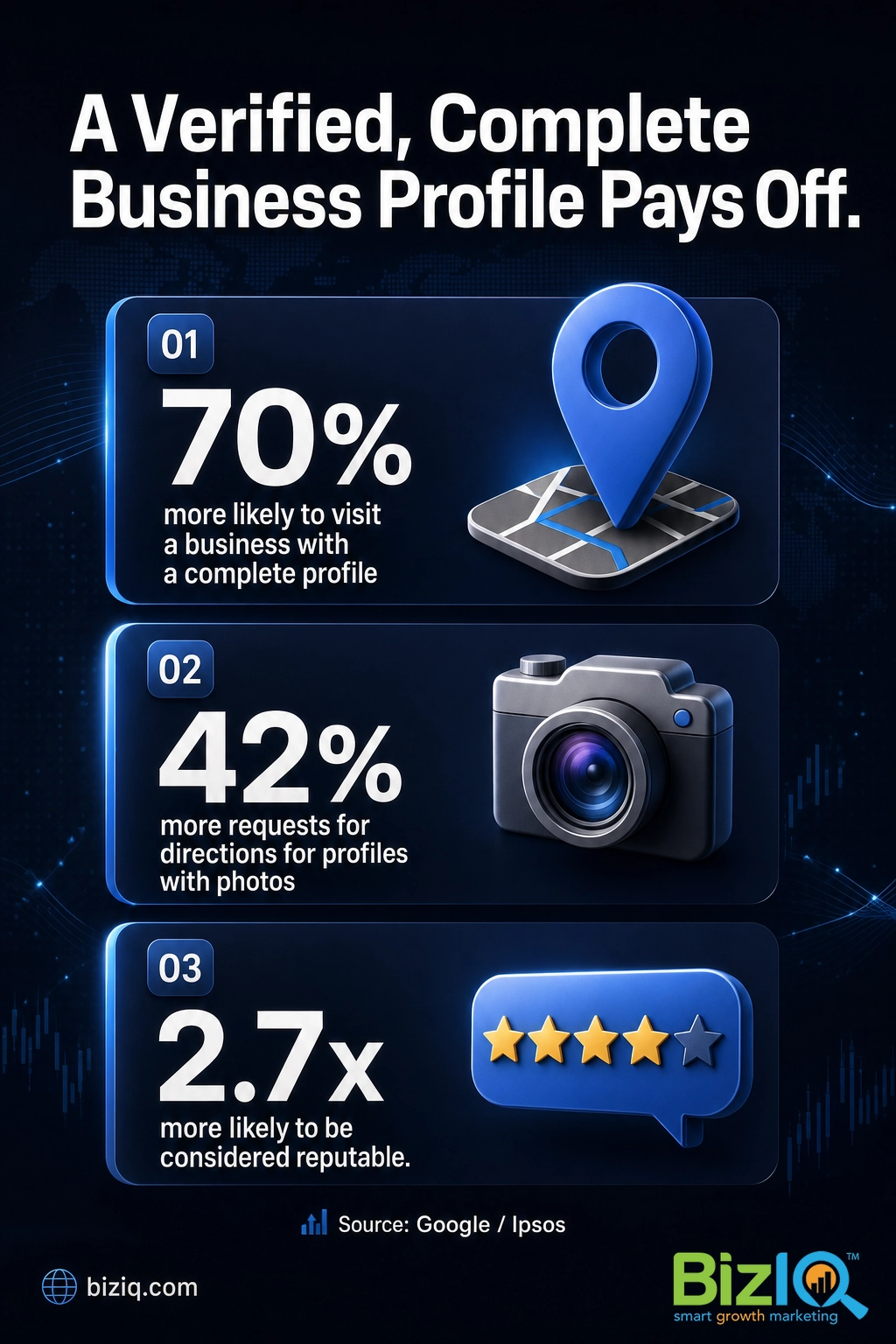
Photos are a good example of what you unlock. Google found that Business Profiles with photos get 42 percent more requests for directions and 35 percent more click-throughs to their website than profiles without them. You can only add and curate those photos once you have verified control, so verification is the gate that stands between your listing and that extra traffic. For a busy owner, that is the difference between a listing that just sits there and one that steadily sends you calls and visits.
Real results for real local businesses
How BizIQ clients turned their Google presence into customers.
Holloway Construction
Demolition & excavation — Jonesborough, TN
Down to their last $2,500 with no online presence, Holloway Construction had BizIQ launch a website in under 24 hours and optimize their Google Business Profile so customers could find them — and made $30,000 in 24 hours.
“BizIQ saved my business.” — Mark Holloway, Owner
10X Health
Health & wellness
Only 14% of 10X Health’s ranking keywords were non-branded. BizIQ grew their organic visibility during rapid growth — contributing to 20K products sold in one month and a +100% increase in average monthly website sessions.
“We literally 10X-d the business, and BizIQ was our digital partner in crime.” — Alana, 10X Health
Source: Google Business Profile
When to Call a Professional
If you reach this point and the managing account is lost, the profile keeps bouncing back to “verification required,” or a suspension has knocked you out of local results, that is the moment to bring in help rather than keep guessing. Reclaiming access, appealing a suspension, and passing a reverification cleanly all go faster when someone has done it before. BizIQ sets up and verifies Google Business Profiles for small businesses every day, then optimizes them so the listing actually earns calls and leads.
Troubleshooting Common Verification Problems
Most “I thought I was verified” surprises come down to a handful of causes. Here is how to sort them out.
| Problem | Likely cause | Fix |
|---|---|---|
| “Get verified” still shows after I verified | You are signed in to the wrong Google account | Sign out, then sign in with the account that manages the profile |
| “Verification required” keeps reappearing | Google is rechecking after a major edit to your name, address, or category | Complete the requested reverification and avoid repeated large edits |
| Profile disappeared from search and Maps | The profile was suspended for a suspected guideline issue | Review Google’s guidelines, fix the issue, and request reinstatement |
| I cannot find the dashboard at all | No profile exists yet, or another person manages it | Create a new profile, or request access from the current manager |
If you have tried these and still cannot get a straight answer from Google, it may be time to reach a human. Our guide on how to contact Google Business Profile support shows the current ways to open a case.
How to Keep Your Profile Verified and Working
Verification is not a one-time box to tick. Google can ask you to reverify after you change core business details, and profiles that sit untouched are easier targets for suspension or edits by others. The owners who stay out of trouble treat the profile as a living listing: they keep the name, address, and phone consistent with the rest of the web, add fresh photos, respond to reviews, and avoid sweeping edits all at once.
Verification gets you the keys, but the businesses that win locally keep driving. A verified profile that is updated weekly with posts, photos, and review replies will out-rank a verified profile that was claimed once and forgotten. Treat the “verified” status as the start line, not the finish.
Staying on top of all of this every week is a lot for an owner who already has a business to run, which is where ongoing local SEO services earn their keep. You can also browse more answers in our Google Business Profile FAQ hub or explore the full Google Business Profile resources.
Highly professional
“I have been working with this organization for a while now. They are highly professional and have helped me immensely. I have worked with other similar groups in the past only to find…”
— John G.
We are very happy
“BizIQ has helped our business so much! They promised and delivered! We are very happy with their service, our web presence and all the follow up support we get!”
— CharLee B.
Highly recommend BizIQ
“Our business recently hired BizIQ to create our website. They have created the best website we have ever had. We have been impressed by their customer service and how quickly they do…”
— Norman S.
Frequently Asked Questions
How do I know if my Google Business Profile is verified?
Is my Google Business Profile verified if I can see it on Google?
How do I check my Google Business verification status?
What does “verification required” mean on my Google Business Profile?
Can a Google Business Profile lose its verification?
How long does Google Business Profile verification take?
What should I do if my Google Business Profile is not verified?
Knowing your verification status takes about five minutes, and it is the foundation everything else in local search is built on. If the checks above show your profile is unverified, stuck, or managed by someone you cannot reach, BizIQ can claim, verify, and optimize it so it starts earning calls and customers.