The Google Business Profile API (application programming interface, a way for software to talk to Google) is Google’s official toolset for managing the business listings you own, all in code rather than by hand. It lets a program update your hours, publish posts, upload photos, and reply to reviews across your listings automatically. Most small businesses never need it, and that is completely fine. This guide explains what it does, who it is really for, and how access works, without the developer jargon.
- The Google Business Profile API lets software manage listings you own, instead of clicking through Google by hand.
- It is built for businesses with many locations, agencies, and software companies, not the typical one-location owner.
- If you run one or a few locations, the free Business Profile dashboard already does everything you need.
- Access is restricted: you need a Google Cloud project, a real business reason, and Google’s approval.
- A complete, active profile drives real local results whether you use the API or not, so that is where to focus first.
What’s in This Guide
What the Google Business Profile API Actually Is
Think of your Google Business Profile as the free listing that shows up when someone searches your business name or looks for a service “near me.” It holds your name, address, phone number, hours, photos, reviews, and the posts you publish. Normally you edit all of that by logging into Google and clicking around, the same way you would update a social media page.
The Google Business Profile API is a different door into that same listing. Instead of a person clicking buttons, a piece of software sends instructions straight to Google: “change Friday’s hours,” “post this update,” “reply to that review.” An API is just the agreed-upon language two programs use to talk to each other. So the API is not a product you log into. It is plumbing that connects Google to other software.
Here is the important part for an owner: the official API only touches listings you own and have verified. It is not a way to peek at or edit someone else’s business. That ownership rule is what separates Google’s real API from the look-alike tools we cover below.
You need the API to manage your Google listing. You do not. Nearly everything the API does, you can do for free in the Business Profile dashboard with a few clicks. The API only matters when you are doing those same tasks across dozens or hundreds of listings, or building them into other software.
API vs. the Dashboard vs. Third-Party Tools
The fastest way to understand the API is to see it next to the two things people confuse it with: the free dashboard you already use, and the “Business Profile APIs” sold by other companies. They sound alike but do very different jobs.
| Tool | What it is | Best for | Edits listings you own? |
|---|---|---|---|
| Business Profile dashboard | Google’s free website and app where you manage your listing by hand | One or a few locations | Yes |
| Google Business Profile API | Google’s official code interface for managing your listings automatically | Many locations, agencies, software makers | Yes |
| Third-party “profile data” APIs | Tools from other companies that read public listing data for any business | Research, monitoring, competitor data | No, read-only public data |
That last row trips people up. Companies sell services with names like “Google Business Profile data API,” but those read publicly visible information. They cannot change your listing and they are not Google’s official tool. Only the real API, tied to verified ownership, can update what customers see.
There is one more source of confusion worth clearing up. The Business Profile API is not the same as the Google Maps or Places API. Those power maps, directions, and location features inside apps and ads. If that is the side you are curious about, we break it down in our guide to the Google Maps Business API built for ads and local sales. In short: the Business Profile API edits your listing, while the Maps side displays place data to the public.
Be careful with any vendor promising to “get you API access” or “boost your rankings through the API.” Google’s API does not change rankings, and access is granted by Google, not resold by a middleman. If an offer sounds like a shortcut to the top of Maps, it is a red flag, not a feature.
What You Can Do With the API
When a business or software company is approved to use it, the API can handle the same everyday tasks you do in the dashboard, just faster and across many listings at once.
- Business information: update name, address, phone, hours, holiday hours, categories, and attributes.
- Posts: publish offers, events, and updates to one listing or thousands at the same time.
- Reviews: pull in new reviews and send replies that your team writes or approves.
- Questions and answers: monitor the Q&A section and post official answers.
- Photos and media: upload images and videos in bulk.
- Performance insights: gather how customers found you, calls, and direction requests to report on results.
The theme is scale and connection. One restaurant owner does not need software to change Friday’s hours. A chain with 300 locations, or a marketing platform serving thousands of clients, absolutely does. Setting the right profile categories on one listing takes a minute; doing it correctly across hundreds is exactly the kind of job the API exists for.

Who Actually Needs It, and Who Doesn’t
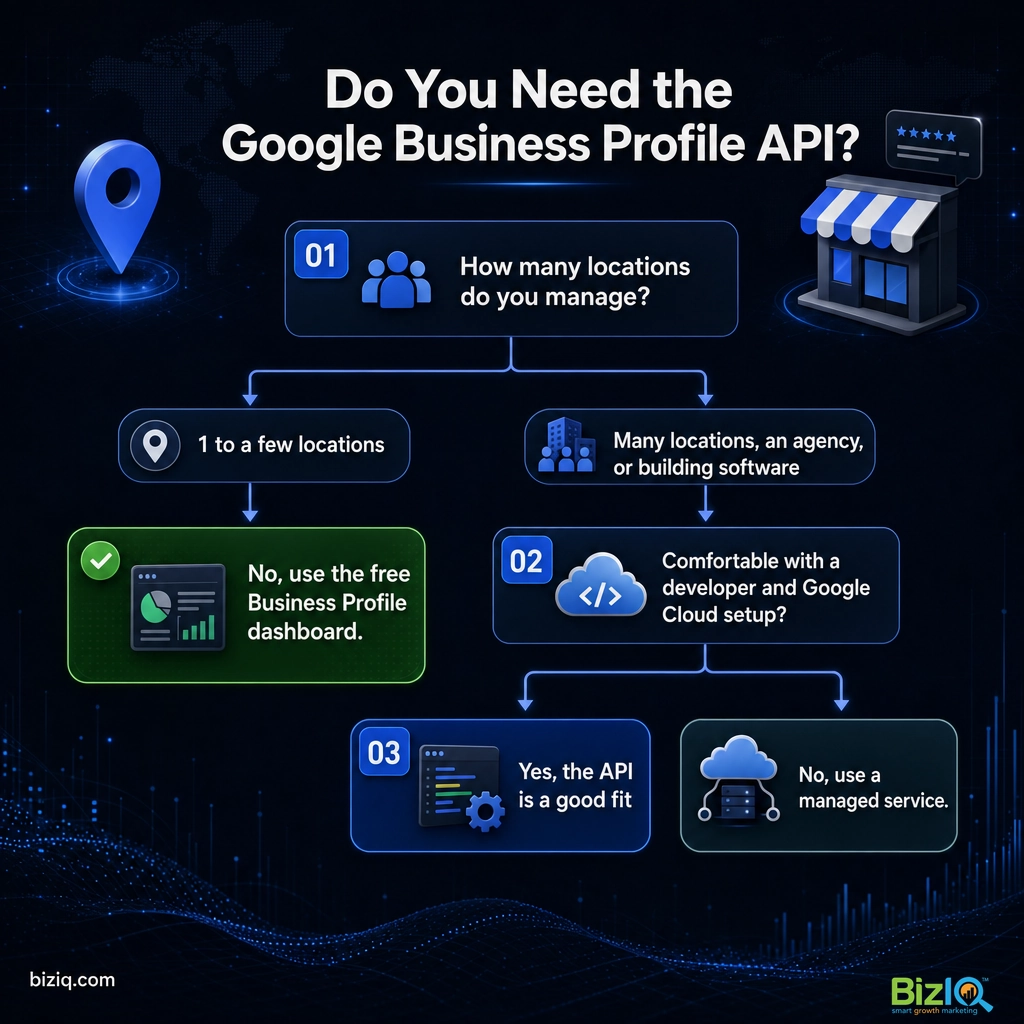
This is the question most owners really want answered, so let us be direct. The API is a power tool. Power tools are great for the right job and overkill for everything else.
You probably need the API if you are: a multi-location brand or franchise managing many profiles, a marketing agency updating listings for lots of clients, or a software company building Google management into your own product. In those cases, doing the work by hand would take a team all day, every day.
You almost certainly do not need the API if you are: a single-location business, or an owner with a handful of locations. The free dashboard already lets you post, reply, add photos, and update hours in minutes. Spending money on a developer to automate what takes you ten minutes a week makes no sense.
If you are in that second group, the smarter move is not more technology. It is making sure the profile you already have is complete, accurate, and worked consistently. That is where local calls and leads actually come from, and it is the part many owners quietly neglect.
The good news is that a strong, well-managed profile does not require code or a developer at all. It takes the right setup and a little regular attention, which you can do yourself or hand to a partner. Not sure where your profile stands today? A quick, free look will tell you what is missing before it costs you leads.
Why Your Business Profile Matters, API or Not
Whether you ever touch a line of code, your Business Profile is often the first thing a local customer sees, before your website. A complete, active profile earns trust and clicks, while a thin or outdated one quietly sends people to a competitor. The numbers behind this are strong.
Profiles with photos also see about 35% more clicks through to the website than profiles without, according to Google. None of that requires the API. It requires a profile that is filled out, verified, and kept fresh, which is exactly what the free tools and a little consistency deliver. If you want to go deeper, learn how to optimize your profile for local search and whether a Business Profile actually helps your SEO (search engine optimization, how you show up in Google).
Source: Google Business Profile | BizIQ customer reviews
Real results for real local businesses
How BizIQ clients turned their Google presence into customers.
Holloway Construction
Demolition & excavation — Jonesborough, TN
Down to their last $2,500 with no online presence, Holloway Construction had BizIQ launch a website in under 24 hours and optimize their Google Business Profile so customers could find them — and made $30,000 in 24 hours.
“BizIQ saved my business.” — Mark Holloway, Owner
10X Health
Health & wellness
Only 14% of 10X Health’s ranking keywords were non-branded. BizIQ grew their organic visibility during rapid growth — contributing to 20K products sold in one month and a +100% increase in average monthly website sessions.
“We literally 10X-d the business, and BizIQ was our digital partner in crime.” — Alana, 10X Health
How to Get Access to the API
If you do fall into the group that needs it, here is the honest version of how access works. It is not a download button. Google restricts the API and reviews each request, so plan for setup time and a developer’s help.
- A Google account tied to the business and its verified profiles.
- A real business purpose. Google asks what you intend to do with the API and expects a legitimate answer, not curiosity.
- A business website. Google looks for a working site that matches the request.
- A Google Cloud project where the API is enabled and secured with Google’s standard sign-in (called OAuth).
- An access request to Google, then approval. Nothing works until Google says yes.
You will also need the identifiers Google uses to know which listing is which. Our walkthrough on how to find your Business Profile ID covers that step. And if you are headed down this road because you manage several listings, see our guide to managing multiple locations first; it may solve your problem without any code at all.
Prefer to skip the developer work entirely? That is what a marketing partner is for. BizIQ sets up, verifies, and manages Business Profiles for local businesses every day, so you get the results without the Google Cloud paperwork.
Get your Business Profile set up for $97
Explore local SEO services for your business
Response has been terrific
“I'm not sure why I tried BizIQ instead of the other 500 Google solicitation calls I get but I'm so glad I did! They are very professional and have taken over our neglected Google…”
— Mark E.
The right job
“BizIQ is providing the data my business needs to grow. I can tell from customer leads that they are doing the right job. My Client Success Manager is providing the skill and patience I…”
— Mark B.
Best business decision
“Going with BizIQ was the best business decision I've ever made! Our Client Success Manager does a fantastic job keeping our web presence up-to-date and keeping us informed about our…”
— Harry J.
Common Questions About the Google Business Profile API
What is the Google Business Profile API?
Is the Google Business Profile API free?
Do I need the API to manage my Google Business Profile?
What is the difference between the Google Business Profile API and the Google Maps API?
How do I get access to the Google Business Profile API?
Can the API respond to Google reviews automatically?
What happened to the Google My Business API?
Related Terms
- Google Business Profile: your free listing on Google Search and Maps. Learn whether it helps your SEO.
- Google Maps Business API: the map-and-places side used for apps and ads, explained in this guide to using it for sales.
- Business Profile ID: the identifier Google uses for your listing. Here is how to find yours.
- Profile categories: the labels that tell Google what you do. See how to pick the right categories.
- Multi-location management: handling many listings at once, covered in managing multiple accounts.
- OAuth: Google’s secure sign-in that lets approved software connect to your account without sharing your password.
Sources & methodology: Definitions and access requirements reflect Google’s official Business Profile developer documentation and Business Profile Help. Local-impact figures (reputation, visits, direction requests, website clicks) are Google / Ipsos consumer research published by Google Business Profile. BizIQ’s 4.6-star rating from 1,000+ reviews is from BizIQ’s verified Google Business Profile, shown on our reviews page. No statistics were estimated or invented.