
A Google Business Profile is the single most valuable free listing a medical practice can own, because it decides whether your office shows up when a patient searches “doctor near me” or “pediatrician in my city.” A Google Business Profile (GBP) is the business listing that appears in Google Search and on Google Maps with your practice name, hours, phone number, reviews, and photos. For doctors and medical practices, a complete, well-run profile is often the difference between a fully booked schedule and a quiet waiting room. This guide walks through exactly how to set one up, verify it, and optimize it to attract more new patients.
- A practice and its individual doctors can each have a profile. Google has specific rules for how practitioner listings and the practice listing work together.
- Your primary category carries the strongest ranking signal, so pick the one that most precisely matches your specialty.
- Reviews drive both rankings and patient trust, but responses must stay HIPAA-safe and never confirm someone is a patient.
- Photos, accurate hours, services, and the Online care attribute all help you win the patient who is choosing a provider in seconds.
- Telehealth-only practices with no in-person location generally do not qualify for a profile.

What’s in This Guide
- Why a Google Business Profile matters for doctors
- Practice listing vs. individual doctor listings
- How to set up and verify your profile
- Choosing the right categories for a medical practice
- Getting and responding to patient reviews
- Photos, posts, and details that win patients
- Telehealth, online care, and booking
- Common mistakes medical practices make
- How to track your results
- Frequently asked questions
Why a Google Business Profile Matters for Doctors
When someone needs a doctor, they rarely scroll past the first handful of local results. They look at the map pack (the cluster of three listings with the map at the top of a local search), skim the star ratings, glance at the photos, and pick. Most of them never visit your website at all. That means your Business Profile, not your homepage, is your real front door for new patients.
A complete profile does measurable work. Google’s own research shows how much a finished listing changes behavior.
The same research found that a complete profile makes customers 2.7 times more likely to consider a business reputable and 50% more likely to consider buying from it. For a medical practice, “reputable” is not a soft metric. It is the exact impression that turns a nervous searcher into a booked appointment. Source: Google (Ipsos research commissioned by Google).
There is also a terminology note worth clearing up, because you will see both names. Google My Business (GMB) was the old name for this product. Google renamed it Google Business Profile in 2021 and removed the standalone app, so you now manage everything from Search and Maps. If a vendor or an old article still says “Google My Business,” they mean the same thing you are setting up here.
Ranking well in local search is a core part of any local search strategy for your practice, and the profile is the foundation the rest of it is built on.
Practice Listing vs. Individual Doctor Listings
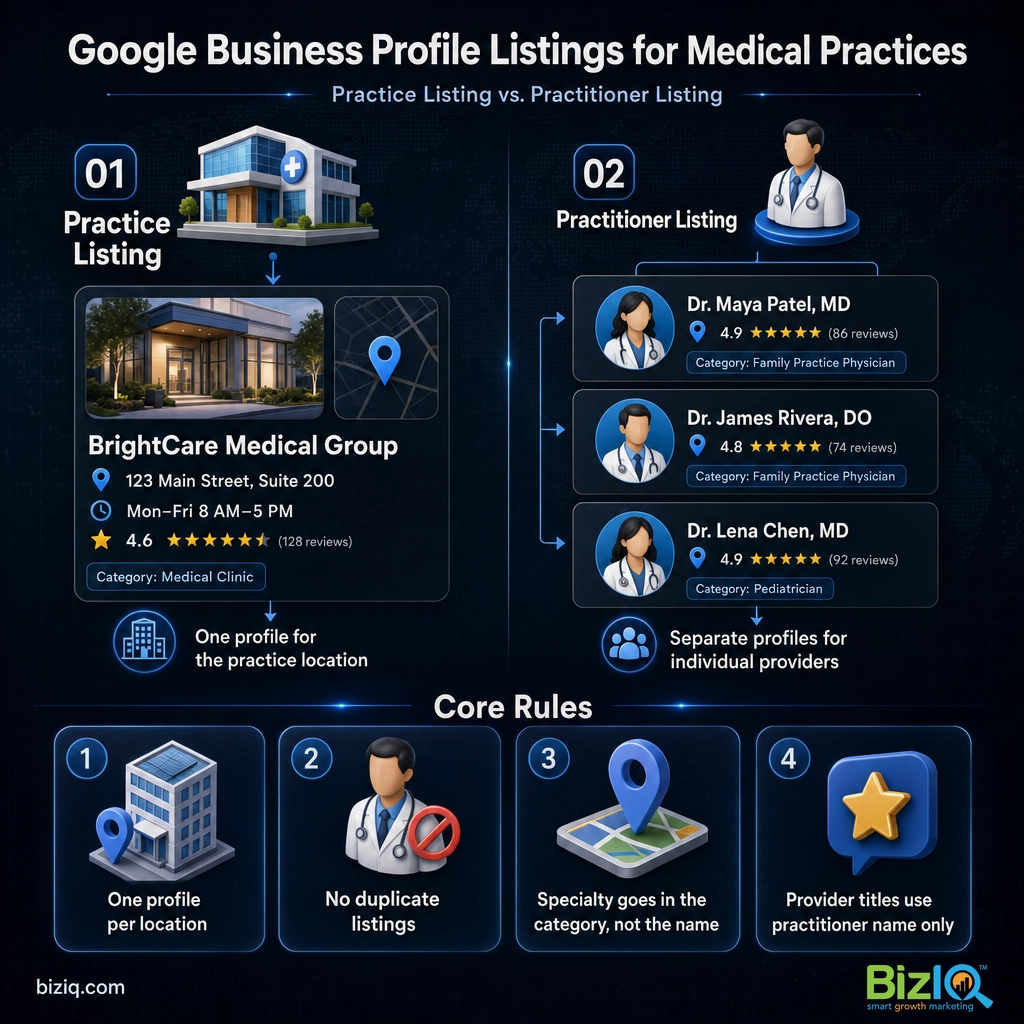
This is the part most medical practices get wrong, and it is where Google’s rules are strict. Google treats doctors, dentists, and other clinicians as “individual practitioners,” which have their own listing policy separate from ordinary businesses.
Here is how Google’s guidelines actually read, so you can set this up correctly the first time:
- A practitioner gets their own profile if they operate in a public-facing role and can be contacted directly at the verified location during stated hours. Support staff and administrators do not qualify.
- When several providers work at one location, the organization creates a profile for the location itself, and each qualifying provider gets a separate profile. The provider’s profile title should include only the practitioner’s name, not the organization’s name.
- A solo doctor inside a branded organization shares one profile with the organization, named in the format “[Organization]: [Practitioner Name],” so the practice and the practitioner do not compete against each other.
- A practitioner should not create multiple profiles to cover different specializations, and a business should never create more than one profile per location. Duplicate listings violate Google’s guidelines and can get an account suspended.
The payoff for doing this right is real estate. A three-physician practice that sets up the location profile plus a clean profile for each provider can occupy more space in local results and capture patients who search by a specific doctor’s name. Done wrong, duplicate or mislabeled listings get merged or suspended, and you lose the reviews attached to them.
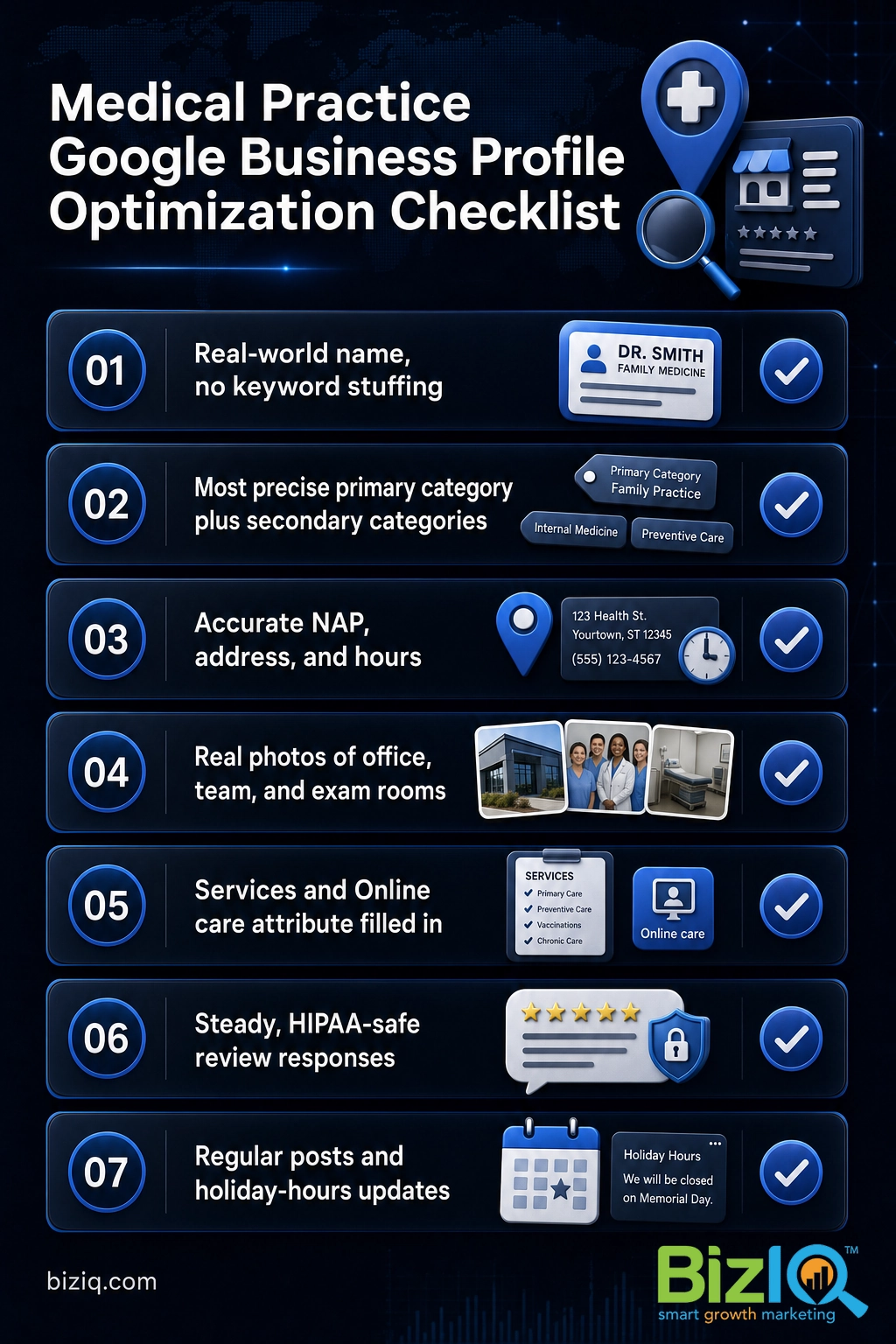
“Adding my specialty to the business name will help me rank for it.” It will not, and it can get your listing suspended for name stuffing. Your real-world name goes in the name field. Your specialty belongs in the category. Google rewards the accurate category far more than keywords jammed into a name, and a clean name keeps you compliant.
Source: Google Business Profile Help: Guidelines for representing your business on Google.
How to Set Up and Verify Your Profile
Setting up a profile for a medical practice follows the same path as any business, with a couple of healthcare-specific steps. Work through these in order.
- Search for an existing profile first. Google often auto-creates listings for medical offices from public data. Search your practice name and address before you create anything. If a listing already exists, claim it instead of making a duplicate.
- Enter your real-world name and primary category. Use the name exactly as it appears on your signage, with no legal suffixes like LLC and no specialty keywords. Choose the most precise category for your specialty.
- Add your address, service area, phone, and hours. Your name, address, and phone number (your NAP, the core contact details) must match your website and other directories exactly, down to the suite number.
- Verify that you manage the location. Google will ask you to prove control of the listing. Options can include a postcard with a code, phone, email, or video verification. Medical practices are frequently asked for video verification showing the office exterior, signage, and interior.
- Complete every field before you publish. The profile that wins is the one with nothing left blank: services, hours, description, attributes, and photos all filled in.
Verification timing varies widely, from a few minutes to a couple of weeks depending on the method Google assigns, so start it early. If you want the exact timeline and what to do if it stalls, see our guide on how long Google verification takes.
Choosing the Right Categories for a Medical Practice
Categories tell Google what you are and which searches to show you for. This is the single most valuable field on the whole profile, and medical practices have a rich set to choose from.
Your primary category should be the single most accurate description of what the practice does: Family Practice Physician, Pediatrician, Dermatologist, Orthopedic Surgeon, Dental Clinic, and so on. Then add secondary categories for the other real services you provide, such as Walk-In Clinic, Medical Group, or a procedure-specific category. Do not add categories for services you do not actually offer, because that invites both suspensions and the wrong kind of patient.
A few rules keep this clean:
- Pick the most specific category available rather than a broad one. “Pediatrician” beats “Doctor” if that is what you are.
- Use secondary categories deliberately, not as a dumping ground. Each one should map to a service a patient could book.
- Re-check your categories once a year. Google adds and renames medical categories regularly.
Categories and the way you describe your services go hand in hand. If you want the full method for picking and ordering them, read our walkthrough on choosing the right Google Business Profile categories.
Getting and Responding to Patient Reviews
Reviews are the loudest trust signal a medical practice has, and they influence rankings too. A steady stream of recent, detailed, positive reviews tells both patients and Google that your practice is active and well regarded. The practical goal is simple: make it easy for happy patients to leave one, and respond to every review that comes in.
The healthcare twist is compliance. HIPAA (the Health Insurance Portability and Accountability Act, the federal law that protects patient health information) applies to what you write back in public. You cannot confirm that the reviewer was a patient, reference their visit, or mention any clinical detail, even to defend yourself against an unfair review.
Never write a public review response that confirms someone is a patient or names any treatment, diagnosis, appointment, or clinical detail. Even a friendly “thanks for trusting us with your procedure” can be a HIPAA violation. Keep public replies generic: thank the person, restate your commitment to patient care, and invite them to call the office to discuss anything specific in private.
A safe, repeatable response pattern works for almost every situation: acknowledge, stay professional, and move the specifics offline. For a full library of compliant templates, see our guide on responding to Google reviews. To build volume the right way, our post on getting more patient reviews covers the ask, the timing, and the tools.
Proof matters here, and it is why practices partner with an agency that lives in this work. BizIQ holds a 4.6-star rating from 1,000+ Google reviews, earned by running the same review strategy we set up for client practices.
Real results for real local businesses
How BizIQ clients turned their Google presence into customers.
New Image by Hilary
Cosmetic enhancement services
A previous agency had her competing against herself, so customers couldn’t find her. BizIQ won a $3,000 refund, then built an optimized site with local keyword research — now customers find her again straight from a Google search.
10X Health
Health & wellness
Only 14% of 10X Health’s ranking keywords were non-branded. BizIQ grew their organic visibility during rapid growth — contributing to 20K products sold in one month and a +100% increase in average monthly website sessions.
“We literally 10X-d the business, and BizIQ was our digital partner in crime.” — Alana, 10X Health
Photos, Posts, and Details That Win Patients
Once the structure is right, the content on the profile is what converts a searcher into a booked patient. Photos do the heaviest lifting, because a prospective patient wants to see the office, the team, and the environment they are about to trust with their health.
Profiles with photos also earn 35% more click-throughs to their website. For a medical office, upload real, current photos: the exterior and signage so patients can find you, the waiting room and exam rooms, your providers and staff, and any equipment that signals quality of care. Avoid stock imagery, which patients spot instantly and distrust. Source: Google.
Beyond photos, keep the profile alive:
- Services: list your real procedures and visit types so the profile answers “do they do what I need?” before a patient has to call.
- Posts: use Google Business Profile posts for health awareness months, new providers, expanded hours, or flu-shot season. They keep the listing fresh.
- Hours and holiday hours: wrong hours are the fastest way to lose a patient and earn a one-star review. Update them before every holiday.
- Q&A: seed and monitor the questions section so accurate answers (parking, insurance, new-patient policy) come from you, not a stranger.
Telehealth, Online Care, and Booking
Patient expectations shifted toward virtual visits, and your profile can reflect that, with one important eligibility rule. A Google Business Profile requires a real location where you see patients in person. A telehealth-only practice with no physical office generally does not qualify for a listing.
If you offer virtual visits alongside in-person care at a verified address, you are eligible and should use the tools Google gives you:
- Online care attribute: turn this on so patients searching for virtual options can find and recognize your practice.
- Booking and appointment links: connect or add a scheduling link so a patient can request an appointment straight from the profile, removing a step that loses leads.
- Insurance and access details: use attributes and your description to answer the practical questions patients ask before they ever call.
The less friction between the search and the booked appointment, the more of those searches become patients.
Common Mistakes Medical Practices Make
Most lost rankings and suspended listings trace back to a short list of avoidable errors. Check your profile against these:
- Keyword-stuffing the name. Adding a specialty or city to the business name violates Google’s rules and risks suspension.
- Duplicate listings. A leftover auto-created listing, an old address, or a second profile for the same provider splits your reviews and confuses Google.
- Inconsistent NAP. A phone number or suite that differs across your website, profile, and directories weakens your local ranking.
- Ignoring reviews. Unanswered reviews, or worse, a HIPAA-violating response, cost you both trust and compliance.
- Letting the profile go stale. No new photos, outdated hours, and no posts tell Google the listing is neglected.
Fixing these is usually faster than practices expect, and it tends to move rankings quickly because the profile was being held back rather than genuinely uncompetitive.
How to Track Your Results
A profile is worth managing only if you can see what it returns. Watch three things over time: your position in the map pack for the searches that matter (your specialty plus your city), the actions patients take on the profile (calls, direction requests, website clicks, and bookings), and your review velocity and average rating.
Google shows much of this inside the profile’s performance view, and a proper local SEO (search engine optimization) program layers on rank tracking so you know whether you are gaining or slipping against nearby practices. If you want to know where you stand right now, our guide on checking your Google Business Profile ranking shows you how to measure it.
The same local SEO playbook applies across medical verticals. If you run a dental office, our Google Business Profile guide for dentists covers the specifics for that specialty, and BizIQ’s work in digital marketing for healthcare practices brings the whole strategy together.
Highly recommend BizIQ
“Our business recently hired BizIQ to create our website. They have created the best website we have ever had. We have been impressed by their customer service and how quickly they do…”
— Norman S.
Remarkable job
“Our Client Success Manager has done a remarkable job building our website. Her professionalism and knowledge is great. I never dreamed my business could look so good on a website. All…”
— Michael C.
Count on them
“These folks are great! They DO what they say they DO unlike others that just promise. You can count on them.”
— Mike B.
Frequently Asked Questions
Can a doctor have a Google Business Profile?
Should every doctor in a practice have their own Google Business Profile?
What is the best primary category for a medical practice?
Can I respond to patient reviews without violating HIPAA?
Do telehealth-only or virtual doctors qualify for a Google Business Profile?
What is the difference between Google Business Profile and Google My Business?
How do I verify a doctor’s Google Business Profile?
Get Your Medical Practice Found on Google
A well-run Google Business Profile is the highest-return, lowest-cost marketing a medical practice owns. Set it up correctly, keep it complete, stay HIPAA-safe in your reviews, and it will quietly fill your schedule with new patients month after month. If you would rather have it done right the first time, BizIQ can handle the setup, verification, and ongoing optimization for you.