
What structured data schema does every local plumber website need?
Every local plumber website should implement structured data for its business, services, service area, reviews, FAQs, and contact information to help search engines and AI-powered search better understand its content. Proper schema markup can improve search visibility, increase eligibility for rich results, and make it easier for potential customers to find and trust your plumbing business.
Winning the race for emergency service calls
When a homeowner is standing in three inches of water from a burst pipe at midnight, they do not browse multiple pages or read lengthy articles. They search frantically for immediate help, and they click the first qualified business that surfaces in their local results. That decision happens in seconds, and it is almost entirely shaped by how clearly your website communicates with search engine crawlers before a human ever sees your listing.
Implementing structured data schema tells Google exactly what you do and where you do it: like filling out a detailed business card instead of just writing down a name. It is a uniform, machine-readable layer that highlights your exact services, service areas, and real-time availability without altering a single visible element of your site’s design. Search engines do not read your website the way a homeowner does. They need code, not copy. They crawl your pages looking for structured clues about your business entity, and when those clues are missing or ambiguous, they default to whatever they can infer, which is rarely what you want them to display.
This is the foundation of effective plumbing SEO strategies. Structured data directly influences how search engines categorize your services, verify your location, and decide whether your business qualifies for the enriched search displays that drive clicks.
Understanding schema markup as a local translation tool
How Google reads JSON-LD
JSON-LD, or JavaScript Object Notation for Linked Data, is Google’s preferred format for structured data, and for good reason. Unlike older methods that required embedding code directly inside your visible HTML elements, JSON-LD sits cleanly in your page’s <head> or <body> as a self-contained script. Googlebot reads it separately from your page’s visual layout, which means you can update your schema without touching your design, and vice versa.
Think of it as a digital name tag attached to your website’s header. It works behind the scenes. Your visible page might describe your services in natural language, but the JSON-LD script tells Googlebot: “This entity is a licensed plumber, operating in these specific cities, available at these hours, reachable at this number.” That level of explicit declaration eliminates guesswork. Search engines use this structured information to build their Knowledge Graph, the internal map that links your website to verified physical entities, geographic coordinates, and industry-specific service categories. When that map is accurate and complete, your business becomes eligible for rich snippets: the enhanced search displays that show star ratings, business hours, and service details directly in the results page.
The massive local schema adoption gap
Only 12.4% of domains currently implement structured data correctly. That is a tiny fraction. For local contractors, that number represents a wide-open competitive gap; most of your direct competitors are either running broken schema generated by automated website builders or no schema at all.
The click-through rate difference is measurable. Rich results generated by proper schema markup earn a 58% CTR compared to 41% for standard listings without structured data. That 17-point spread, compounded across hundreds of monthly searches for terms like “emergency plumber near me” or “frozen pipes plumber,” translates into a meaningful volume of calls that your competitors are not capturing simply because their technical setup is incomplete.
Automated builders, such as Wix, Squarespace, and many WordPress themes, generate generic LocalBusiness schema that omits industry-specific properties, leaves service areas undefined, and often breaks entirely during template updates. That is the gap your implementation can fill.
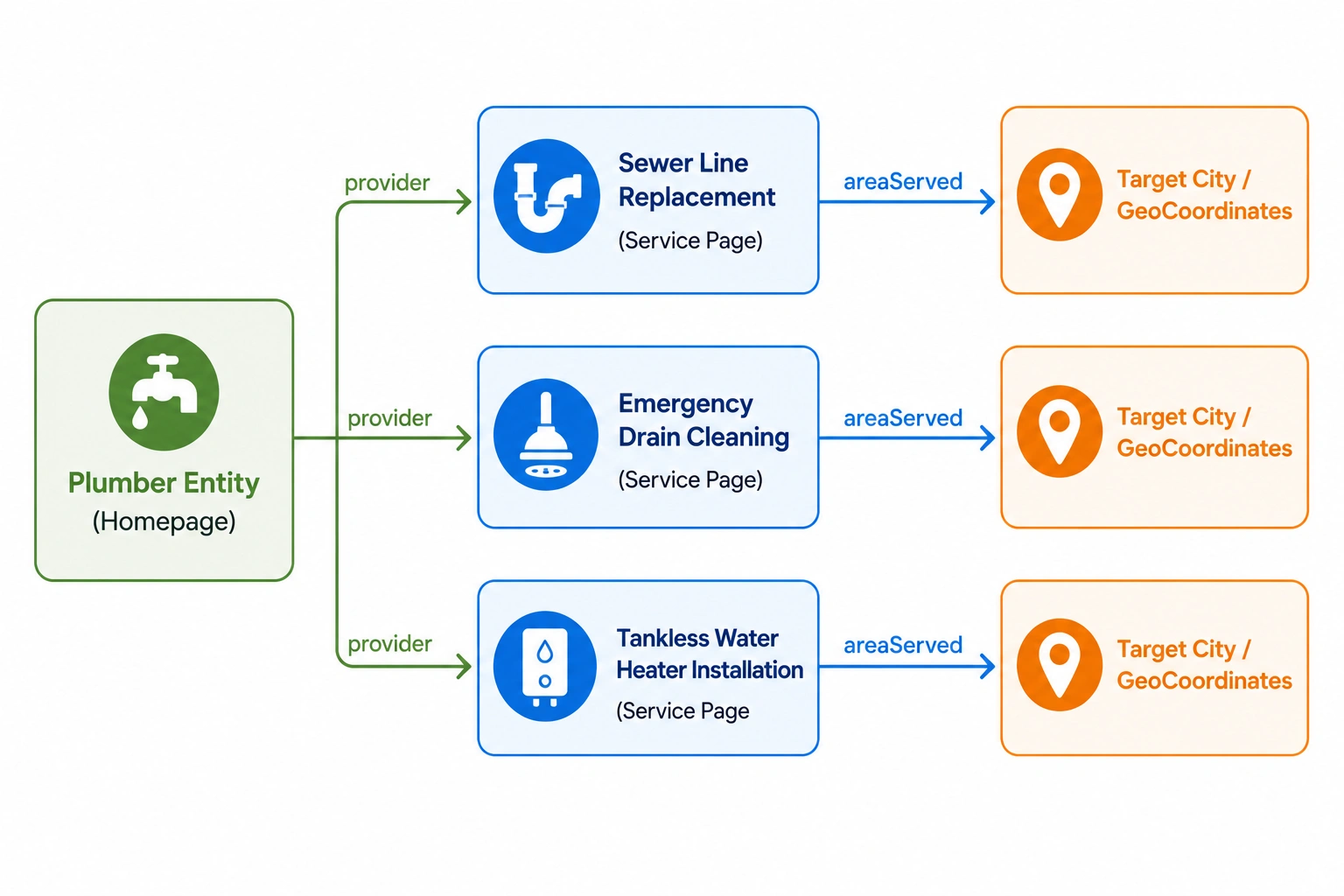
A simple entity relationship diagram shows how a homepage connects service pages to geographic locations for stronger local SEO.
Establishing the core plumber entity
Essential properties for your core schema
The first and most important schema decision you make is the @type declaration. Most automated tools default to LocalBusiness or HomeAndConstructionBusiness, both technically valid, but neither tells Google anything specific about what you do. The Schema.org Plumber documentation defines a dedicated subtype that sits under HomeAndConstructionBusiness and signals your exact industry without ambiguity. Using @type: "Plumber" is not a minor refinement; it is the difference between Google filing your business under a broad contractor category versus recognizing it as a specialized plumbing entity eligible for industry-specific search displays.
Beyond the type declaration, your core schema needs several properties to pass Google’s validation checks:
**name**: Your exact legal business name, matching your Google Business Profile character-for-character.**url**: Your primary homepage address.**telephone**: Your main business number, formatted with the country code (e.g.,+1-602-555-0100).**logo**: A direct URL to your high-resolution business logo.**image**: High-quality photographs of your service trucks or shop; these build entity authority by connecting your schema to real-world visual assets.**address**: Your full physical address, including street, city, state, and ZIP.
The address requirement deserves particular attention. Schema.org’s flexible vocabulary technically allows service-area businesses to omit a physical address and rely solely on areaServed. Google’s own Local Business Structured Data Guidelines, however, list address as a required property to qualify for local business rich results. Omitting it will generate validation errors in Google Search Console even if the rest of your schema is flawless.
NAP consistency (Name, Address, and Phone number) is the governing principle here. Your schema values must match your Google Business Profile and your website’s contact page exactly. Precision is non-negotiable. If your address says ‘Suite 100’ on Google and ‘Ste 100’ everywhere else, search engines get confused, and so do potential customers. Think of it as using the same signature on every legal document: a single discrepancy creates doubt, and search engines resolve doubt conservatively.
Nesting high-ticket emergency services
Decoupling business schema from service offerings
One of the most common schema errors on plumbing websites is applying the primary Plumber schema to every single page. The homepage carries your business entity. Individual service pages carry something different, and conflating the two dilutes the precision that makes structured data valuable in the first place.
Each high-value service your business offers, such as sewer line replacement, tankless water heater installation, emergency drain cleaning, or burst pipe repair, deserves its own Service schema on its dedicated page. Within that schema, the serviceType property names the specific job, and the provider property links back to your main Plumber entity on the homepage. This creates a clean, navigable web of structured information: Google can follow the thread from a specific service query to the service page, then trace the provider relationship back to your verified business entity.
The practical implication is significant. When someone searches “tankless water heater installation near me,” Google is not just looking for a plumber; it is looking for a plumber whose website explicitly declares that specific service as a structured offering. A generic Plumber schema on your homepage does not accomplish that. A Service schema on a dedicated water heater page, linked back to your core entity, does.
Ready to secure more high-ticket service calls?
Get a free, detailed analysis of your website’s technical setup with our professional Local SEO Audit. Let’s make sure search engines can read your site perfectly.
Defining service area boundaries without storefront errors
Mapping your dispatch radius
Plumbers operate as service-area businesses; the location of your office or warehouse is largely unimportant to a homeowner with a flooded basement. What matters is whether you dispatch to their address. You must define this clearly. The areaServed property is how you communicate that dispatch radius to search engines in a format they can process and verify.
You have two primary implementation paths. The first uses AdministrativeArea to specify recognized jurisdictions: cities, counties, or ZIP codes. This is the cleaner option for plumbers who operate within well-defined municipal boundaries. The second uses GeoCircle to define a custom service radius around a specific set of geographic coordinates, which is useful when your actual dispatch territory cuts across city and county lines in ways that recognized jurisdictions do not capture cleanly.
Whichever path you choose, Google requires latitude and longitude coordinates within the GeoCoordinates property to be specified to at least 5 decimal places. A coordinate like 33.44838 carries far more locational precision than 33.448, and that precision directly affects how confidently Google maps your business to local search queries.
Protecting your Google Business Profile
There is a real tension here worth acknowledging. Privacy matters to business owners. Many plumbers who run home-based operations or dispatch from private warehouses do not want their physical address publicly visible on Google Maps. Schema.org accommodates that preference; Google’s validation system does not fully.
The practical solution: include your physical address in your website’s schema code to satisfy Google’s validation requirements, while keeping that address hidden on your public Google Business Profile. These are two separate systems with two separate configurations, and managing them independently prevents the validation errors that would otherwise suppress your rich results eligibility.
Precise service area schema also reinforces your proximity signals. Observational local SEO studies have found that accurate service area implementation yields a +6% to +18% increase in organic CTR and a +8% to +22% lift in discovery impressions in Google Maps, representing meaningful gains for a business where a single high-ticket emergency call can justify an entire month of marketing investment.
“To win in local search, your website’s structured data must perfectly mirror your real-world operations. If your schema says you serve an entire metro area but your website only mentions a single neighborhood, search engines will default to the more restrictive boundary, costing you high-value emergency leads.”
Configuring twenty-four seven emergency availability
Setting up the openingHoursSpecification property
“Open 24 Hours” written in plain text on your contact page is invisible to search crawlers looking for structured schedule data. Googlebot does not parse natural language descriptions of availability; it looks for a specific, machine-readable format, and when that format is absent, your business simply does not qualify for “Open Now” filter results during late-night emergencies.
The openingHoursSpecification property solves this. Unlike the simpler openingHours text string (which handles standard weekly schedules like “Mo-Fr 08:00-17:00”), openingHoursSpecification is a structured object that defines precise operating windows for each individual day. For true 24/7 emergency availability, you configure every day of the week with an opening time of 00:00 and a closing time of 23:59. That explicit declaration is what makes your business eligible to appear with a green “Open 24 hours” badge in search results, which is the kind of visual signal that an anxious homeowner at 2 a.m. notices immediately.
It is worth being precise about what this markup does and does not do. It tells Google when your emergency dispatchers are active. This is a critical distinction. It does not dynamically reflect whether a technician is currently available in a specific ZIP code; current schema standards do not support real-time dispatch status. But the static availability declaration still carries substantial weight, particularly for searches filtered by “Open Now” or for queries that include urgency signals like “emergency plumber near me.”
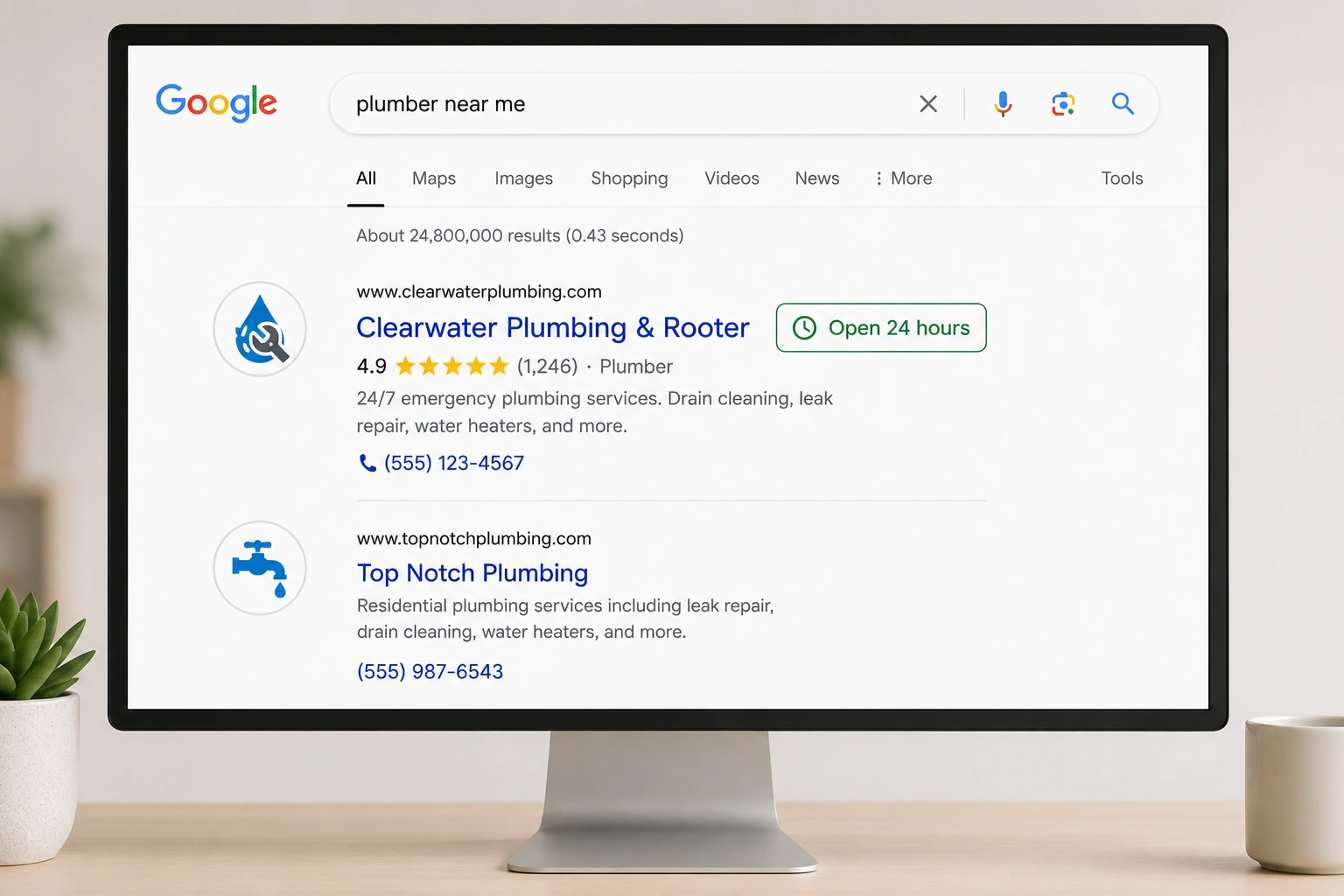
A plumbing business with structured data stands out in Google search results with rich snippets, improving visibility and click potential.
Don’t let your competitors take the late-night emergency calls.
Partner with an expert seo company for plumbers to configure your technical schema and capture high-value leads around the clock.
Using aggregate ratings for instant trust
Implementing review schema safely
Review stars in search results are one of the most powerful trust signals available to a local service business. A 4.8-star rating displayed next to your listing for “water heater replacement” communicates credibility before a homeowner ever clicks through, and for high-ticket services where the hiring decision carries real financial weight, that credibility matters.
The restriction to understand clearly: Google will not display review stars in organic search results for a local business page that hosts and controls its own reviews. If your website features a testimonials section where you curate and publish reviews about your own business, adding AggregateRating schema to that page will not generate star-rich snippets. Google’s policy on self-serving reviews is explicit, and attempting to work around it risks a manual action against your site. Do not cut corners here.
The correct application is narrower but still genuinely useful. Adding AggregateRating to your individual **Service pages**, using verified, third-party review data from platforms like Google Reviews or Yelp, remains a valid and effective trust signal. The required properties are simple:
**ratingValue**: Your average score (e.g.,4.8).**reviewCount**: The total number of verified reviews.**bestRating**: The maximum possible score (typically5).
For high-ticket service pages where a homeowner is evaluating whether to call you for a sewer line replacement or a major water heater installation, a structured rating display builds the kind of immediate credibility that shortens the decision cycle. It is not a guaranteed star display in every context, but it strengthens your entity’s trust profile in Google’s Knowledge Graph, and that has compounding value over time.
Testing and validating your structured data
Running your code through official validators
Writing schema is only half the work. A single syntax error (such as a missing comma or an unclosed bracket) renders the entire script unreadable to Googlebot, and your site will show no validation errors in your CMS while silently failing every crawler check. Two tools exist specifically to catch these failures before they cost you visibility.
Google’s Rich Results Test is the primary tool. Paste your page URL or raw JSON-LD code directly into the tool, and it will parse your schema exactly as Googlebot would, flagging critical errors that prevent rich results and warnings that represent optional improvements you should still address. The tool also generates a preview of how your listing might appear in search results, which is useful for confirming that your business hours, ratings, and service details render as intended.
The Schema Markup Validator at Schema.org operates independently of Google’s supported property list and catches structural errors that the Rich Results Test might not surface. Running your code through both tools gives you a broader picture: one validates against Google’s specific requirements, the other validates against the broader Schema.org vocabulary.
The distinction between errors and warnings matters. Errors are blockers: they prevent your schema from generating any rich results at all. Warnings are recommendations; Google can still process your markup with warnings present, but resolving them generally improves the completeness of your structured data profile. Treat errors as urgent and warnings as a prioritized backlog.
Transitioning from setup to maintenance
Once your schema is validated and live, the technical foundation is set, but it requires ongoing attention. Website updates, theme changes, and CMS migrations are the most common causes of schema decline. Code breaks easily. A plugin update that restructures your page templates can silently strip or corrupt your JSON-LD scripts without triggering any visible error on the front end. Building a quarterly schema audit into your site maintenance schedule, using the same two validation tools, prevents the gradual erosion that affects most local business sites over time.
Avoiding common schema syntax errors
Common code pitfalls to watch for
JSON-LD is unforgiving about syntax. The structure depends on precise punctuation, and a single misplaced character can invalidate the entire script without producing any visible error on your website.
The most common failure point is a missing comma between properties. In JSON-LD, every property-value pair except the last one in a block must be followed by a comma. Omit one, and the parser stops reading at that point. Everything after the missing comma is ignored, including your phone number, address, or service area declarations.
Unclosed curly brackets {} are the second most frequent culprit. Every opening bracket must have a corresponding closing bracket, and nested schema structures (like openingHoursSpecification objects nested inside your main Plumber entity) require careful bracket management. A single unclosed bracket at the end of a nested object will invalidate the parent structure entirely.
The subtler issue is smart quote errors. Standard word processors, like Microsoft Word or Google Docs, automatically convert straight quotation marks (") into typographic “curly” quotes (" "). JSON-LD requires straight quotes exclusively. Paste schema code through a word processor even once, and every string value in your script breaks. Use a plain text editor like Notepad, VS Code, or an online JSON validator to write and edit schema code. This is a small operational discipline that prevents a disproportionate number of validation failures.
Frequently asked questions about plumber schema
Does schema markup help my plumbing business rank in the Google Map Pack?
No, schema markup does not directly influence rankings within the Google Map Pack. But it still helps. Map Pack positions are primarily driven by your Google Business Profile optimization, physical proximity to the searcher, and the volume and quality of your local reviews. That said, implementing structured data on your website strengthens your overall organic visibility and helps Google verify the consistency of your NAP data across the web, which indirectly supports your local map presence by strengthening the entity signals that Google use to confirm your business is legitimate and accurately located.
Should I put my schema markup on every page of my plumbing website?
No. Your homepage and contact page carry your primary Plumber schema. Keep it there. Individual service pages, such as water heater repair, drain cleaning, or sewer line replacement, should each carry Service schema specific to that offering, with a provider property pointing back to your main business entity. Copying the same business schema across every page does not amplify your signals; it creates duplication that search engines interpret as sloppy implementation rather than thoroughness.
What is the difference between openingHours and openingHoursSpecification?
The openingHours property is a simple text string for standard weekly schedules, which are useful for businesses with steady Monday-through-Friday hours. The openingHoursSpecification property is a structured object that handles complexity: holiday schedules, split shifts, or explicit 24/7 emergency availability defined day by day. It offers more control. For plumbers offering round-the-clock emergency dispatch, openingHoursSpecification is the correct choice because it allows you to declare precise opening and closing times for each individual day of the week.
How do I test if my plumbing schema markup is working correctly?
Use Google’s official Rich Results Test. It is fast and free. Paste your page URL or the raw JSON-LD code into the tool, and it will examine your markup against Google’s supported properties, flag any critical errors that block rich results, surface warnings worth resolving, and show you a preview of how your listing might render in search. Running the same code through the Schema Markup Validator at Schema.org adds a second layer of structural verification.
Can I use Plumber schema if I run my business from home?
Yes. You can protect your privacy. Configure your schema to define your service area using the areaServed property while keeping your home address off your public Google Business Profile. However, include your physical address in the schema code itself; Google requires a physical address to validate local business rich results, and omitting it will generate errors in Google Search Console even if your service area is precisely defined. The address in your schema and the address on your GBP are managed through separate systems, which gives you the freedom to satisfy Google’s technical requirements without exposing your home address publicly.
Securing your local visibility
Structured data schema is one of the few technical investments in local SEO where the effort-to-impact ratio is genuinely favorable. It pays off quickly. You are not building backlinks over months or waiting for content to build authority; you are giving Google a precise, machine-readable declaration of who you are, where you work, and when you are available, and that declaration can start influencing your search visibility within days of deployment.
The tactics above are not theoretical. The competitive gap in schema adoption among local contractors is real and measurable, and the click-through rate advantage that rich results carry over standard listings compounds across every high-intent search your business is eligible to appear in. Implementing these five schema layers (your core Plumber entity, nested service schemas, precise service area boundaries, structured emergency availability, and properly scoped aggregate ratings) builds a technical foundation that supports every other element of your local search strategy.
There is no clean bow to wrap around the full picture, because schema is not a one-time fix. It requires maintenance, validation, and periodic updates as your services and service areas evolve. But the businesses that treat it as an ongoing operational discipline rather than a setup task are the ones that stay visible when a homeowner needs an emergency plumber at midnight.
Ready to secure more high-ticket plumbing leads through a technically sound local search strategy?
Our team handles schema implementation, local citation management, Google Business Profile optimization, and the full technical SEO stack. Explore our specialized digital marketing for plumbers services today, or call us to start building your custom strategy.