
To respond to a Google Business review, sign in to your Google Business Profile (GBP, the free listing that shows your business on Google Search and Maps), open the review, click Reply, and post a short, personal, and professional response. The habit that actually moves the needle is simple: reply to every review you get, good or bad, and do it within a few days. This guide walks through the exact steps, gives you copy-ready examples for positive, negative, neutral, no-comment, and fake reviews, and shows how a steady reply routine turns your reviews into more calls, more visits, and better local rankings.
- Reply to every review, including star-only ratings with no text. Consistency signals an active, customer-focused business to both shoppers and Google.
- Use one repeatable framework: thank, acknowledge, address, invite. It works for five-star raves and one-star complaints alike.
- Keep replies short, personal, and public-safe. Never share private details, never argue, and move heated issues offline.
- Respond fast, within a few business days, and faster for negative reviews. Speed is what prospective customers notice.
- A strong reply history and a growing review count feed your local search visibility, so review management is part of your marketing, not an afterthought.
What’s in This Guide
- Why Responding to Google Reviews Is Worth Your Time
- Before You Reply: What You Need
- How to Respond to a Google Review, Step by Step
- The 4-Part Response Formula
- How to Respond to Positive Reviews (With Examples)
- How to Respond to Negative Reviews (With Examples)
- How to Respond to Neutral, 3-Star Reviews (With Examples)
- How to Respond to Reviews With No Comment
- What to Do About Fake or Policy-Violating Reviews
- Quick Reference: Response Approach by Review Type
- Mistakes to Avoid
- When to Bring in a Review-Management Partner
- Troubleshooting Common Reply Problems
- Frequently Asked Questions
Why Responding to Google Reviews Is Worth Your Time
Every review on your profile is read by the next potential customer, and your reply is read right along with it. When a shopper sees that you thank happy customers and handle unhappy ones with grace, you look like a business worth calling. When your reviews sit there with no response, you look absent. For a local business, that difference shows up directly in phone calls, form fills, and foot traffic.
There is a search benefit, too. Google treats reviews as a local ranking factor and has said that replying to reviews can help your visibility. Your responses add fresh, relevant text to your profile, and a business that engages tends to collect more reviews over time, which strengthens the signals Google uses to decide who shows up in the local map pack (the box of three nearby businesses that appears above the regular results).
The payoff starts with a complete, well-tended profile in the first place.
Reviews and your replies are a big part of what “complete” means. If your profile itself needs work before you worry about replies, start with a Google Business Profile that is fully filled out, then build the response habit on top of it.

Before You Reply: What You Need
Responding takes a minute once you are set up. Make sure these are in place first.
- A verified profile. You must own and verify your Google Business Profile (formerly called Google My Business, or GMB) before you can reply to any review. If you have not claimed it yet, do that first.
- Access to reply. You can respond from the Google Business Profile dashboard on desktop, or by searching your own business name while signed in to the Google account that manages the listing. On a phone, the Google Maps app lets you manage reviews on the go.
- A plan for who responds. Decide whether you, a manager, or a marketing partner handles replies, and give them access through the profile’s user settings so nobody is sharing one password.
- A few minutes, a few times a week. Replies post after a short processing delay and customers get an email when you respond, so a quick, regular routine keeps you current without taking over your day.
How to Respond to a Google Review, Step by Step
Here is the exact process on desktop. The mobile steps in the Google Maps app are nearly identical.
Step 1: Sign In and Open Your Reviews
Sign in to the Google account that manages your listing and search your business name, or go to your Business Profile dashboard. Find the Reviews section, which lists every review you have received, newest first.
Why it matters: replying from the owner account is what lets your response appear as the official business reply.
What success looks like: you can see your full list of reviews with a Reply option under each one.
Step 2: Choose the Review and Click Reply
Pick the review you want to answer and click Reply directly beneath it. Work through them in order, oldest unanswered first, so nothing slips through the cracks.
Why it matters: answering in order keeps your response history consistent and makes sure early reviewers are not ignored.
What success looks like: a reply text box opens under the review you selected.
Step 3: Write a Short, Personal, Professional Reply
Write your response using the formula in the next section. Keep it to two or three sentences, mention the customer or their experience specifically, and use a warm, human tone. Avoid copying and pasting the same words onto every review.
Why it matters: a personal reply reads as genuine, while an identical template on every review reads as a robot and can look like low-effort content.
What success looks like: your reply names something real from the review and sounds like a person, not a form letter.
Never include a customer’s phone number, order details, appointment information, or any private data in a public reply, even to be helpful. Everything you post is visible to the whole internet. Offer to continue the conversation by phone or email instead.
Step 4: Post, Then Monitor
Click Reply or Post to publish. Your response may take a short while to show publicly, and the customer will get an email notification. Set a reminder to check for new reviews on a regular schedule so you never fall behind.
Why it matters: reviews keep arriving, so the habit, not the one-time effort, is what builds the reputation that wins customers.
What success looks like: your reply is live, the reviewer has been notified, and you have a recurring time blocked to do this again.
The 4-Part Response Formula
You do not need a different strategy for every review. One simple framework covers nearly all of them. Work through these four moves and adjust the warmth and the apology to match the star rating.
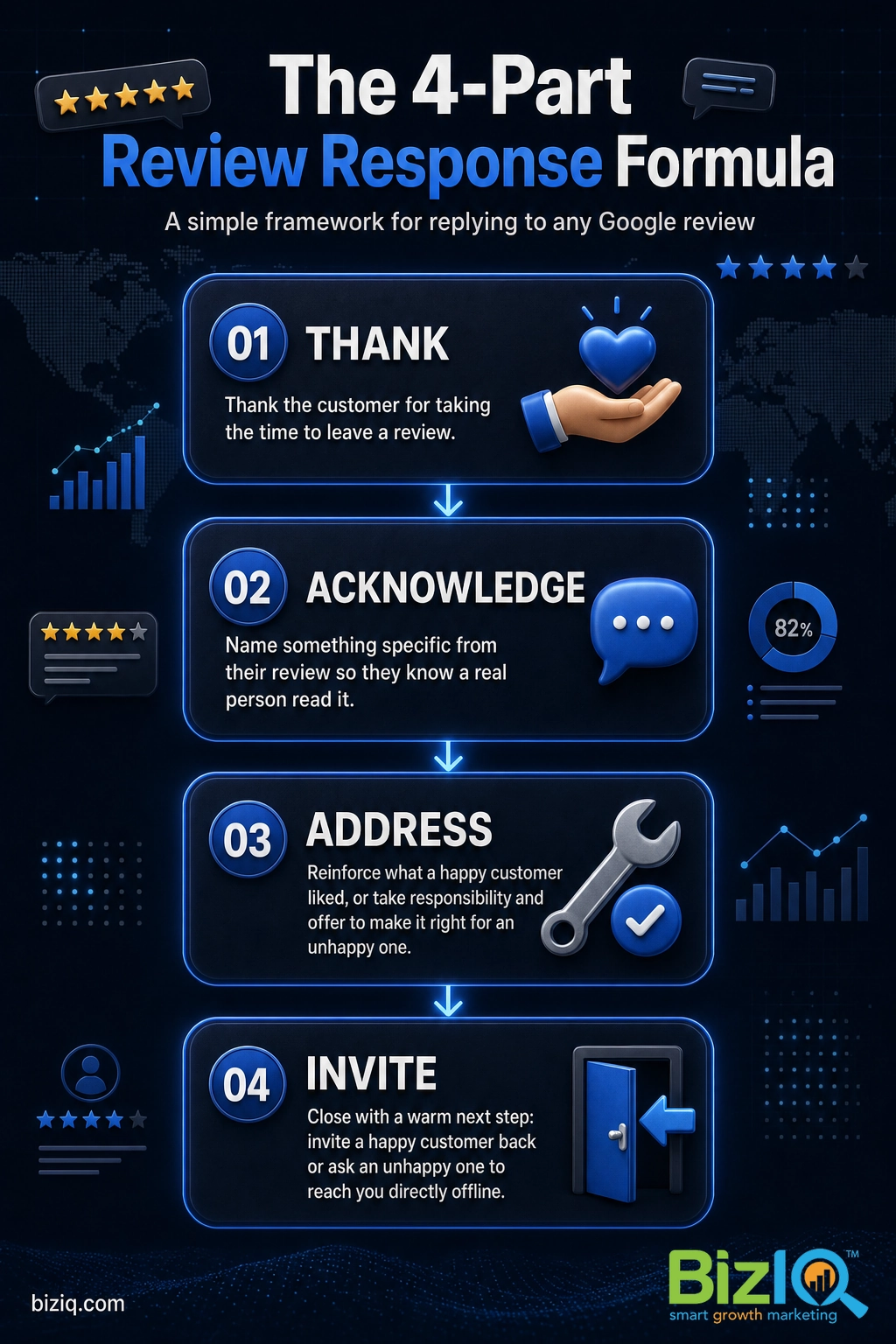
- Thank. Open by thanking the customer for taking the time to leave a review. This is true whether the review is glowing or brutal.
- Acknowledge. Name something specific from their review, the dish they loved, the technician who helped, or the problem they ran into, so they know a real person read it.
- Address. For a positive review, reinforce what they liked. For a negative one, take responsibility where it is due, apologize sincerely, and say what you will do or offer to make it right.
- Invite. Close with a warm next step: invite a happy customer back, or ask an unhappy one to reach you directly so you can resolve it offline.
If you want more sample language for different situations, our team has broken down how to respond to every type of online review in a companion guide. For the quickest wins, these keys to a great review response are worth a read.
Seeing the process in action helps. This short video walks through managing your Google Business Profile reviews the right way.
How to Respond to Positive Reviews (With Examples)
Happy reviews are the easy ones, and they deserve a reply just as much as the hard ones. A quick, personal thank-you encourages the next customer to leave a review too, and it shows prospects that real people are glad they chose you. Keep it genuine and, where it fits naturally, work in what you do and where you do it.
Example, five-star review of a restaurant:
“Thanks so much, Maria! We are thrilled the wood-fired pizza and the patio made your anniversary dinner special. Nights like yours are exactly why we do this. We would love to welcome you and your husband back soon, and please say hi to the kitchen next time.”
Example, five-star review of a home-services company:
“We really appreciate the kind words, James. Diego will be glad to hear the same-day AC repair got your family cool again before the weekend heat. Thank you for trusting us, and we are here whenever you need us.”
When it reads naturally, mention your service and city in a positive reply, for example “glad we could help with your bathroom remodel in Phoenix.” It adds a relevant local keyword to your profile without sounding forced. Never stuff keywords, a reply that reads like an ad undoes the trust the review just earned.
How to Respond to Negative Reviews (With Examples)
Negative reviews are where your reply matters most, because future customers are watching how you handle pressure. The goal is not to win the argument. It is to show every reader that you are reasonable, you care, and you fix problems. Stay calm, respond quickly, apologize sincerely, and take the details offline. One graceful reply to a bad review can reassure far more prospects than the review scares off.
Example, a service that went wrong:
“Hi Robert, thank you for letting us know, and I am sorry your install did not go the way it should have. That is not the experience we want anyone to have. I would like to make this right personally, so please call me at the shop or email us and ask for the owner. We will take care of it.”
Example, a complaint you partly disagree with:
“Thank you for the feedback, and I am sorry you left frustrated. Our records show the appointment ran long because of an issue we flagged on site, but clearly we did not explain it well in the moment, and that is on us. I would welcome the chance to walk you through it. Please reach out to us directly and we will follow up.”
Do not get emotional, do not blame the customer, and do not reveal private account details to prove a point. An angry or defensive reply does more damage than the original review, and it lives on your profile permanently. If a review truly rattles you, draft your response, wait an hour, then reread it before posting.
For a deeper playbook on tough feedback, see our guide to responding to bad reviews as a small business owner.
How to Respond to Neutral, 3-Star Reviews (With Examples)
Three-star reviews are a gift, because the customer is telling you exactly where the “good but not great” gap is. Thank them, acknowledge the mix of positive and negative, and show you are acting on it. These replies turn fence-sitters into fans.
Example, a middling experience:
“Thanks for the honest review, Priya. I am glad the haircut itself hit the mark, and I hear you on the wait time, that is something we are actively working to improve with online booking. We would love another chance to give you a smoother visit next time.”
How to Respond to Reviews With No Comment
A star rating with no written review is common, and you should still reply. You do not know exactly what prompted it, so keep your response short, gracious, and open-ended.
Example, a five-star rating with no text:
“Thank you for the five stars! We appreciate you choosing us, and we would love to hear what you enjoyed most. See you again soon.”
Example, a one- or two-star rating with no text:
“Thank you for the rating. We would genuinely like to understand what fell short so we can make it right. Please reach out to us directly, we read every message.”
What to Do About Fake or Policy-Violating Reviews
Sooner or later you may get a review from someone who was never a customer, a competitor, or a troll. Resist the urge to fight it in public. First, post a short, factual, professional reply so readers see your side. Then flag the review to Google for removal if it breaks Google’s rules, such as spam, hate speech, a conflict of interest, or clearly off-topic content. You can read the official guidelines on Google’s prohibited and restricted content policy.
Example reply to a suspected fake review:
“Thank you for the feedback. We take every review seriously, but we are unable to find any record of a visit or service matching this. If you believe you worked with us, please contact us directly so we can look into it. We want every real customer to have a great experience.”
Removal is never guaranteed and can take time, so set expectations accordingly. For the full process, see our guides to removing fake Google reviews and the kinds of behavior that trigger Google review policy warnings.
Quick Reference: Response Approach by Review Type
Keep this table handy until the formula becomes second nature.
| Review type | Your goal | Response move |
|---|---|---|
| 5-star with praise | Reinforce and invite back | Thank by name, echo what they loved, invite a return visit |
| 5-star, no text | Acknowledge warmly | Short thank-you, gentle nudge to share more |
| 3-star, mixed | Close the gap | Thank, acknowledge both sides, name the fix you are making |
| 1-2 star complaint | Show you care and resolve | Apologize, take responsibility where due, move it offline |
| Low rating, no text | Open a door | Thank, invite them to tell you what went wrong directly |
| Fake or policy-violating | Protect your reputation | Brief factual reply, then flag to Google for removal |
Mistakes to Avoid When Responding
A few habits quietly undo all the goodwill a thoughtful reply earns. Steer clear of these.
A common myth is that ignoring a bad review makes it fade away. The opposite is true: an unanswered complaint sits at the top of your profile telling every prospect you did not care enough to respond. A calm, helpful reply reframes the same review as proof that you handle problems well.
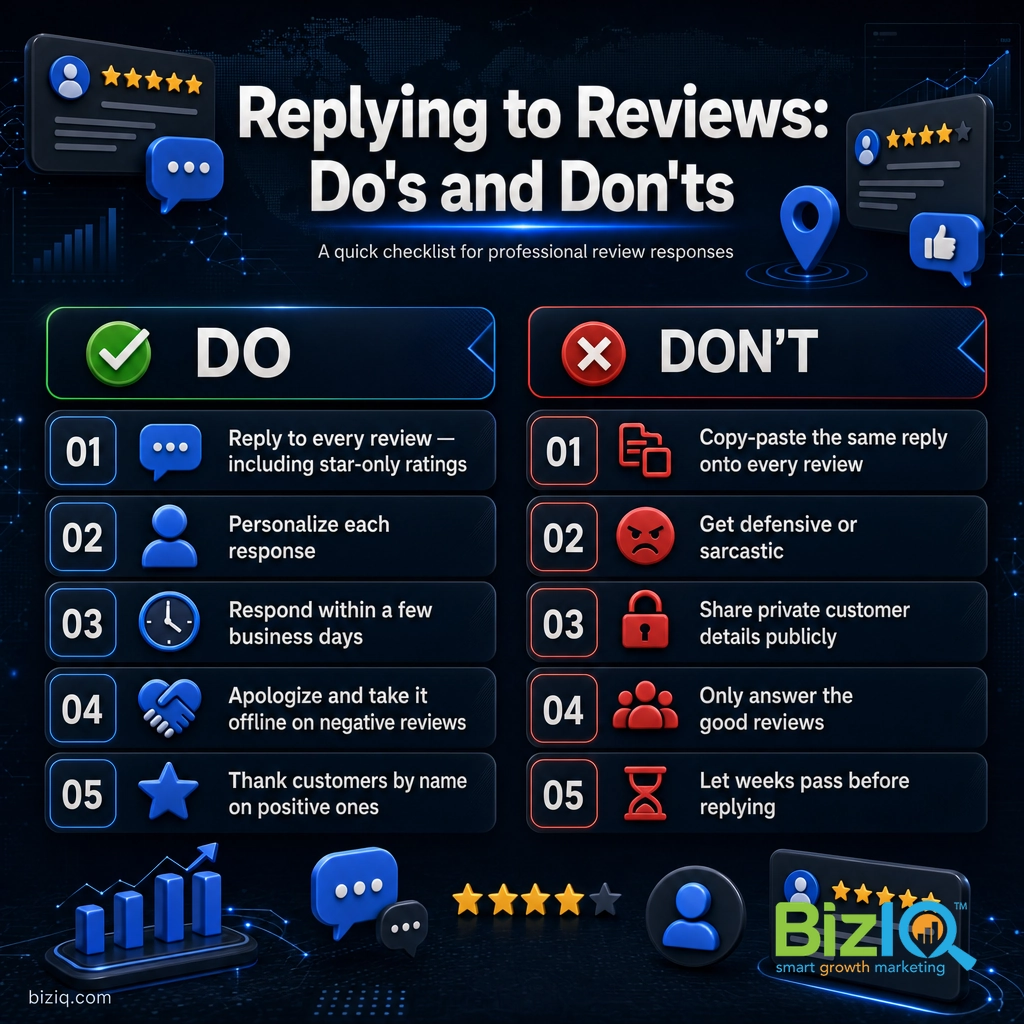
- Copy-pasting one reply onto everything. Identical responses read as automated and add no real value.
- Getting defensive or sarcastic. You will never win a public argument, and it scares off future customers.
- Over-sharing private details. Keep specifics about accounts, health, or orders out of public replies.
- Only replying to the good ones. Prospects notice when the hard reviews are met with silence.
- Letting weeks pass. A late reply still helps, but speed is what signals an attentive business.
When to Bring in a Review-Management Partner
If you reach the point where reviews are coming in faster than you can keep up, where a flood of negative feedback needs a careful strategy, or where you do not have the time to reply consistently across one or several locations, that is the moment to hand it off. A dedicated review-management service monitors new reviews, drafts on-brand replies, helps you earn more positive reviews, and flags policy-violating ones, so your reputation is handled while you run the business.
This is exactly the kind of ongoing work our Reputation Management Services cover, and it pairs naturally with keeping your listing itself in top shape through Google Business Profile reviews done right.
Real results for real local businesses
How BizIQ clients turned their Google presence into customers.
Rosalia’s Mexican Restaurant
Restaurant — Orangeburg, SC
An out-of-date Google Business Profile was sending customers to competitors. BizIQ revamped the website and optimized their GBP so patrons can easily find them online, see the latest deals, and read reviews.
“They make us louder, they help us demand attention, and we get it.” — Kim, Owner
Holloway Construction
Demolition & excavation — Jonesborough, TN
Down to their last $2,500 with no online presence, Holloway Construction had BizIQ launch a website in under 24 hours and optimize their Google Business Profile so customers could find them — and made $30,000 in 24 hours.
“BizIQ saved my business.” — Mark Holloway, Owner
BizIQ lives by the same advice we give. Our own reputation is built on it.
Responding to reviews is not a customer-service chore that sits off to the side. Every reply adds fresh, relevant text to your profile, nudges more customers to post, and shows Google an engaged business, which is why we treat review responses as part of local SEO (search engine optimization, the work of ranking higher in Google), not separate from it.
Troubleshooting Common Reply Problems
If replying is not working the way you expect, one of these is usually the cause.
| Problem | Likely cause | Fix |
|---|---|---|
| No Reply button appears | Your profile is not verified, or you are signed in to the wrong Google account | Verify the listing and sign in with the account that manages it |
| Your reply is not showing publicly | Normal processing delay, or the reply tripped an automated filter | Wait a bit; if it stays hidden, edit out links or promotional language and repost |
| The customer says they got no notification | Rare delivery issue on Google’s side | Nothing to fix on your end; the reply is still live on your profile |
| A review you flagged is still there | Google has not finished its review, or it did not find a policy violation | Keep your factual public reply up; escalate through Business Profile support if it clearly violates policy |
| You need to change a reply you posted | A typo or a response you want to soften | Open the review, edit your reply, and save, or delete it and repost |
Have more questions about managing your listing? Our Google Business Profile FAQ covers the common ones, and if you are still building your review count, start with how to get more Google Business reviews.
Best SEO company
“Hands down the best SEO company in business!! Our Client Success Manager is the most honest and hard working person I have had the pleasure of working with! This company can change…”
— James H.
Uncomplicated & easy
“Since working with BizIQ we have already noticed a climb in our daily bottom line. Customers new to our small town have easily found us and have come in to buy eyeglasses that would…”
— Eve H.
So pleased
“I am so pleased with BizIQ. For the first time I did the right thing in hiring them to assist me with increasing my business. I have moved onto page one of the internet in my area and…”
— Jan W.
Frequently Asked Questions
Should you respond to every Google review?
How long should you take to respond to a Google review?
Can you edit or delete your reply to a Google review?
What should you do about a fake or policy-violating review?
Do customers get notified when you reply to their review?
Should you use the customer’s name in your reply?
Does responding to Google reviews help your local SEO?
Turn Every Review Into Local-Search Fuel
Responding to Google reviews is one of the highest-return habits a local business owner has, and it costs nothing but a few minutes a week. Thank the good, address the bad, reply to all of it, and keep your profile complete behind the scenes. Do that consistently and your reviews stop being something to dread and start being the proof that wins your next customer. If you would rather have experts set up and run it for you, BizIQ can help.
Get Your Google Business Profile Set Up for $97
Source: Google Business Profile Help, Reply to reviews | Google Business Profile | Google Prohibited and Restricted Content