

Your portfolio is your proof. Every high-resolution image of a vaulted ceiling, a custom kitchen, or a finished exterior tells a prospective client something a written description never could. Deleting those galleries to chase a faster load time isn’t a real option, and anyone who suggests otherwise doesn’t understand how luxury residential construction gets sold.
The problem is that every unoptimized image you publish is quietly working against your search rankings. Search engines use automated crawlers to evaluate your site before a single human ever lands on it. If those crawlers encounter a media-heavy page that loads slowly, Google interprets that as a signal that your site doesn’t deliver value, and your rankings reflect it. Technical SEO for home builders isn’t about stripping your site down to text and thumbnails. It’s about engineering your site so that the same beautiful portfolio loads fast enough to rank, convert, and retain.
When a prospective client waits more than a few seconds for your gallery to render, they don’t wait. They simply leave. They go back to the search results page, and that exit signals to Google that your site failed to satisfy the query. That behavioral data compounds over time, dragging your rankings further down while your competitors, who may have less impressive work but faster sites, climb past you.
This guide covers the specific technical fixes that let you keep every pixel of your portfolio while meeting the performance standards Google uses to determine where you appear in search results.
Google measures that performance through three core metrics:
- Largest Contentful Paint (LCP): This metric captures how quickly the largest visible element in the viewport, typically a hero image or a full-width portfolio photo, finishes rendering. Google’s threshold for a passing score is under 2.5 seconds, according to Forrester’s analysis of Core Web Vitals. For image-heavy builder sites, LCP is almost always the most difficult metric to pass without deliberate optimization.
- Cumulative Layout Shift (CLS): CLS measures visual stability: specifically, how much page elements shift position while the page is still loading. A score below 0.1 is considered good, per Forrester’s Core Web Vitals research. Portfolio pages that load images without declared dimensions are particularly prone to high CLS, because the browser doesn’t know how much space to reserve until the file arrives.
- First Input Delay (FID): FID measures the gap between a user’s first interaction with the page, like clicking a gallery filter or tapping a navigation link, and the moment the browser actually processes that input. A score under 100 milliseconds is the benchmark, according to Forrester’s Core Web Vitals breakdown. Heavy JavaScript from gallery plugins is the most common culprit on builder sites.
For a deeper examination of how these metrics interact with search rankings and how to measure them across your site, the Core Web Vitals guide from BizIQ covers the full picture.
The High Cost of Slow Loading Times on Builder Websites
A luxury home buyer researching builders carries a set of expectations that extends to your digital presence. They’re evaluating your attention to detail, your professionalism, and your ability to manage a complex project, and a sluggish website communicates the opposite of all three before they’ve read a single word of your copy. The connection between site speed and perceived brand quality is not subtle, and it’s not something you can compensate for with better photography.
The business case for speed is measurable. Slower load times directly suppress the search visibility that drives new inquiries, and the path to improve page speed runs through the same technical fixes that also improve user retention and time-on-site. These aren’t separate problems with separate solutions; they share the same root cause and the same remedies.
Mobile performance compounds the issue considerably. Many prospective clients first encounter a builder’s portfolio on a phone, often while standing in a neighborhood they’re considering or sitting in a meeting with a real estate agent. High-resolution images that render acceptably on a fiber-connected desktop can completely stall a mobile browser on a 4G connection, and the user experience deteriorates fast. Mobile optimization for construction portfolios isn’t a secondary concern; it’s where most of your first impressions truly occur.
Local SEO for home builders is tightly coupled to mobile performance as well. Google’s ranking algorithms for local search results and Map Pack placements weight mobile-friendliness and load speed heavily. A portfolio that freezes on mobile doesn’t just frustrate users; it systematically removes your business from the local search results where buyers are actively looking for builders in your market.
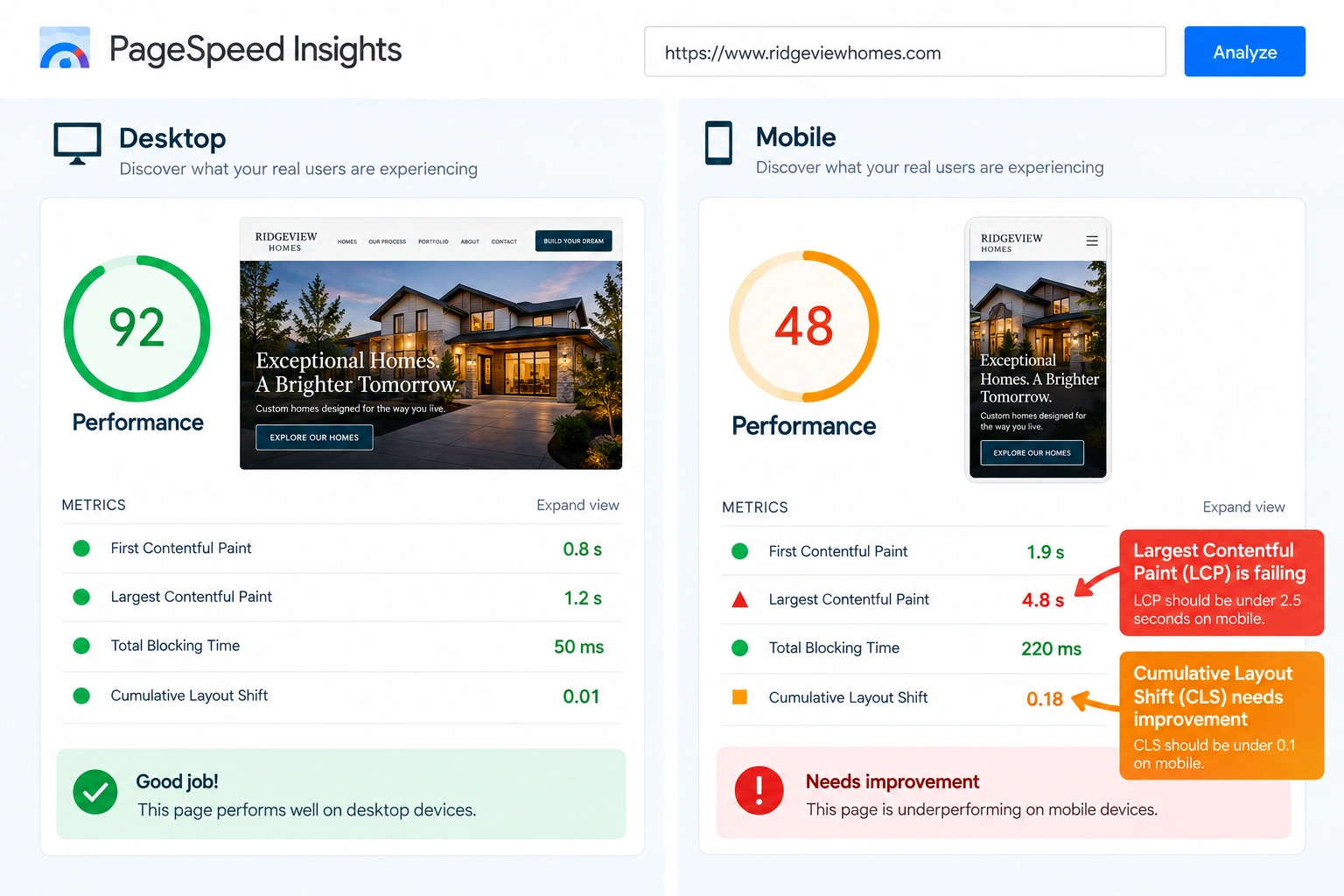
A PageSpeed Insights comparison highlights how an image-heavy home builder website can perform well on desktop while encountering mobile speed issues.
Modern Image Formats and Advanced Compression Techniques
The format your images are saved in matters as much as how you compress them. Format choice dictates performance. JPEG and PNG have served the web for decades, but they carry significant overhead compared to what’s now available, and that overhead shows up directly in your LCP scores.
- Next-generation formats (WebP and AVIF): Converting your portfolio assets to WebP or AVIF delivers meaningfully smaller file sizes at equivalent or superior visual quality compared to JPEG and PNG. Tools like Convert WebP & AVIF (Quicq) and TinyPNG handle this conversion at scale, making it practical for galleries with hundreds of images, according to the NIST National Vulnerability Database entry on image format handling. The visual difference on a well-calibrated monitor is negligible; the difference in load time is not.
- Responsive image syntax (
srcset): Implementingsrcsetin your image markup instructs the browser to fetch a version of each image sized appropriately for the device rendering it. A mobile visitor on a 390-pixel-wide screen has no reason to download a 2400-pixel-wide file, but withoutsrcset, that’s exactly what happens. This single change can cut mobile image payload by more than half on a typical portfolio page. - Lossy compression and metadata stripping: Every image your photographer delivers contains embedded metadata: GPS coordinates, camera model, exposure settings, and lens data. None of that information is visible to your site visitors, but it adds to every file’s weight. Lossy compression tools strip this metadata during export, reducing file sizes substantially without degrading the visual quality a human eye can detect. Think of it like packing for a move: you keep everything valuable, but you don’t ship air in boxes.
Platform-Specific Performance Bottlenecks and How to Fix Them
The platform your site runs on shapes which performance problems you’ll encounter and which tools are available to address them. There’s no universal fix; the right approach depends on where your site lives. Every platform behaves differently.
- WordPress: Most custom builders running WordPress rely on performance plugins to manage the gap between a content-rich site and acceptable load times. Tools like NitroPack and Hummingbird handle caching, CSS and JavaScript deferral, and lazy loading of images from within the WordPress admin, according to CISA Bulletin SB25-258. The configuration options are extensive, which is both an advantage and a source of misconfiguration risk: aggressive settings on the wrong plugin can break gallery functionality if not tested carefully.
- Webflow and Wix: Both platforms apply automatic responsive image scaling on delivery, which removes one layer of manual work. The catch is that the scaling happens after upload: if you push a 12-megapixel RAW export into Webflow, the platform will resize it for display, but it’s still serving a bloated source file. Controlling upload dimensions before assets hit the platform is the only reliable fix, and it requires discipline at the photography handoff stage.
- Maintenance and ongoing optimization: Platform performance isn’t a one-time configuration. Plugins update, themes change, and new portfolio content gets added, each of which can reintroduce the bottlenecks you already fixed. BizIQ’s guide on website performance optimization covers how structured maintenance plans keep performance consistent across different content management systems over time.
Is Your Heavy Portfolio Costing You Leads?
Don’t let slow loading times hide your beautiful craftsmanship. Our team of technical SEO experts specializes in helping custom home builders optimize their websites for speed, search engines, and conversions, all without sacrificing a single pixel of your stunning portfolio.
The Direct Connection Between Site Speed and Conversions
Performance optimization isn’t just a ranking exercise; it has a direct line to revenue. Speed drives revenue. Forrester research on Core Web Vitals and SEO found that 40% of marketers who optimize their SEO and user experience processes observe measurable improvements in conversion rates. For a custom home builder, where a single converted lead can represent a seven-figure project, that’s not a marginal gain.
A structured technical audit is where that conversion improvement begins. Identifying which pages are bleeding performance, and understanding why, is the prerequisite to fixing them. The process of learning how to improve website conversion rates through a website audit gives you a systematic way to trace performance leaks back to their source and prioritize the fixes with the highest impact.
Custom home buyers are in a high-consideration phase when they land on your site. They’re researching a decision that will consume years of their life and a significant portion of their net worth. A fast, stable, visually polished website communicates competence and reliability before they’ve read your about page or looked at your floor plans. A slow, shifting, partially loaded page creates friction and doubt; in a high-stakes purchase decision, doubt is enough to send someone back to the search results.
Speed optimization functions as a silent salesperson in this context. When the path from browsing a portfolio gallery to submitting a contact form is completely frictionless, conversion happens more naturally. When that path includes a three-second wait, a layout jump, and a gallery that loads in pieces, the friction accumulates, and prospects who were genuinely interested quietly disappear.
“Think of Core Web Vitals like a building inspection. Google won’t certify a house with structural issues, even if the finished product looks beautiful. In the same way, a gorgeous portfolio won’t generate leads if technical performance issues prevent search engines from ranking it.”
Aligning Technical SEO and User Experience (UX)
Technical SEO and UX design are often treated as separate workstreams with separate owners: developers handle the performance side, designers handle the visual side, and the two rarely sit in the same room. That division creates predictable problems. A design team that optimizes for visual impact without performance constraints will produce pages that look exceptional in mockups and load poorly in production. A development team that optimizes for speed without design input will produce pages that pass PageSpeed Insights and feel sterile to the people actually browsing them.
Industry consensus, reflected in Forrester’s analysis of Core Web Vitals, is that search engines now formally reward the intersection of these two disciplines. Google made this explicit with the Google Page Experience update, which folded user experience signals: Core Web Vitals, mobile-friendliness, HTTPS security, and the absence of intrusive interstitials, directly into its core ranking algorithms. A site that performs well technically but frustrating users still loses. A site that delights users but fails Core Web Vitals thresholds also loses. The ranking advantage belongs to sites that do both. Balance is essential.
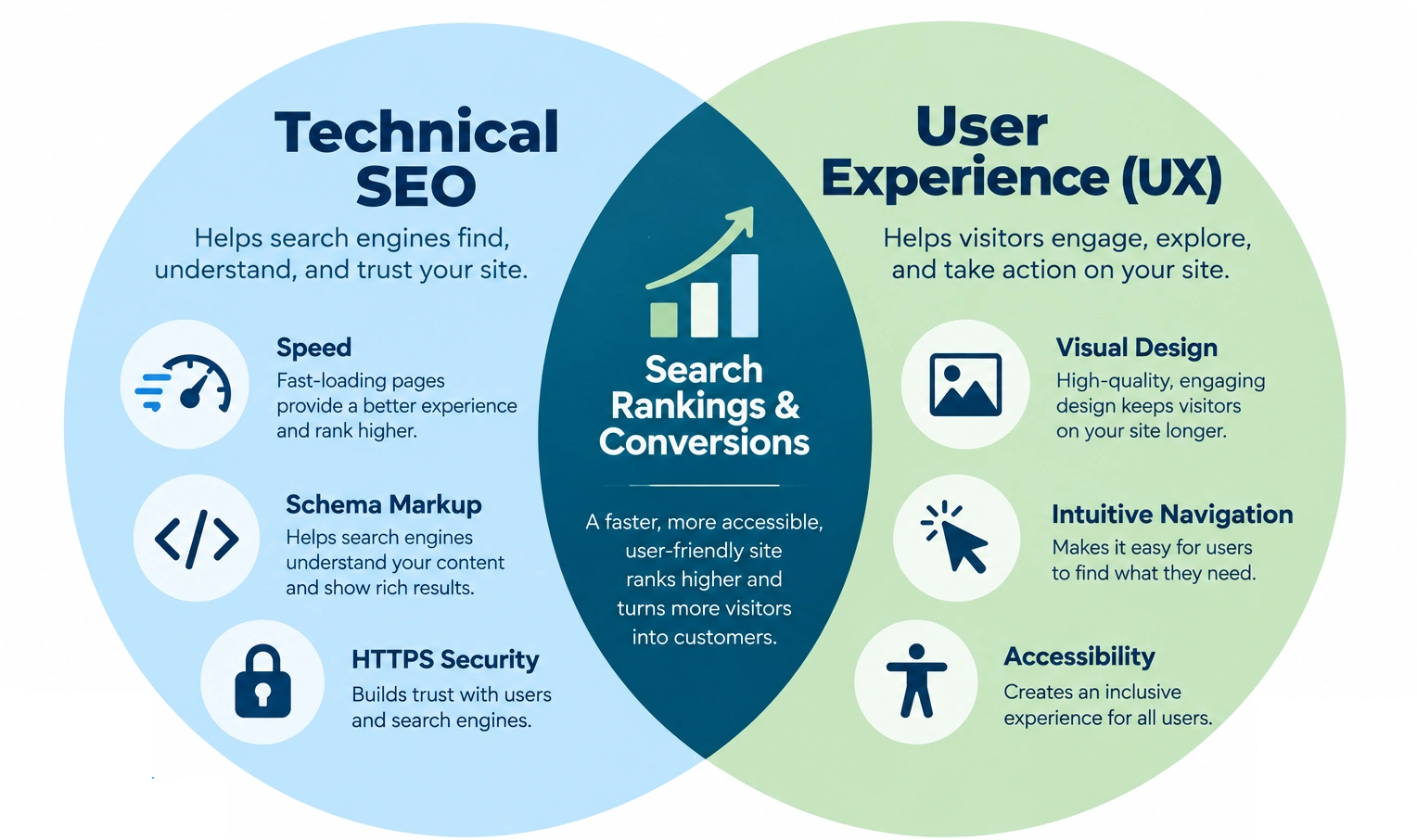
Technical SEO and user experience work together to create websites that are accessible, easy to navigate, search-friendly, and conversion-focused.
Let Us Handle the Tech While You Build the Homes
You wouldn’t let an amateur handle the foundation of a custom home. Don’t let your website’s technical foundation slide. Partner with BizIQ for professional website design and on-site optimization services that keep your brand fast, visible, and highly competitive.
Expert Best Practices for Optimizing Heavy Portfolios
The following practices represent the current technical consensus for builder sites carrying significant image loads. None of them require a full site rebuild; most can be applied incrementally to an existing codebase. Start with simple adjustments.
- Define image dimensions in HTML: Declaring explicit
widthandheightattributes on every<img>element tells the browser how much space to reserve before the file downloads. This eliminates Cumulative Layout Shift (CLS) by preventing the page layout from recalculating as images arrive, per Forrester’s Core Web Vitals research. It’s one of the highest-leverage, lowest-effort fixes available for portfolio pages. - Implement lazy loading: The
loading="lazy"attribute on off-screen images defers their download until the user scrolls them into the viewport. On a portfolio page with 40 or 50 images, this can reduce initial page payload by 70% or more, dramatically improving LCP for the above-the-fold content that Google primarily measures first. - Deploy a Content Delivery Network (CDN): A CDN distributes your portfolio assets across a network of geographically dispersed servers, so a visitor in Miami isn’t pulling images from a data center in Seattle. Latency drops, and perceived load speed improves globally. For builders with national or regional reach, this is particularly consequential.
- Optimize for Interaction to Next Paint (INP): Google replaced First Input Delay with Interaction to Next Paint (INP) to capture responsiveness across the full lifespan of a page visit, not just the first click, according to NIST research on data-heavy web interactions. Portfolio galleries with JavaScript-powered filters are the most common INP failure point on builder sites: every filter interaction that blocks the main thread for more than 200 milliseconds registers as a poor INP event. Auditing and deferring non-critical JavaScript is the primary fix.
Balancing Aggressive Compression with Site Security and Stability
There’s a version of image optimization that goes too far, and it creates a different category of problem. Some optimization plugins, particularly free or poorly maintained ones, carry documented vulnerabilities when processing images at exceptionally high compression ratios. CISA Bulletin SB25-356 specifically flags the risk of denial-of-service conditions triggered by certain compression edge cases in unverified plugins. For a builder whose website is their primary lead generation channel, a DoS event during peak browsing hours isn’t a theoretical risk; it’s a real business disruption.
The practical implication is that plugin selection matters as much as plugin configuration. Security cannot be secondary. Free optimization tools sourced from unverified repositories carry a higher vulnerability surface than enterprise-grade solutions with active security maintenance cycles. Builders running WordPress in particular should treat their plugin stack the way they treat their subcontractor list: vetting credentials before granting access to anything critical.
How to Audit and Optimize Your Site’s Core Web Vitals
Before you can fix anything, you need a reliable performance baseline. Baselines guide your strategy. Google PageSpeed Insights gives you LCP, CLS, and INP scores for both desktop and mobile, broken down by URL, which matters because a builder’s homepage and a deep portfolio gallery page often have dramatically different performance profiles. Running the audit on your highest-traffic portfolio pages, not just your homepage, gives you an accurate picture of where the real problems live.
Once you have that baseline, the remediation sequence follows a clear order: convert portfolio images to WebP, declare explicit dimensions in your HTML, implement lazy loading on off-screen assets, and configure a CDN for asset delivery. Each step compounds the previous one. To work through this process systematically and track your improvements against real performance data, BizIQ’s resource on how to audit your Core Web Vitals provides a structured framework for establishing your starting point and measuring progress after each change.
Frequently Asked Questions About Technical SEO for Home Builders
How does image size affect search engine optimization for home builders?
Large, uncompressed images increase page load times, which drives up bounce rates and suppresses search rankings. Google’s crawlers measure how quickly your pages load and factor that into where you appear in results, so an unoptimized gallery isn’t just a user experience problem, it’s a visibility problem. For a targeted strategy on attracting qualified traffic, the guide on how to optimize homebuilder websites covers the full organic lead generation picture.
What is the best image format for real estate and construction galleries?
WebP and AVIF are the current best options. They outperform older formats. Both formats deliver superior compression ratios and equivalent or better visual quality compared to JPEG and PNG, which means your luxury craftsmanship renders sharply without the file weight that drags down load times, according to the NIST National Vulnerability Database on image format handling. AVIF offers slightly better compression at the cost of broader browser support; WebP is the safer default for most builder sites today.
How do I fix Cumulative Layout Shift (CLS) on my portfolio pages?
The fix is direct: add explicit width and height attributes to every image element in your HTML. This reserves the correct amount of space in the page layout before the image file downloads, preventing the browser from recalculating element positions mid-load. Forrester’s Core Web Vitals research identifies undefined image dimensions as one of the most common sources of poor CLS scores on media-heavy pages.
What is the difference between FID and INP?
First Input Delay measured only the latency of a user’s very first interaction with a page. Interaction to Next Paint measures the latency of every interaction across the entire page session: every gallery filter click, every navigation tap, and every form field entry. That broader scope makes INP a more accurate representation of how responsive a portfolio gallery genuinely feels during extended browsing, per NIST research on data-heavy web performance. Google replaced FID with INP as an official Core Web Vital in 2024.
Can I optimize my image-heavy website without a complete redesign?
Yes, and for most builder sites, a redesign isn’t the right starting point anyway. High-impact fixes, such as converting images to WebP, adding lazy loading, declaring image dimensions, and configuring a CDN, apply directly to your existing WordPress, Webflow, or Wix installation without touching your design or content structure. The gains from these changes alone are often substantial enough to move the needle on both rankings and load time before any structural work is warranted.
At BizIQ, we understand that managing these complex technical details can feel overwhelming when you are busy managing active construction sites and client consultations. As a small business ourselves, we share the same goals and aspirations as the home builders we serve. We stand beside you as partners, helping market local, small businesses within their communities to ensure your craftsmanship gets the visibility it deserves.
To take the first step toward a faster, more visible website, contact BizIQ today for a personalized website performance review. Explore our specialized on-site optimization packages to see how we can turn your beautiful portfolio into a powerful, lightning-fast lead-generation engine.
Partner with BizIQ to Build Your Digital Foundation
Your portfolio represents years of hard work and exceptional design. Let us ensure the world genuinely sees it. With our performance-based local search rankings assurance, we help home builders secure first-page search engine visibility, or the next month is on us.
Get Started with BizIQ Today