
If you want more new patients finding your dental practice on Google, your Google Business Profile is the single most important free tool you have. Google Business Profile (GBP), formerly called Google My Business (GMB), is the listing that puts your practice in the local map pack on Google Search and Google Maps, complete with your hours, reviews, photos, and a button to book. This guide walks a busy dentist through claiming, verifying, and optimizing that profile so your office shows up when someone nearby searches for a dentist and is ready to call.
- Google Business Profile (GBP) is the free listing that gets your dental practice into Google’s local map pack, where patients searching “dentist near me” actually look.
- The three levers that move local rankings most for dentists are an accurate, complete profile, a steady stream of recent Google reviews, and consistent name, address, and phone (NAP) details everywhere online.
- Set your primary category to Dentist, then add the specific services you offer, from cleanings to implants, so you match more patient searches.
- Respond to every review, but keep replies HIPAA-aware: never confirm someone is a patient or discuss treatment in public.
- A complete profile with real photos builds trust and brings in measurably more calls, direction requests, and website visits.
What’s in This Guide
- Why a Google Business Profile Matters for Dentists
- How to Claim and Verify Your Dental Profile
- Choose the Right Categories for a Dental Practice
- Add Your Services, Hours, and Description
- Photos That Win Dental Patients
- Reviews: Your Biggest Local Ranking Lever
- Posts, Q&A, and the Book Now Button
- Connect Your Profile to the Rest of Your Local SEO
- Frequently Asked Questions
Why a Google Business Profile Matters for Dentists
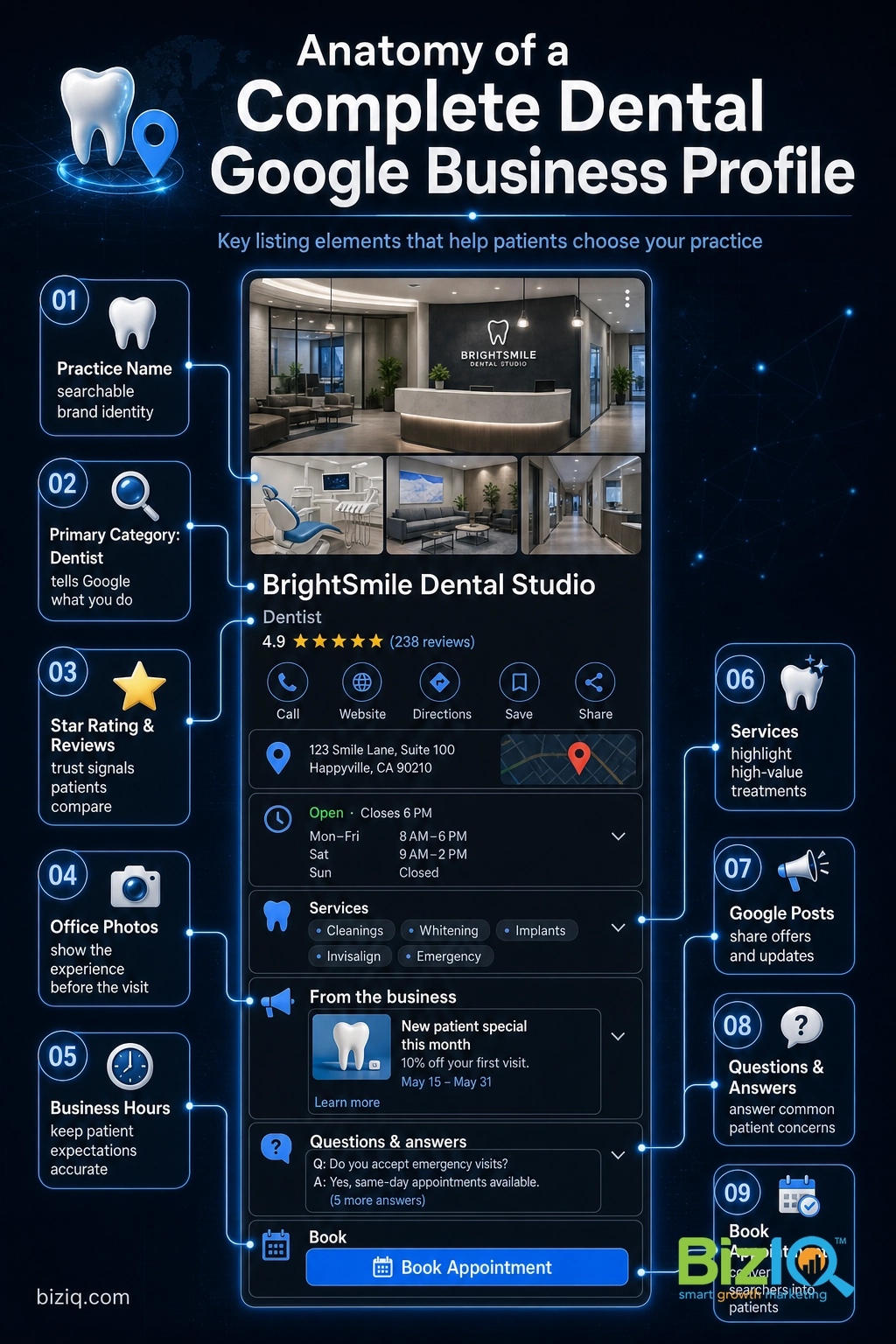
When someone has a toothache or needs a new family dentist, they almost always open Google or Google Maps and search for a dentist nearby. The results they see first are not the blue links. They are the local map pack: a small map with three practices, each showing a star rating, hours, and a call or directions button. Your Google Business Profile is what decides whether your office appears in that pack, and how convincing it looks when it does.
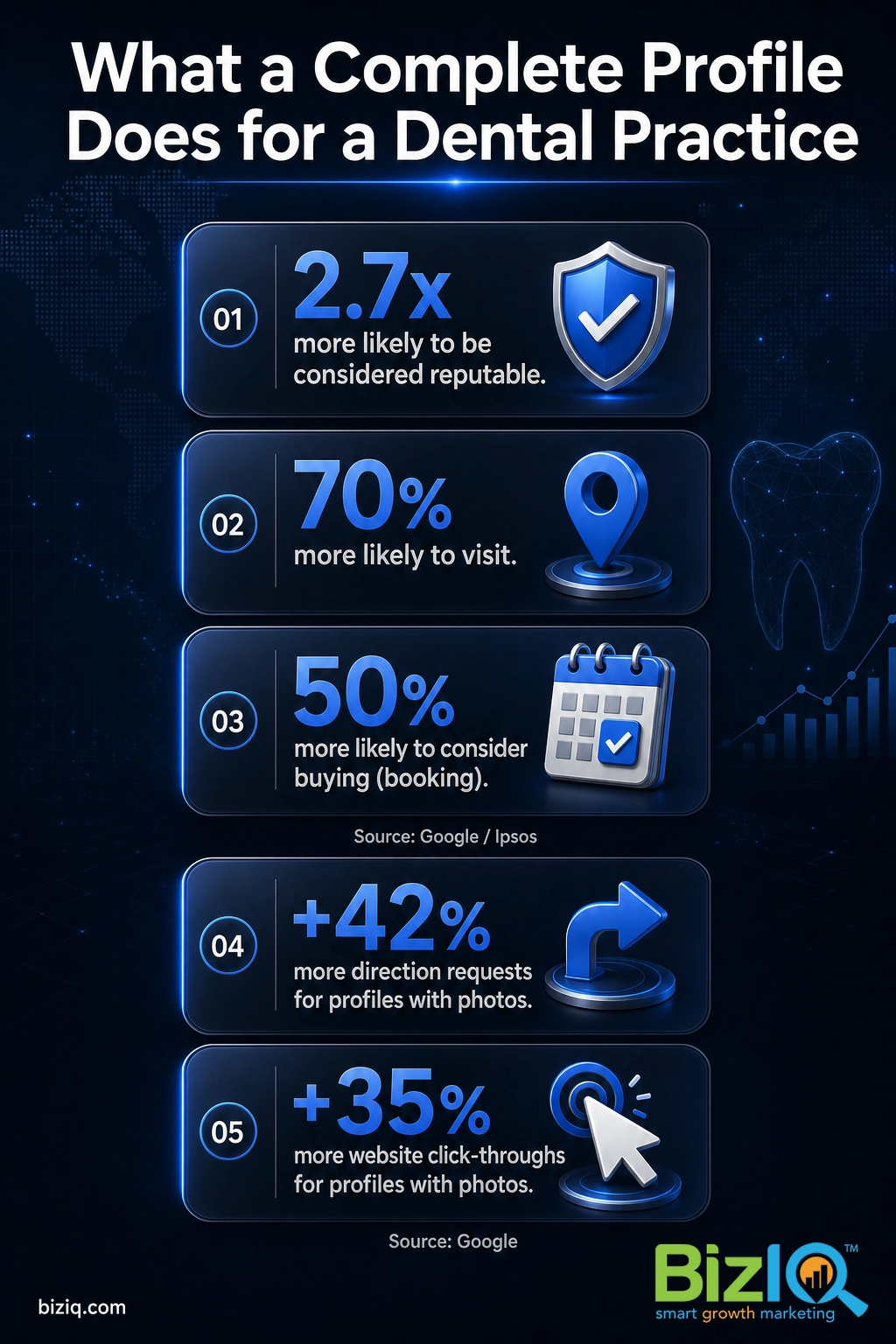
For a dental practice, that visibility turns directly into booked chairs. A profile that is complete, accurate, and active signals to Google that your practice is a legitimate, well-run business worth showing, and it signals the same thing to the patient deciding who to call.
In the same Google research, people were 70% more likely to visit and 50% more likely to consider buying from a business with a complete profile. For a dentist, “buying” means booking a cleaning, a consultation, or an emergency visit, so a thorough profile is not busywork. It is the difference between being found and being skipped.
Want a plain walkthrough of how a profile earns that visibility? Watch the short overview below.
Source: Google Business Profile (official)
How to Claim and Verify Your Dental Profile
Before you can optimize anything, the profile has to be yours. Many practices already have an unclaimed or outdated listing that Google generated automatically, so start by searching your practice name and city to see what is out there.
- Find or create the listing. Go to the Google Business Profile manager, search for your practice, and claim it if it exists. If nothing comes up, create a new profile with your exact practice name.
- Enter your core details. Add your name, address, and phone number exactly as they appear on your website and front door. This NAP (name, address, phone) consistency matters more than it looks.
- Choose how to verify. Google confirms you actually run the business, usually by postcard, phone, email, or video. Pick the method Google offers you and complete it, because an unverified profile cannot rank or be edited fully.
- Finish and lock it down. Once verified, add a recovery email and limit who has owner and manager access so the listing stays under your control.
Verification time depends on the method Google assigns, so if you want the specifics before you start, see our guide on how long Google business verification takes. If you are not sure whether an existing listing is already confirmed, check first with our walkthrough on how to check your profile and ranking.
A real listing is enough, and Google will fill in the rest. Google will auto-generate a basic listing, but an unclaimed, unverified profile is thin, often has wrong hours, and cannot rank well or be managed. Claiming and verifying is the step that turns a placeholder into an asset.
Choose the Right Categories for a Dental Practice
Categories tell Google which searches your practice should appear for, and they are one of the strongest ranking signals you control. Your primary category carries the most weight, so for most offices it should be set to Dentist.
Then add secondary categories for the specific services you provide. The more accurately your categories describe your practice, the more relevant searches you can win without competing against every general dentist in town.
| If your practice offers… | Consider adding this category |
|---|---|
| General and family care | Dentist (primary) |
| Veneers, whitening, smile makeovers | Cosmetic dentist |
| Care for children | Pediatric dentist |
| Same-day and urgent care | Emergency dental service |
| Implants and restorations | Dental implants provider / Oral surgeon |
| Braces and aligners | Orthodontist |
| Root canals | Endodontist |
Only add a category for a service you genuinely perform. For a deeper look at picking and combining them, see our complete list of Google Business Profile categories and how to choose.
Add Your Services, Hours, and Description
Once your categories are set, flesh the profile out so it answers the questions a prospective patient has before they call. This is where many dental listings fall flat, and where a little effort separates you from the practice down the street.
Services. List the treatments you offer as individual services, such as routine cleanings, exams, teeth whitening, fillings, crowns, Invisalign, dental implants, and emergency visits. Each one you add is another specific search you can match. Our guide on adding services to your profile covers the mechanics.
Hours. Keep regular hours accurate and set special hours for holidays. Nothing erodes trust faster than a patient driving to a “closed” office that your profile said was open.
Description. Write a clear, friendly description of your practice, who you serve, and what makes patients comfortable. Lead with what the patient cares about, such as gentle care, same-day appointments, or family-friendly scheduling, rather than industry jargon.
Photos That Win Dental Patients
Dentistry is a trust decision, and photos do a lot of that trust-building before a patient ever walks in. Add real, high-quality images of your exterior and signage, the waiting room, treatment rooms, your team, and your technology. Authentic photos of your actual office beat polished stock every time, because patients are deciding whether they will feel comfortable in your chair.
Google also reports that profiles with photos earn 35% more website click-throughs. For a practice, those are patients actively heading your way or researching before they book. Refresh your photos regularly so the listing looks active, and keep any patient images within privacy and consent rules. For a closer look at image standards, our walkthrough on approving your Google Business Profile photos is a good next read.
Source: Google Business Profile (official)
Reviews: Your Biggest Local Ranking Lever
For dentists, reviews do double duty. They are a major local ranking factor, and they are the social proof that convinces a nervous new patient to pick you over the practice next door. A steady flow of recent, genuine reviews tends to move the needle more than almost anything else you can do after your profile is complete.
Getting reviews. The most reliable method is simple: ask every happy patient at the end of their visit, and make it effortless. A short review link, a card at checkout, or a QR code in the operatory removes the friction. Our guides on getting more Google reviews and responding to them with examples go deep on both.
Respond carefully. Reply to every review, positive or negative, but keep it HIPAA-aware. Thank the reviewer and, for anything negative, invite them to call the office to make it right. Never confirm that the person is a patient, and never reference their treatment, diagnosis, or visit in a public reply. A warm, generic response protects patient privacy and still shows future readers that you care.
Reviews work. We helped a dental client strengthen exactly this kind of local presence, and you can see the results in our dental practice case study.
Real results for real local businesses
How BizIQ clients turned their Google presence into customers.
New Image by Hilary
Cosmetic enhancement services
A previous agency had her competing against herself, so customers couldn’t find her. BizIQ won a $3,000 refund, then built an optimized site with local keyword research — now customers find her again straight from a Google search.
Signmakers
Custom signage — Los Angeles, CA
This 25-person LA sign maker — serving brands like Ferrari, Louis Vuitton, and Piaget — got the phone ringing with higher-quality clients after partnering with BizIQ.
“We definitely got the phone ringing with higher quality clients.” — Paul Stoakes, Owner
We practice what we preach here. You can read our own feedback on the BizIQ reviews page.
Posts, Q&A, and the Book Now Button
A profile is not a set-it-and-forget-it listing. The practices that win local search keep it active, and Google gives you several ways to do that.
Google Posts let you share updates, new-patient specials, and reminders right on your profile, which keeps it looking current. Questions and answers appear publicly on your listing, so seed the common ones yourself (“Do you take my insurance?” “Do you see children?” “Do you offer emergency appointments?”) and answer them clearly before a competitor’s answer, or a wrong one, shows up.
Most importantly for a dental practice, add a booking or appointment link so a ready patient can act in one tap. Our guide on adding a Book Now button shows how to connect it to your scheduler.
Connect Your Profile to the Rest of Your Local SEO
Your Google Business Profile does not work in a vacuum. It performs best when the rest of your online presence reinforces it, which is the heart of local search engine optimization (SEO), the practice of helping your business rank for nearby searches.
Keep your NAP consistent. Your name, address, and phone number should match exactly across your website, your profile, and directory listings like Yelp and Healthgrades. Mismatches confuse Google and can quietly hold your rankings back.
Point your website at the same services. A dedicated page for each major treatment on your site, linked from a relevant profile, gives Google more reason to trust that you truly offer those services. If you are weighing whether a site is even needed, our post on using Google Business without a website lays out the trade-offs.
Optimize the listing itself over time. Local ranking is ongoing, not one-and-done. Our walkthrough on optimizing your profile for local SEO is the natural companion to this guide.
Pulling all of this together, keeping it consistent, and improving it month after month is exactly the kind of work a dedicated partner handles so you can stay focused on patients. If that is where you would rather spend your time, our local SEO services are built for exactly this.
Your Next Steps
You do not need to do everything at once. Claim and verify your profile first, then set your categories, add your services and photos, and start asking patients for reviews. Keep it active with posts and quick answers, and make sure your website and directory listings tell the same story. Done consistently, a well-run Google Business Profile becomes one of the most reliable sources of new-patient calls your practice has.
If you would rather hand it off, BizIQ has helped small and local businesses grow online since 2013, and eligible local marketing packages are backed by our Local Marketing Guarantee: we work to get you onto the first page of Google’s local map or organic results within 60 days for at least two geo-tagged keyword phrases, or you do not pay the next month until we do.
Get your profile set up for $97
See how we help dental and healthcare practices
Fantastic
“Great company to work with. The people are fantastic and do a great job eliminating the hassle of what could otherwise be a very daunting and time consuming task. The increase in…”
— Tim M.
Help build your business
“BizIQ is a great company and the employees are extremely helpful. The representative that I used takes care of every request in a timely manner and calls me on a monthly basis just to…”
— Cheryl H.
Orders keep coming
“BizIQ has helped my business grow, the calls and orders keep coming every day. I didn't think I needed to expand to this kind of help but I'm so glad I did. BizIQ is very affordable…”
— Deborah F.
Frequently Asked Questions
Is Google My Business the same as Google Business Profile?
Is a Google Business Profile free for dentists?
What primary category should a dentist choose on Google Business Profile?
How do dentists get more Google reviews, and can they respond to them?
How long does it take a dental practice to rank in the local map pack?
Can a dental practice with more than one location use one profile?
Do I need a website to use Google Business Profile as a dentist?
Methodology & Sources. Reputation and visibility figures are from Google’s own research on complete Business Profiles (Google / Ipsos) and Google’s published data on profiles with photos. BizIQ’s 4.6-star rating reflects 1,000+ Google reviews. Guarantee terms follow BizIQ’s published Local Marketing Guarantee. Category and feature details reflect Google Business Profile as of 2026. Last Updated: November 2026.