If local customers cannot find your contracting business on Google, they hire the contractor they can find. Your Google Business Profile, the free listing that shows up on Google Maps and in the local results of Search, is the single biggest lever you have over whether your phone rings. This guide walks you through setting one up correctly and then optimizing it so your business climbs into the local map pack, the three-business box that sits at the top of local searches.
- Google Business Profile (GBP) is the free listing that decides whether your contracting business appears on Google Maps and in the local search results. It was formerly called Google My Business (GMB).
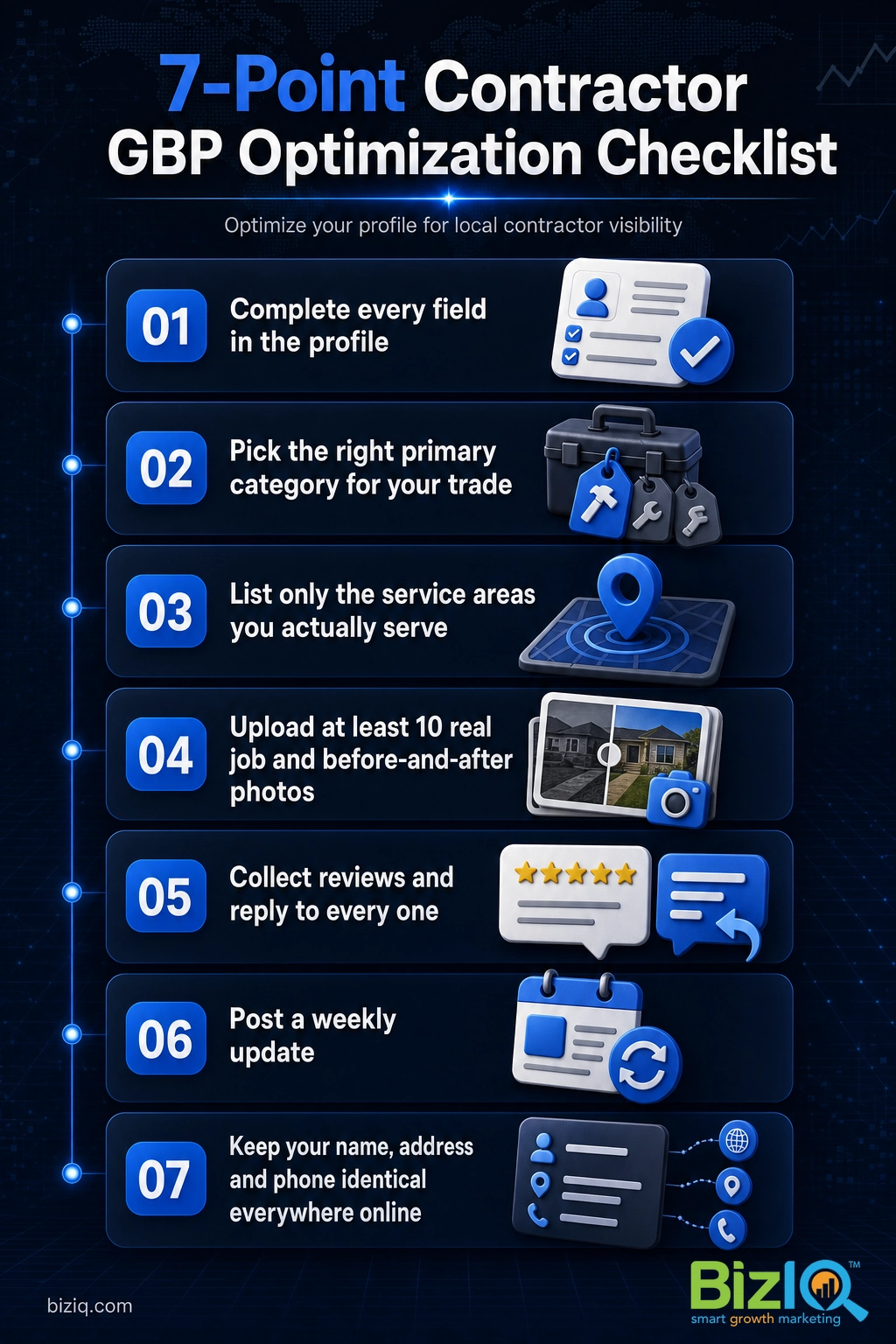
- Verification plus a fully completed profile is the foundation. A thin or unverified profile cannot rank, no matter how good your website is.
- Contractors with no storefront set up as a Service Area Business: verify an address, hide it, then list only the areas you truly serve.
- Your primary category, real job photos, and a steady stream of reviews are the three biggest ranking and trust signals.
- Keep your name, address and phone identical everywhere online, and treat the profile as something you maintain weekly, not set and forget.
What’s in This Guide
- Why your profile is a contractor’s number one local-visibility tool
- What a complete contractor profile includes
- How to set up your profile, step by step
- Choosing the right categories for your trade
- Setting your service area when you have no storefront
- How to optimize your profile to rank in the map pack
- Reviews: your most powerful ranking and trust signal
- Common contractor profile mistakes to avoid
- How long until you see results
- Frequently asked questions
Why Your Profile Is a Contractor’s Number One Local-Visibility Tool
When a homeowner searches “roofer near me” or “kitchen remodeler in [their town],” Google does not start by showing websites. It shows the local map pack: a map with pins and three business listings, each with a star rating, a call button and a directions button. Those three spots capture the majority of the clicks for local searches. Your Google Business Profile is the only thing that decides whether you are one of the three.
That is why your profile matters more than almost anything else in your marketing. A homeowner choosing a contractor is inviting a stranger onto their property, so trust signals do heavy lifting, and Google puts those signals, your rating, your reviews, your photos and your completeness, right at the top of the results.
Google’s own research, conducted with Ipsos, found that a complete Business Profile makes customers 2.7 times more likely to consider a business reputable, 70% more likely to visit, and 50% more likely to consider buying. For a contractor, “consider buying” is a request for a quote. Source: Google Business Profile.
Your profile also feeds the rest of your local marketing. It is the anchor for your Google Business Profile management and for broader local SEO work, because the reviews, categories and consistent business information on your profile reinforce everything else Google knows about you. SEO stands for search engine optimization, the work of helping your business rank higher in those results.
Real results for real local businesses
How BizIQ clients turned their Google presence into customers.
Holloway Construction
Demolition & excavation — Jonesborough, TN
Down to their last $2,500 with no online presence, Holloway Construction had BizIQ launch a website in under 24 hours and optimize their Google Business Profile so customers could find them — and made $30,000 in 24 hours.
“BizIQ saved my business.” — Mark Holloway, Owner
Lines Sunscreens
Sun screens & shades — Arizona (since 1974)
This since-1974 family shop had relied on a street sign and word of mouth. A modern new website from BizIQ built a real online presence — and a significant surge of new customers.
“BizIQ goes above and beyond!” — Debbie, Lines Sunscreens
What a Complete Contractor Profile Includes
Before you start filling things in, it helps to see the whole picture. A fully built-out contractor profile is not just a name and a phone number. Every field you complete gives Google another reason to show you and gives a homeowner another reason to pick you.
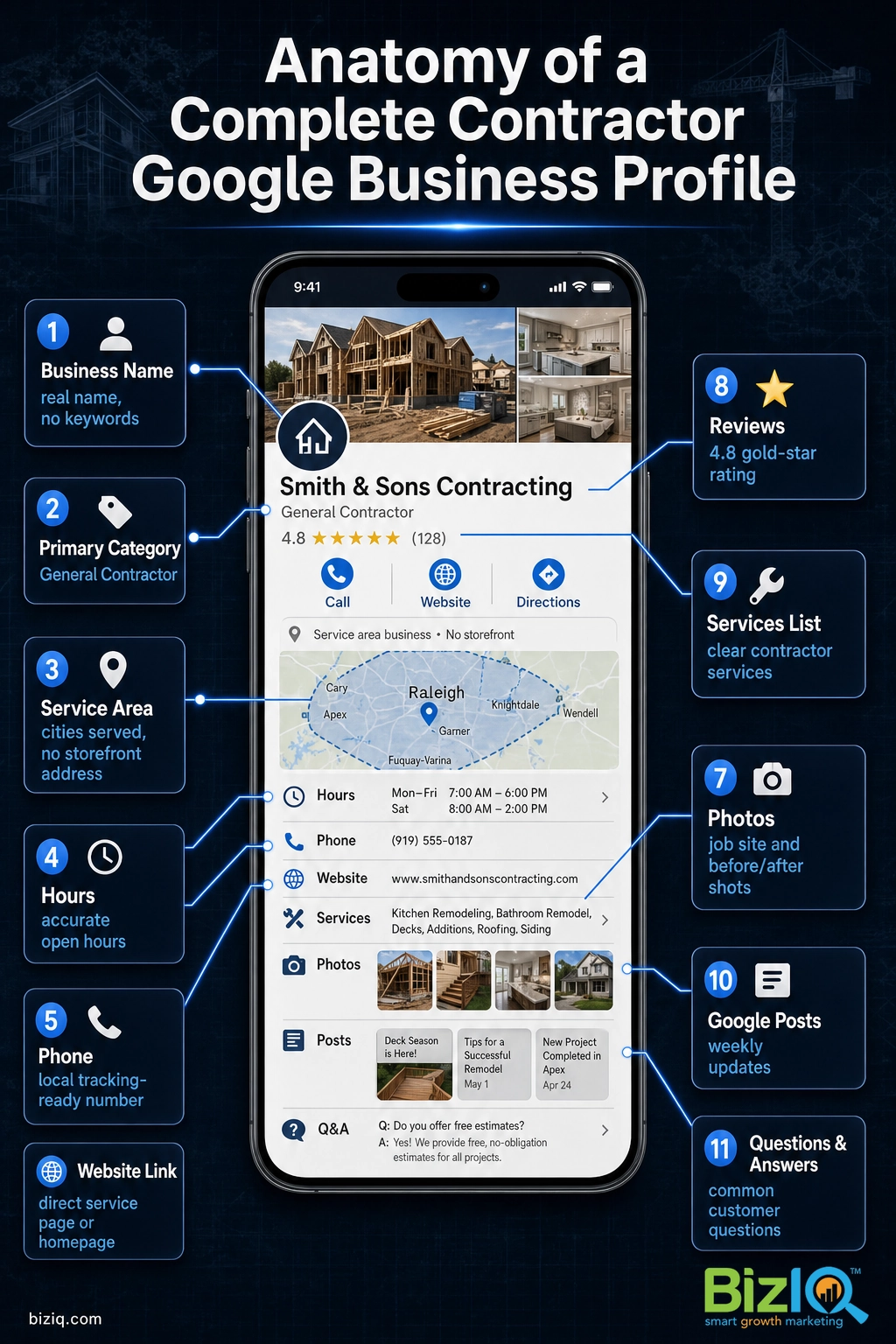
Here is what a complete profile covers:
- Business name: your real, legal business name, with no extra keywords bolted on.
- Primary category: the one category that best describes your main trade.
- Secondary categories: every other service you offer.
- Service area: the cities, counties or ZIP codes you work in.
- Hours: including special hours for holidays.
- Phone and website: the same numbers and link you use everywhere else.
- Photos: job-site shots, finished work, your team, your trucks.
- Services and description: a plain-language list of what you do.
- Reviews: and your replies to them.
- Google posts and the Q&A section: your ongoing, fresh activity.
How to Set Up Your Google Business Profile, Step by Step
If you have never claimed a profile, or you inherited one someone else made, follow these steps in order. The whole setup takes well under an hour, though verification can add a few days.
- Search for your business first. Google your business name and city. If a listing already exists, you need to claim it rather than create a duplicate. Duplicate listings compete with each other and hurt your ranking. If nothing comes up, you are creating a new one.
- Go to the Google Business Profile sign-up and claim or create. Visit the Google Business Profile page, sign in with the Google account you want to own the profile, and either claim the existing listing or enter your business name to start a new one. Use a company Google account, not a personal one, so you keep control if staff change.
- Choose your primary category. Google asks for a category during setup. Pick the one that best matches your main trade. You can refine this later, and the categories section below covers how to choose well.
- Enter your address or set your service area. If customers come to a storefront or shop, enter the address. If you travel to customers, this is where you tell Google you are a Service Area Business, covered in detail below.
- Add your phone and website. Use the exact same phone number and website address that appear on your site, your invoices and your other listings.
- Verify your business. Google confirms you are real, usually by phone, text, email, video or a mailed postcard. Verification is not optional: an unverified profile will not show in the map pack. Pick the fastest method Google offers you and complete it right away. If you want to know what to expect, see our guide on how long Google verification takes.
Once you are verified, your profile is live. That is the starting line, not the finish. The next sections turn a live profile into one that ranks.
Choosing the Right Categories for Your Trade
Categories are one of the strongest ranking signals you control, and most contractors get them wrong by being either too broad or too narrow. Google gives you one primary category and up to nine secondary categories.
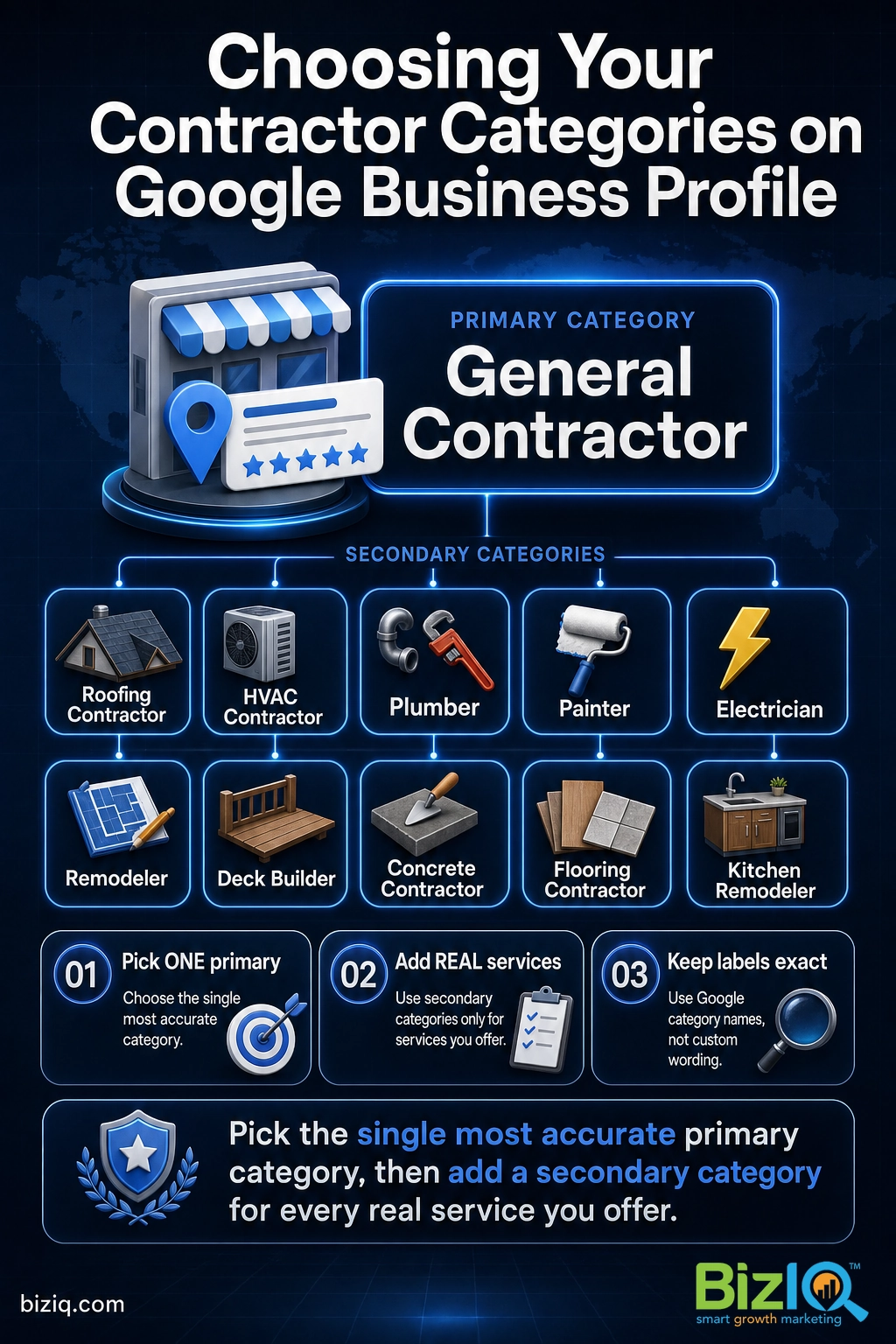
The rule is simple: set your primary category to the single service you most want to be known for, then add a secondary category for every other service you genuinely provide. A remodeler who also does roofing might set “General Contractor” or “Remodeler” as the primary, then add “Roofing Contractor,” “Deck Builder” and “Kitchen Remodeler” as secondaries.
| If your main trade is… | A good primary category | Secondary categories to consider |
|---|---|---|
| General contracting / remodeling | General Contractor | Remodeler, Kitchen Remodeler, Bathroom Remodeler, Deck Builder |
| Roofing | Roofing Contractor | Gutter Cleaning Service, Siding Contractor |
| HVAC | HVAC Contractor | Air Conditioning Contractor, Furnace Repair Service, Heating Contractor |
| Plumbing | Plumber | Drainage Service, Water Heater Installation, Gas Installation Service |
| Painting | Painter | Painting, Drywall Contractor |
| Electrical | Electrician | Lighting Contractor, Electrical Installation Service |
Do not add categories for services you do not offer just to appear in more searches. Irrelevant categories confuse Google about what you do and can pull you out of the searches you should win. For a deeper look at picking and ordering categories, read our full guide on Google Business Profile categories.
Setting Your Service Area When You Have No Storefront
Most contractors do not have a shop a customer would visit. They work out of a truck, a garage or a home office. Google has a specific setup for this called a Service Area Business, and getting it right is one of the most important steps for a contractor.
Here is how it works. Google still needs a real address to verify that your business exists, so you enter yours during setup. Then you hide that address from the public and instead list the places you serve. Customers see “serving Phoenix and surrounding areas” rather than your home address.
List only the areas you truly work in. Google lets you add up to 20 service areas, and it is tempting to claim every town within an hour’s drive. Resist it. Spreading your service area too wide dilutes your relevance and can push you down in the towns where you actually want the work. Pick the areas you serve often and serve well, and add more only as you genuinely expand.
If you have a mix of a physical shop and travel work, you can show your address and set a service area. Choose the setup that matches how customers actually reach you.
How to Optimize Your Profile to Rank in the Map Pack
A verified, complete profile gets you into the game. Optimization is how you move up. Google ranks local businesses on relevance, distance and prominence, and while you cannot change where a customer is standing, you have real control over relevance and prominence. These are the levers that move the needle.
Add real photos, and keep adding them
Photos are not decoration. They are a ranking and conversion factor, and contractors have an unfair advantage here because your work is visual. Upload at least ten photos to start: finished jobs, work in progress, before-and-after pairs, your crew, your branded trucks. Then add a few fresh ones every month so Google and customers see an active business.
Google reports that profiles with photos earn 42% more requests for directions and 35% more website click-throughs than profiles without. For a contractor, before-and-after photos do double duty: they feed Google and they answer the quiet question every homeowner has, which is “can these people actually do the work?” Source: Google Business Profile.
Want to see how BizIQ sets up a contractor’s profile and video presence the right way? Watch this short walkthrough.
Fill in services and a plain-language description
Add each service as its own entry with a short description. Write your business description in plain language a homeowner uses, not industry jargon. Name the work you do and the areas you serve, naturally, without stuffing keywords.
Post weekly updates
Google Posts show up right on your profile. A weekly post about a recent job, a seasonal reminder (gutter cleaning before winter, AC tune-ups before summer) or a current offer keeps your profile active, and an active profile signals to Google that your business is open and engaged.
Keep your business information identical everywhere
Your name, address and phone number, often called your NAP, must match exactly across your website, your profile and every directory you appear in. Even small differences, like “Street” on one and “St.” on another, make Google less confident about your business and can hold back your ranking. For the full playbook on this, see our guide on optimizing your profile for local search success.
Reviews: Your Most Powerful Ranking and Trust Signal
If you do only one thing after setup, make it this: get a steady stream of real reviews and reply to every one. Reviews are among the strongest local ranking factors, and for a contractor they are also the deciding factor for a nervous homeowner comparing three quotes.
Build a simple habit. At the end of every job, ask the customer for a review and send them the direct link. Reply to the good ones with thanks and to the critical ones with a calm, professional response. A thoughtful reply to a bad review often reassures future customers more than a wall of five stars.
We practice what we preach. BizIQ holds a 4.6-star rating from 1,000+ Google reviews, earned the same way we are telling you to earn yours: by doing good work and asking every customer to share it. Source: BizIQ reviews.
The contractors who win the map pack are rarely the ones with the flashiest website. They are the ones who treat their profile like a job site that is never quite finished: fresh photos after every project, a new review every week, a reply to every comment. Consistency beats intensity. A profile that gets a little attention every week will outrank a competitor who built a perfect profile once and walked away.
For the specific scripts and tactics, read our guide on how to get more Google reviews.
Common Contractor Profile Mistakes to Avoid
Most of the damage contractors do to their own profiles comes from a handful of avoidable mistakes. Here are the ones we see most.
Myth: Adding keywords to your business name helps you rank. It is one of the most common and most dangerous mistakes. Changing your name from “Smith Roofing” to “Smith Roofing Best Roofer Phoenix Fast” violates Google’s guidelines and can get your profile suspended, which takes you out of the results entirely. Use your real business name. Earn ranking through categories, reviews, photos and completeness instead.
Other mistakes to steer clear of:
- Setting and forgetting. A profile that never gets a new photo, post or review stalls. Ongoing activity is a signal.
- Claiming service areas you do not serve. It dilutes your relevance where it counts.
- Letting duplicate listings sit. Two profiles for one business split your reviews and confuse Google. Claim and merge them.
- Ignoring reviews. No replies, or defensive replies, cost you both ranking and trust.
- Inconsistent business information. Mismatched phone numbers or addresses across the web undercut everything else.
How Long Until You See Results
This is the question every contractor asks, and the honest answer is that it depends on your market and your starting point. If you are fixing a neglected or unverified profile, you often see early movement within a few weeks once it is verified and fully built out. More stable positioning in the local map pack usually builds over a couple of months of steady reviews, fresh photos and regular posts.
Local search is competitive, so be wary of anyone promising a specific position by a specific date. What you can count on is this: a complete, active, well-reviewed profile will consistently beat a thin, stale one. The work compounds. Keep at it and your profile keeps climbing.

Put Your Contractor Profile to Work
Your Google Business Profile is the closest thing a contractor has to a 24-hour salesperson sitting at the top of Google. Set it up correctly, optimize it with real photos and steady reviews, and keep it active, and it will feed your pipeline with local customers who are ready to hire.
If you would rather have experts handle the setup and optimization for you, BizIQ can help. We build and manage profiles for contractors across the country, and it is part of how we deliver full-service marketing for construction and contracting businesses. You can also browse our Google Business Profile FAQ for quick answers to common questions.
Get a Free Google Business Profile Analysis
See Our $97 Profile Setup Service
Uncomplicated & easy
“Since working with BizIQ we have already noticed a climb in our daily bottom line. Customers new to our small town have easily found us and have come in to buy eyeglasses that would…”
— Eve H.
So pleased
“I am so pleased with BizIQ. For the first time I did the right thing in hiring them to assist me with increasing my business. I have moved onto page one of the internet in my area and…”
— Jan W.
Fantastic
“Great company to work with. The people are fantastic and do a great job eliminating the hassle of what could otherwise be a very daunting and time consuming task. The increase in…”
— Tim M.
Frequently Asked Questions
Is Google Business Profile the same as Google My Business?
What category should a contractor choose on Google Business Profile?
Can a contractor use Google Business Profile without a storefront?
How many service areas can a contractor list on their profile?
Do photos really help a contractor’s profile rank and get calls?
Should I put keywords in my Google Business Profile business name?
How long until a contractor’s profile shows up in the local map pack?
Sources: Google Business Profile (completeness and photo engagement data, Google/Ipsos research); BizIQ’s own Google rating and review count from its public reviews page. Review counts drift over time, so BizIQ’s total is stated as 1,000+.