The fastest way to get more Google reviews is to ask every happy customer, make leaving one a single tap, and do it consistently instead of in occasional bursts. Reviews are not just nice to have. They shape the star rating people judge you by in a split second, and they feed the signals Google uses to rank your business in local search. This guide walks through 11 proven strategies to get more Google Business Profile reviews, with practical steps you can start today and the policy guardrails that keep your profile safe.
A quick note on names: your Google Business Profile (GBP) is the free listing that shows your business on Google Search and Maps. It used to be called Google My Business (GMB), and you will still see that older name around, but it is the same tool and the same reviews.
- Great service comes first: reviews are the byproduct of an experience worth talking about.
- Get your Google review link from your profile and turn it into a one-tap ask by text, email, and QR code.
- Ask every customer, at the right moment, and make requesting reviews a routine, not a one-time campaign.
- Respond to every review, good and bad: it builds trust and encourages more people to leave one.
- Never buy reviews or offer incentives. It breaks Google’s rules and can get your profile suspended.
What’s in This Guide
- Why Google Reviews Matter for Your Local Business
- 1. Deliver a Review-Worthy Experience
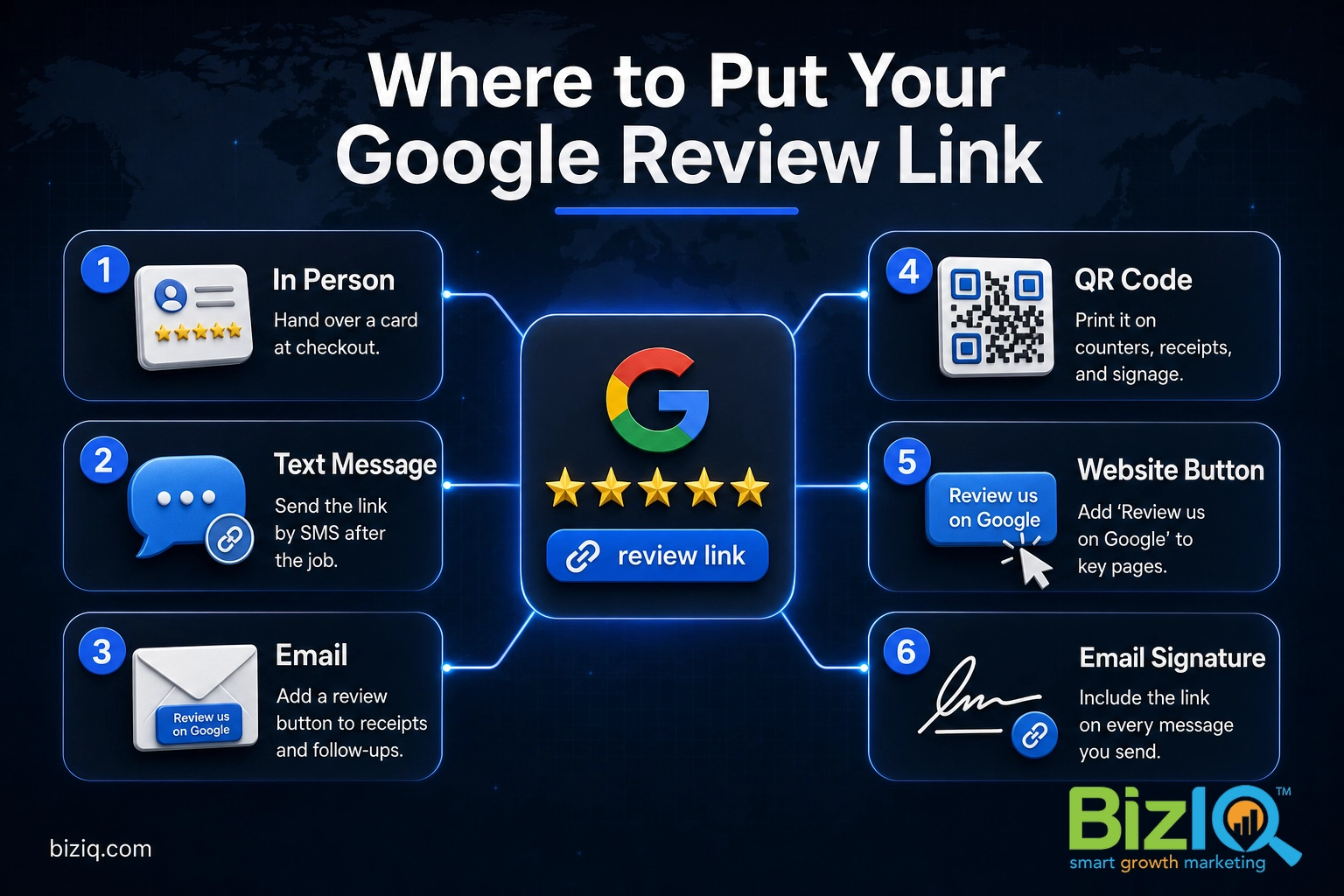
- 2. Get Your Google Review Link and Make It One Tap
- 3. Just Ask, in Person, at the Right Moment
- 4. Send Review Requests by Text
- 5. Follow Up by Email
- 6. Put a Review QR Code Everywhere
- 7. Add a Review Button to Your Website
- 8. Make Asking for Reviews a Routine
- 9. Respond to Every Review, Good and Bad
- 10. Show Off the Reviews You Already Have
- 11. Stay Inside Google’s Review Rules
- When to Let a Pro Handle It
- Troubleshooting Common Review Problems
- Frequently Asked Questions
Why Google Reviews Matter for Your Local Business
When someone searches for what you sell near them, Google shows a short, ranked list of local businesses above the regular results. That block is the local map pack, and reviews are one of the loudest signals that decide who lands in it and in what order. A business with more recent, higher-rated reviews looks more trustworthy to customers and more prominent to Google. The payoff is concrete for a small business: more calls, more direction requests, more people walking in the door.
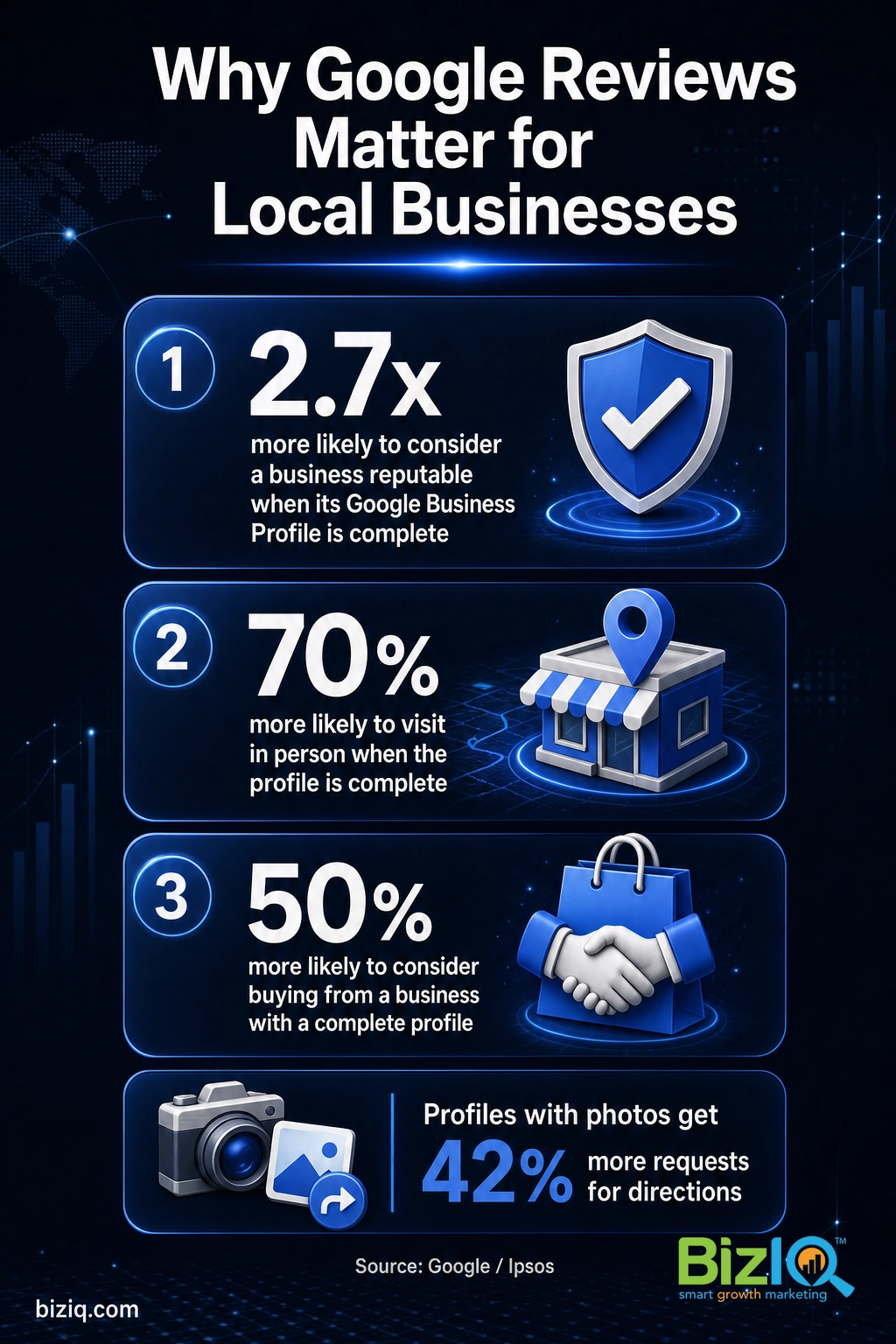
Reviews carry weight with two audiences at the same moment: the customer deciding whether to trust you, and Google deciding where to rank you. A complete, well-reviewed profile moves both.
Source: Google Business Profile
Reviews also do something an ad never can: they let real customers sell for you. A steady stream of honest, recent reviews is social proof that quietly closes the sale before you ever pick up the phone. It is one of the few marketing channels that is genuinely free, which makes it one of the highest-return things a local owner can work on.
Source: BizIQ reviews
You do not need a thousand reviews to win locally. You need a genuine, growing stream of them, and the 11 strategies below are how you build it.
1. Deliver a Review-Worthy Experience
Every strategy below is a multiplier on the experience you give. Nobody takes time out of their day to review a service that was merely fine. People review the moments that stood out: the problem you fixed fast, the friendly extra step, the job that beat their expectations. So the real first strategy is to build small, memorable moments worth mentioning, then make sure your team knows those moments are exactly when a review request lands best.
Why it matters: a flood of requests on top of a flat experience produces silence, or worse, honest three-star reviews. Earn the goodwill first.
What success looks like: customers mention specific things they liked, unprompted. That is your cue that an ask will be welcomed, not resented.
2. Get Your Google Review Link and Make It One Tap
The single biggest thing that stops customers from leaving a review is friction. If they have to search for your business, scroll to the right spot, and find the review button themselves, most give up. Your Google review link removes all of that by dropping them straight into the review box.
What to do: sign in to your Google Business Profile, open your profile, and click “Ask for reviews.” Google hands you a short link. Copy it once, and that link becomes the backbone of nearly every method below. You can shorten it further or create a custom version so it is easy to say out loud.
Why it matters: a one-tap link can turn a vague “leave us a review sometime” into an actual review in under a minute, while the customer is still happy and still has their phone out.
What success looks like: you can text or email that link in seconds, and customers who tap it reach the star box without a single extra step.
3. Just Ask, in Person, at the Right Moment
The most reliable review request is a human one. A simple, sincere “If you have a minute, a quick Google review really helps a small business like ours” works because it is honest and specific. Timing is everything: ask right after a positive moment, when satisfaction is highest. For a service business that is at job completion. For a shop or restaurant it is at checkout, after a compliment.
What to do: train everyone who touches a customer to make the ask part of the natural goodbye, then hand over the review link by text or a card on the spot so there is nothing to remember later.
Give your team one short, approved line to say and a card or text template to send. People ask far more often when they are not inventing the words each time, and a consistent ask is what turns a trickle of reviews into a steady stream.
What success looks like: asking becomes a habit at the end of every job, not a special event you have to organize.
4. Send Review Requests by Text
Text messages get opened and acted on far more than email, which makes SMS the workhorse of review collection. A short, personal text with your review link, sent within a few hours of the visit, catches customers while the experience is fresh and their phone is in hand.
What to do: keep it brief and human. Use the customer’s name, thank them, explain in one line why it helps, and paste the link. For example: “Hi Maria, thanks for choosing us today. If you have a moment, a quick Google review helps other local folks find us: [your review link].”
Why it matters: a link the customer can tap from the text removes every barrier between a good feeling and a posted review.
Do not blast the same review text to your entire customer list from one phone or tool in a single burst. A wave of reviews from the same source can trip Google’s spam filter and get them removed. Space requests out and tie each one to a real, recent interaction.
What success looks like: most texts are opened, and a healthy share turn into reviews within a day.
5. Follow Up by Email
Email is the natural backup for customers you did not catch in person or by text, and it gives you room to add a little context. It works especially well for businesses that already send a receipt, invoice, or thank-you email, because the review ask can ride along with a message the customer already expects.
What to do: add a clear “Leave us a Google review” button or link to your receipt and follow-up emails, and put the review link in your email signature so every message you send is a gentle reminder.
Why it matters: many happy customers mean to review you and then forget. A friendly follow-up a day or two later recovers reviews you would otherwise never get.
What success looks like: a predictable share of your follow-up emails lead to reviews, with no extra effort once the templates are built.
6. Put a Review QR Code Everywhere
A QR code turns your review link into something a customer can scan with their camera in seconds, with no typing at all. It bridges the gap between the physical world and your online profile, which is perfect for in-store moments.
What to do: create a QR code that points to your Google review link, then put it where customers are already waiting or paying: the counter, the receipt, a table tent, a window cling, business cards, even the back of your vehicle. Our guide on how to make a QR code for Google reviews walks through it step by step.
Why it matters: the moment a customer is happiest is often when they are standing right in front of you. A scannable code lets them act on that feeling before it fades.
What success looks like: customers scan and review on the spot, and you collect reviews even from people who would never respond to a text or email.
7. Add a Review Button to Your Website
Your website visitors are already interested in your business, which makes them prime candidates to leave a review. A clear button or link sends warm traffic straight to your review box.
What to do: add a “Review us on Google” button to your homepage, your contact page, and your thank-you page, each pointing to your review link. Pair it with a few of your best existing reviews so visitors see that others have done it too.
Why it matters: you are capturing reviews from people who sought you out, and you are reinforcing trust for everyone else who visits the page.
What success looks like: the button quietly collects reviews from engaged visitors month after month.
8. Make Asking for Reviews a Routine
The businesses that pull ahead are rarely the ones that ran one clever review campaign. They are the ones that ask, every single time, as part of how they close out a job. Consistency beats intensity, because a steady drip of recent reviews keeps your rating fresh and your profile active in Google’s eyes.
What to do: bake the ask into your workflow. Add a “send review request” step to your job-completion checklist or your point-of-sale process, so it happens automatically rather than when someone remembers. If you use booking or CRM software, set it to send the request after each appointment.
Recency carries weight. Ten reviews in the last three months say more about your business today than fifty reviews from three years ago. A small, consistent habit, five minutes of asking after every job, compounds into a review profile competitors cannot easily catch up to.
What success looks like: new reviews arrive every week without anyone having to launch a special push.
Real results for real local businesses
How BizIQ clients turned their Google presence into customers.
Rosalia’s Mexican Restaurant
Restaurant — Orangeburg, SC
An out-of-date Google Business Profile was sending customers to competitors. BizIQ revamped the website and optimized their GBP so patrons can easily find them online, see the latest deals, and read reviews.
“They make us louder, they help us demand attention, and we get it.” — Kim, Owner
10X Health
Health & wellness
Only 14% of 10X Health’s ranking keywords were non-branded. BizIQ grew their organic visibility during rapid growth — contributing to 20K products sold in one month and a +100% increase in average monthly website sessions.
“We literally 10X-d the business, and BizIQ was our digital partner in crime.” — Alana, 10X Health
9. Respond to Every Review, Good and Bad
Responding to reviews is a quiet growth strategy that most businesses skip. Replies show prospective customers you are engaged and that you care, and they encourage more people to leave a review because they can see the ones that come in get noticed.
What to do: thank positive reviewers by name and mention a specific detail. For a negative review, stay calm, apologize for the experience, and offer to make it right offline. Never argue in public. If you want a repeatable approach, see our guide on how to respond to Google Business reviews.
A common myth is that a single bad review will sink you. It will not. A calm, helpful reply to a critical review often impresses future customers more than a wall of perfect five stars, because it shows how you handle a problem. If a review breaks Google’s policies or is clearly fake, you can report it, and our guide on removing a fake or policy-violating review explains how.
What success looks like: every review has a thoughtful reply, and your public responses read like a business that listens.
10. Show Off the Reviews You Already Have
Reviews create a loop: the more visible your existing reviews are, the more new ones you earn, because people are far more likely to do something they can see others doing. Putting your best reviews in front of customers also reminds them that reviewing you is normal and appreciated.
What to do: feature a few strong Google reviews on your website, in your email footer, and on printed materials. When you reply to a great review, it becomes even more worth highlighting. Keep your profile photos, hours, and services current too, since a complete profile earns more engagement that leads to more reviews.
Source: Google Business Profile
What success looks like: your reviews are doing visible work across your marketing, and that visibility feeds the next round of reviews.
11. Stay Inside Google’s Review Rules
This is the strategy that protects every other one. Google has firm rules about how reviews can be gathered, and breaking them can wipe out the reviews you worked hard to earn, or get your whole profile suspended. The good news is that the rules are simple and the honest path is also the safest one.
- Never pay for or incentivize reviews. No discounts, gift cards, freebies, or contests in exchange for a review. This is the most common way businesses get burned.
- Do not gate reviews. You cannot ask only your happy customers while screening out unhappy ones. Ask everyone the same way.
- No fake reviews. Do not post reviews yourself or have staff, friends, or family do it. Google is good at detecting them, and they can tank your credibility.
- Review from real, varied customers. A burst of reviews from the same device, network, or location looks manipulated and gets filtered.
Why it matters: a profile built on genuine reviews is durable. One built on shortcuts can disappear overnight when Google’s systems catch up. For the full list of what is and is not allowed, read Google’s prohibited and restricted content policy for reviews.
What success looks like: every review you collect is one you never have to worry about losing.
When to Let a Pro Handle It
If you have read this far and thought “I know I should, but I do not have time,” you are not alone. Asking after every job, building the texts and emails, printing the QR codes, and replying to every review is simple work, but it only pays off when it happens every day. That is exactly where it tends to fall apart for a busy owner.
This is the problem BizIQ’s reputation management service solves. We set up the review link, build the request flow, and keep reviews coming in and getting answered, so your profile stays active and your rating keeps climbing while you run your business. A good place to start is a free look at where your profile stands today.
See how BizIQ earns and manages reviews for you
Troubleshooting Common Review Problems
Even with a solid process, a few issues come up again and again. Here is how to handle them.
| The problem | What to do |
|---|---|
| I cannot find my review link | Open your Google Business Profile, click “Ask for reviews,” and copy the short link Google generates. If the option is missing, confirm your profile is verified. |
| A customer says their review is not showing | Reviews can take a short time to post, and Google filters ones it suspects are fake or against policy. Ask them to confirm they were signed in to a Google account and left it from their own device. |
| Several reviews disappeared at once | This is usually the spam filter, often from reviews left on the same network or device, or from incentivized reviews. Keep requests genuine, varied, and spread out over time. |
| I got a fake or unfair negative review | Reply professionally in public, then report the review to Google if it breaks policy. Do not delete your honest replies while you wait. |
| Reviews are turned off on my profile | Reviews cannot be switched off for a standard verified profile. If the review section is missing, your listing may be unverified, duplicated, or suspended, which needs fixing first. |
Source: Google’s official guidance on reviews
So pleased
“I am so pleased with BizIQ. For the first time I did the right thing in hiring them to assist me with increasing my business. I have moved onto page one of the internet in my area and…”
— Jan W.
Fantastic
“Great company to work with. The people are fantastic and do a great job eliminating the hassle of what could otherwise be a very daunting and time consuming task. The increase in…”
— Tim M.
Help build your business
“BizIQ is a great company and the employees are extremely helpful. The representative that I used takes care of every request in a timely manner and calls me on a monthly basis just to…”
— Cheryl H.
Frequently Asked Questions
How do I get my Google review link?
Can I ask my customers for Google reviews?
Is it against Google’s rules to offer a discount for a review?
How do I get more reviews on Google My Business?
How many Google reviews does my business need?
How often should I ask for Google reviews?
Why are my Google reviews not showing up?
Keep Growing Your Local Presence
More reviews are one piece of a strong local presence. These guides pick up where this one leaves off:
- How reviews drive sales from your Google Business Profile, for the bigger picture on turning reviews into revenue.
- Google Business Profile FAQs, with 35 common questions answered, a quick reference you can scan anytime.
- The complete guide to Google Business Profile, if you want to optimize the whole listing, not just reviews.
- Can you turn off Google reviews?, for the honest answer on what you can and cannot control.
Reviews are the clearest proof a local business can offer, and they build quietly, one happy customer at a time. Put these strategies in place, keep the ask consistent, and your profile will keep sending you calls and customers for years.