Your Google Business Profile is the free Google listing that decides whether a homeowner searching “roofer near me” finds your company or your competitor down the road. Set up correctly, with the right category, a clear service area, real job photos, and a steady flow of reviews, it is often the single biggest source of local leads a roofing company has. This guide walks you through claiming, verifying, and optimizing your profile so you win the local map pack and book more roofing jobs.
- Google Business Profile (GBP) is Google’s free business listing that puts your roofing company in Google Search and Google Maps, including the three-business “map pack.”
- Set your primary category to Roofing Contractor, hide your address as a service-area business, and list the areas you actually serve.
- Photos and reviews do the heavy lifting. Profiles with photos get 42% more direction requests, and recent reviews are a top trust and ranking signal.
- Keyword-stuffing your business name violates Google’s rules and risks suspension. Earn relevance the right way instead.
- A profile is ongoing work, not a one-time task. The roofers who keep theirs active and complete win the map pack.
What’s in This Guide
- What a Google Business Profile Is (and Why Roofers Need One)
- How to Set Up Your Profile as a Roofer, Step by Step
- Choose the Right Category: Roofing Contractor
- Set Your Service Area the Right Way
- Photos That Win Roofing Jobs
- Get and Respond to Reviews
- How Google Ranks Roofers in the Map Pack
- Common Mistakes Roofers Make
- Frequently Asked Questions
What a Google Business Profile Is (and Why Roofers Need One)
A Google Business Profile (GBP) is the free listing Google creates for your company and shows in two places homeowners use every day: regular Google Search and Google Maps. If you have ever searched a service and seen a small map with three businesses, star ratings, and “Directions” and “Call” buttons, that block is the local map pack, and every result in it is a Business Profile. For a roofer, that is prime real estate. A homeowner with a leak is not scrolling to page two; they are tapping one of the top three results and calling.
If the name Google My Business (GMB) sounds familiar, that is the same tool. Google renamed Google My Business to Google Business Profile in 2022 and retired the standalone app, so you now manage everything right from Search and Maps. The listing is where you control your roofing company’s name, phone number, service area, hours, services, photos, and reviews.
Why does getting this right matter so much? Because a complete, active profile changes how homeowners judge you before they ever see your website.
The same research found that a complete profile makes customers 70% more likely to visit and 50% more likely to consider buying. For a roofing company, “consider buying” means requesting a quote or booking an inspection. A bare or unclaimed profile leaves all of that on the table, and it hands the advantage to the roofer next door who filled theirs out. The good news is that the profile is free, and the work to optimize it is straightforward once you know the order to do it in.
Real results for real local businesses
How BizIQ clients turned their Google presence into customers.
Holloway Construction
Demolition & excavation — Jonesborough, TN
Down to their last $2,500 with no online presence, Holloway Construction had BizIQ launch a website in under 24 hours and optimize their Google Business Profile so customers could find them — and made $30,000 in 24 hours.
“BizIQ saved my business.” — Mark Holloway, Owner
US Post
Residential mailbox installation
US Post didn’t show up for “mailbox installers near us.” BizIQ’s combined SEO and Google Ads strategy grew their visibility on the way to $11 million in revenue.
“I wouldn’t be here without you guys.” — Lance, Owner
BizIQ has helped home-services companies across the country turn a neglected listing into a steady lead source. If you would rather hand this off, our team sets up and optimizes roofing profiles the right way from day one. Here is a quick look at how the service works:
Get Done-For-You GBP Setup for $97
How to Set Up Your Google Business Profile as a Roofer, Step by Step
Setting up a profile takes about 20 minutes of focused work plus a short wait for verification. Follow these steps in order.
1 Create or claim your profile
Go to Google and search your exact business name. If a profile already exists (Google often auto-generates one), you will see an option to claim or manage it. If nothing comes up, start a new profile from Google’s Business Profile page. Always claim an existing listing rather than creating a duplicate, because duplicates compete with each other and confuse Google.
2 Enter your real business name and primary category
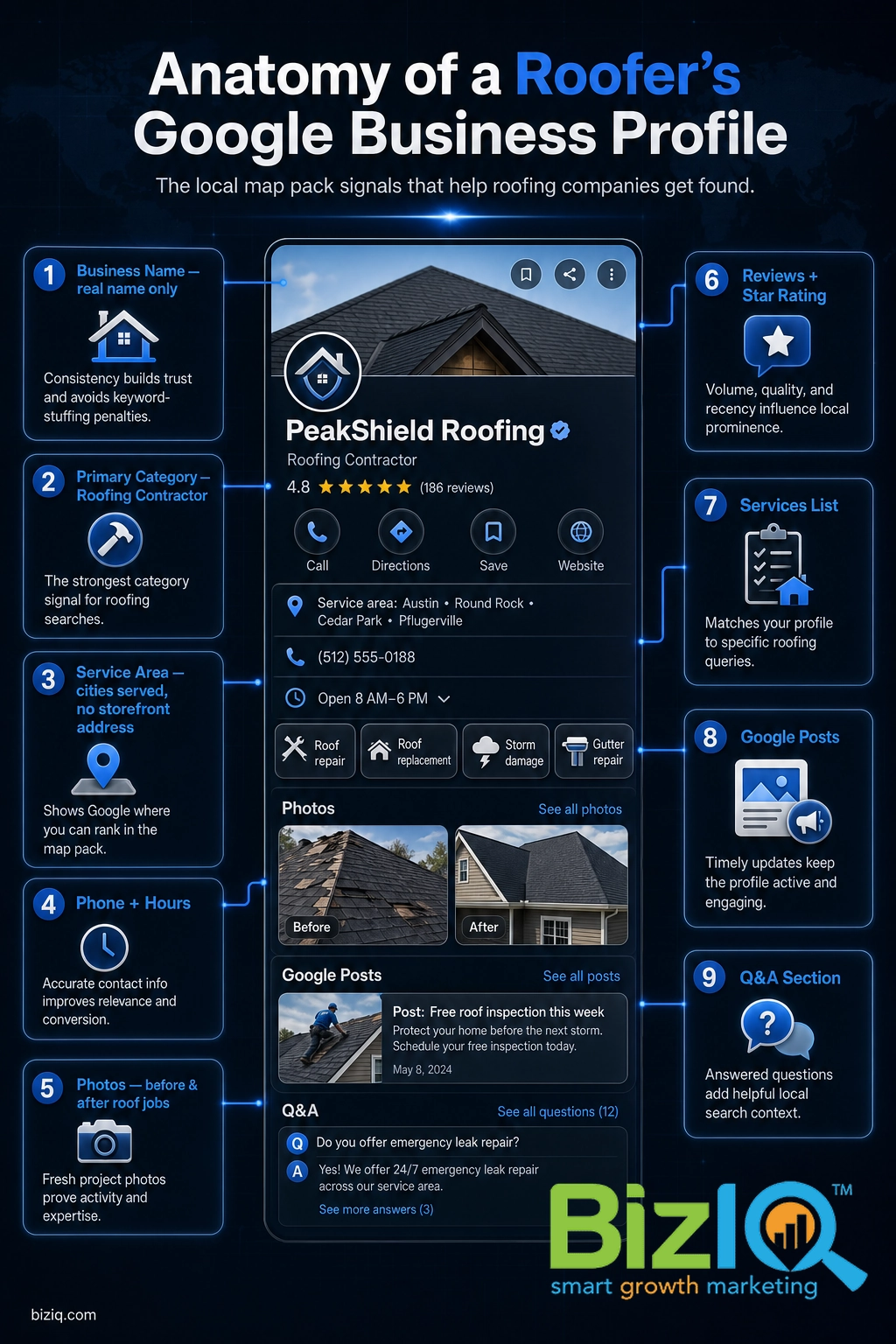
Type your business name exactly as it appears on your trucks, invoices, and signage. Then set the primary category to Roofing Contractor (more on categories below). Do not add cities or the word “roofing” to the name field, no matter how tempting it is for rankings.
3 Set your service area, not a storefront
When Google asks whether customers visit your location, choose the service-area option and list the cities, counties, or ZIP codes you cover. Most roofers should hide the street address because you work at the customer’s home.
4 Add your phone, website, and hours
Enter the phone number you actually answer, your website, and your real business hours. Make sure this information matches your website and other listings exactly, down to how you abbreviate the street. Consistent name, address, and phone details (your NAP) help Google trust that your business is real.
5 Verify your profile
Google confirms you own the business before your edits go live. Depending on your account, you may verify by video, phone, email, or a postcard mailed to your address. Video verification is usually fastest; a postcard can take about a week. Your profile will not appear in Search or Maps until verification is complete, so do this as soon as you can.
Once you are verified, you have the foundation. The rest of this guide is about the choices that separate a roofer who ranks from one who sits on page two.
Choose the Right Category: Roofing Contractor
Your primary category is one of the strongest relevance signals Google has for the map pack, so it deserves real thought. For almost every roofing company, the correct primary category is Roofing Contractor. That is a specific, distinct category, and it is not the same as General Contractor or Construction Company. Choosing a vague category tells Google you might do anything, which means you rank well for nothing.
After your primary category, add secondary categories only for services you genuinely perform. Common honest additions for roofers include Gutter Cleaning Service, Siding Contractor, or Metal Construction Company if you do metal roofing. Do not pad the list with categories you do not serve; it dilutes your relevance and can create expectations you cannot meet. If you are not sure which categories fit, our full breakdown of how to choose the right Google Business Profile categories walks through the selection process.
If you serve a wide region, resist the urge to create a separate profile for every city. Google wants one profile per real location. Instead, set a single profile with a broad service area and build city-level relevance through reviews, photos, and local content on your website.
Set Your Service Area the Right Way
Roofers are the textbook example of a service-area business (SAB): you travel to the customer’s property instead of having them come to a shop. Google lets you list up to 20 service areas, so choose the cities and counties where you actually take jobs and want more of them. Keep it realistic. Listing a metro three hours away will not help you rank there and can hurt your relevance where you really work.
Myth: “Listing more cities in my service area makes me rank in all of them.” Service areas tell Google where you are willing to work, but they are not a ranking shortcut. The map pack still favors the searcher’s proximity to your verified location and your overall prominence. Padding the list spreads your signal thin. You rank in a city by earning reviews, publishing relevant content, and being genuinely active there, not by adding its name to a field.
Photos That Win Roofing Jobs
Roofing is a visual, high-trust purchase. A homeowner spending thousands of dollars wants proof you do clean, professional work, and photos are where you show it. This is also one of the clearest places the data rewards effort.
What happens when a profile has photos (vs. none). Source: Google.
Upload real work, not stock images. Before-and-after shots of a roof replacement, close-ups of clean flashing and ridge caps, your crew on site, and your branded trucks all tell a homeowner you are a legitimate local company. Add new photos regularly rather than loading a batch once and forgetting it, because fresh activity signals that your business is open and busy. If you want the exact dimensions and formats that look sharp on every device, see our Google Business Profile photo size guide.
Get and Respond to Reviews
If photos build trust, reviews close the deal. Recent, genuine Google reviews are one of the most visible things a homeowner sees in the map pack, and they are a major prominence signal for ranking. The roofer with 150 reviews at 4.8 stars beats the one with six reviews almost every time, even if the website is weaker.
The simplest system that works: ask every satisfied customer the day the job wraps, when their relief is highest. Make it effortless by texting or emailing your direct review link, and print a QR code on invoices, door hangers, and yard signs. Then respond to every review, positive or negative, because responses show future customers (and Google) that you are engaged. Our guides on how to get more Google reviews and how to respond to reviews with examples give you the exact scripts.
Reviews also feed your reputation everywhere else online. If keeping up with requests and responses is more than your team can handle during busy season, our reputation management service automates the asking and helps you respond fast.
How Google Ranks Roofers in the Map Pack
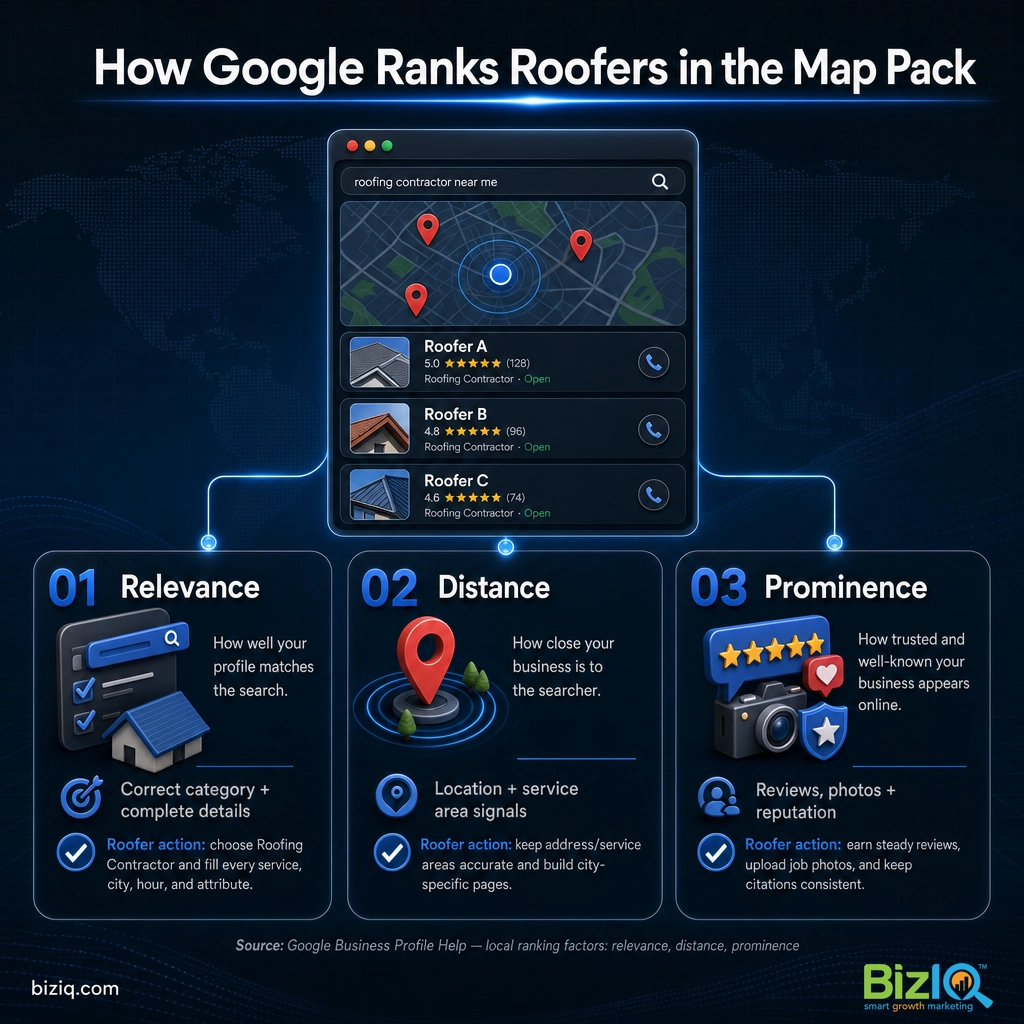
Google has said it ranks local results on three things, and understanding them turns profile work from guesswork into strategy.
| Ranking factor | What it means | What a roofer does about it |
|---|---|---|
| Relevance | How well your profile matches the search | Correct primary category (Roofing Contractor), accurate services, complete details |
| Distance | How close you are to the searcher | Honest, focused service area; genuine presence in the markets you want |
| Prominence | How well-known and trusted you are | Volume and quality of reviews, fresh photos, activity, links and mentions from your website |
You cannot change where a homeowner is standing when they search, but you have direct control over relevance and prominence. That is why category, service area, photos, and reviews matter so much: they are the levers Google actually measures. To see where you currently stand, read our walkthrough on how to check your Google Business Profile ranking.
A Business Profile does not work in isolation. It sits on top of your broader local SEO (search engine optimization, the practice of ranking in Google’s local results). The profile earns the map-pack spot; your website and citations earn the trust that keeps you there. Roofers who pair a strong profile with real local SEO compound their results. For an industry-wide view, our page on digital marketing for roofing companies ties the whole plan together, and the broader GBP guide for contractors covers trades beyond roofing.
Common Mistakes Roofers Make
Most roofers do not lose the map pack to a better marketer. They lose it to avoidable mistakes.
Keyword-stuffing the business name. Changing your name to “Best Roofing Company Denver” feels clever, but it breaks Google’s rule that your profile name must be your real-world business name. Google can suspend or restrict a profile for it, and a suspension can wipe out months of reviews and ranking. Use your true name, always.
- Treating it as set-and-forget. A profile you claimed two years ago and never touched slowly loses ground to active competitors. Post updates, add photos, and answer reviews.
- Inconsistent NAP. A phone number or address that differs between your profile, your website, and old directory listings confuses Google and erodes trust.
- Ignoring the Q&A section. Anyone can post a question on your profile, and a wrong answer can sit there for months. Monitor it and seed your own common questions.
- No service details or description. Empty fields are missed relevance. Fill out every service you offer and a clear, honest business description.
Turn Your Profile Into a Roofing Lead Machine
A Google Business Profile is the most valuable free tool a roofing company owns. Claim it, verify it, set Roofing Contractor as your category, define an honest service area, load it with real job photos, and build a steady habit of earning and answering reviews. Do that consistently and you give yourself the best shot at the local map pack, where the calls actually come from.
If you would rather spend your time on roofs than on Google settings, BizIQ sets up and manages profiles for home-services businesses every day. Start with a free analysis to see exactly where your profile stands and what is holding it back.
Get a Free Google Business Profile Analysis
BizIQ is AWESOME
“The professional team at BizIQ is AWESOME. They have been very attentive to my business objective and understand the complexities of my marketing challenges. Search results are always…”
— Robert N.
BizIQ delivers!
“I am very impressed with the service BizIQ delivers! Not only are my calls with them informative but they have patience and suggestions for me. BizIQ is taking the time to show me they…”
— Cindy M.
Response has been terrific
“I'm not sure why I tried BizIQ instead of the other 500 Google solicitation calls I get but I'm so glad I did! They are very professional and have taken over our neglected Google…”
— Mark E.