A Google Business Profile is the free Google listing that decides whether local homeowners find your plumbing company when a pipe bursts at 7 a.m., or find a competitor instead. Google Business Profile (GBP) is the listing that shows your name, phone number, reviews, hours, and a call button in Google Search and Google Maps. For plumbers, a complete and verified profile is the single biggest lever for showing up in the local “map pack,” turning searches into phone calls, and earning the trust that wins the job. This guide walks you through claiming it, verifying it, and optimizing it to rank in your service area.
- Your Google Business Profile is free, and for most plumbers it drives more calls than any other single marketing asset.
- Three things must be right before anything else works: the profile is verified, your primary category is Plumber, and your service area and hours are accurate.
- Photos, a steady flow of recent reviews, and regular posts are what separate a profile that ranks from one that sits invisible on page two.
- Google ranks local plumbers on relevance, distance, and prominence, so completeness and reputation compound over time.
- You do not strictly need a website, but a profile plus a simple site almost always out-performs a profile alone.
What’s in This Guide
- What a Google Business Profile Is (and Why Plumbers Need One)
- What a Complete Plumber’s Profile Looks Like
- How to Claim and Set Up Your Plumbing Profile
- How to Verify Your Profile
- How to Optimize for More Plumbing Calls
- Reviews: Your Reputation Engine
- How Plumbers Rank in the Local Map Pack
- Common Mistakes Plumbers Make
- Do You Need a Website Too?
- Frequently Asked Questions
What a Google Business Profile Is (and Why Plumbers Need One)
A Google Business Profile is the free business listing Google shows in Search and Maps. When someone types “plumber near me” or “emergency drain cleaning,” Google shows a map with three highlighted businesses at the top, each with a star rating, hours, and a call button. That block is called the local map pack, and getting into it is the whole game for a local plumber.
Here is why it matters more for plumbers than for almost any other business: plumbing is urgent and local. People are not browsing. They have water on the floor and they are calling the first trustworthy result they see. A profile that shows up, looks established, and has recent five-star reviews gets the call. One that is missing or incomplete does not.
Source: Google (Google / Ipsos research also found a complete profile makes customers 2.7 times more likely to consider a business reputable and 50% more likely to consider buying).
What a Complete Plumber’s Profile Looks Like
Before you build yours, it helps to picture the finished product. A strong plumbing profile gives a homeowner everything they need to decide in about five seconds: who you are, how close you are, whether people trust you, and how to reach you right now.
Every complete profile includes the same core parts. Understanding each one tells you exactly what you need to fill in.
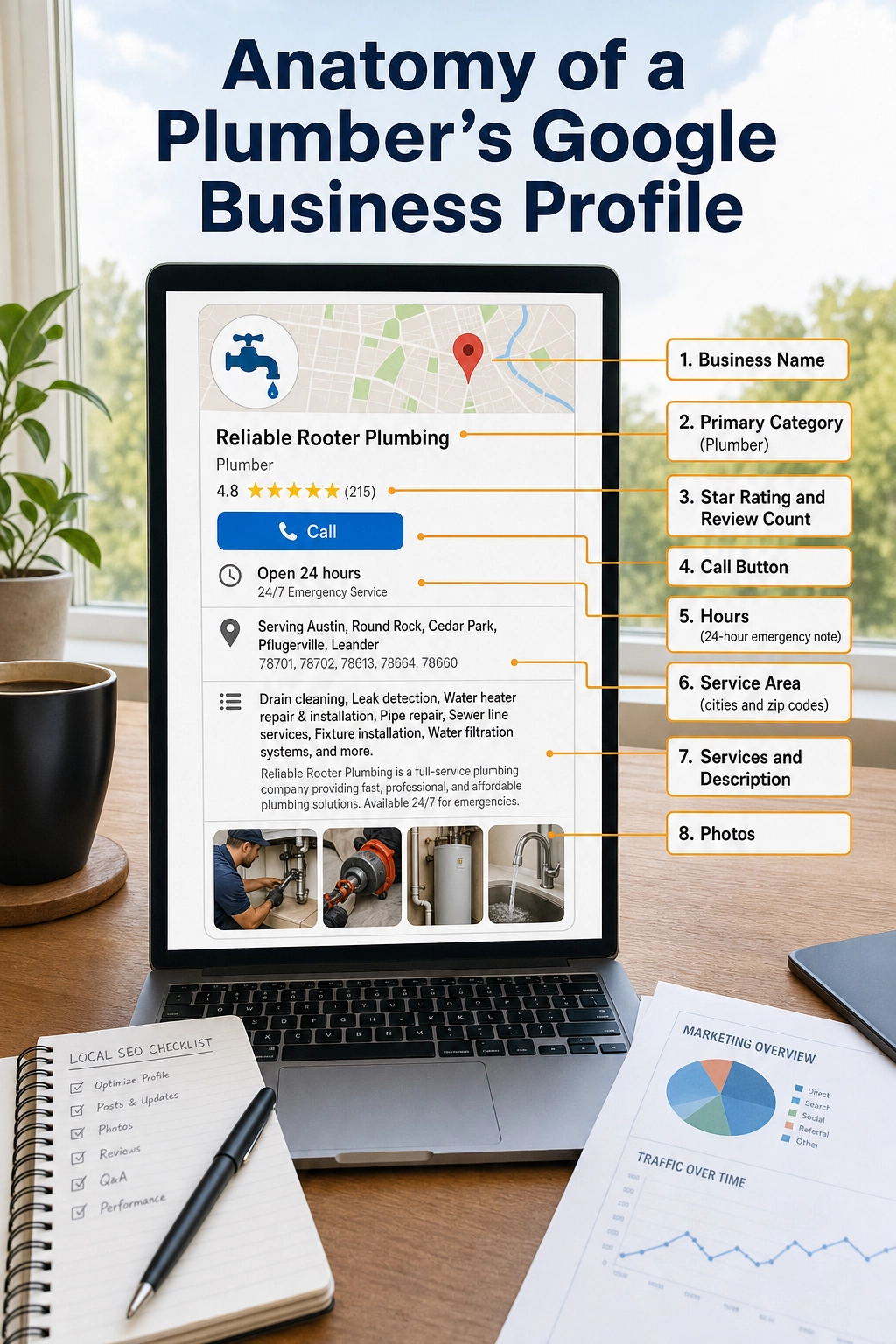
- Business name exactly as it appears on your truck and paperwork, with no keyword stuffing.
- Primary category set to Plumber, plus secondary categories for your other services.
- Star rating and review count, the trust signal customers scan first.
- Phone number and a call button so a mobile searcher can dial in one tap.
- Hours, including whether you offer 24-hour emergency service.
- Service area, the cities and zip codes you actually cover.
- Services and description that spell out the plumbing work you do.
- Photos of your team, trucks, and completed jobs.
How to Claim and Set Up Your Plumbing Profile
Setting up a profile takes most plumbers under 30 minutes. Follow these steps in order.
1 Search for your business first
Go to Google and search your business name plus your city. If a profile already exists (Google may have created one automatically, or a previous owner or employee did), you want to claim that one rather than create a duplicate. Duplicates are a common cause of ranking problems and suspensions.
2 Start at the Business Profile Manager
If no profile exists, go to the Google Business Profile Manager and choose to add your business. Type your business name and select the Plumber category when prompted.
3 Tell Google you are a service-area business
Most plumbers go to the customer, so you are a service-area business, not a storefront. When Google asks whether customers visit you at your address, say no, then list the cities, counties, or zip codes you serve. Hiding your exact street address is fine and expected for a service-area business, and it keeps your home address private if you run the business from home.
4 Add your contact details and hours
Enter the phone number you actually answer, your website if you have one, and your real hours. If you run emergency service, set your hours to 24 hours on the days you take after-hours calls. Accuracy here is not optional: a wrong phone number or missing hours quietly sends calls to a competitor.
Use one consistent business name, address, and phone number everywhere online (your website, directories, and social pages). Marketers call this your NAP, short for Name, Address, Phone. When these match across the web, Google trusts your profile more and ranks it higher. When they conflict, your ranking suffers.
How to Verify Your Profile
Verification is Google’s way of confirming you really run the business. An unverified profile can be created, but it will not rank or show its full features, so this step is the gate to everything else. Google offers one or more of these methods depending on your business:
- Phone or text: Google calls or texts a code, often instant.
- Email: a code arrives in your inbox, usually within minutes.
- Video: you record a short walkthrough showing your tools, branded truck, or equipment, which is increasingly common for service businesses.
- Postcard: Google mails a code to your address, typically arriving in about five business days to two weeks.
Choose the fastest method Google offers you, and do not change major details like your business name or address while verification is pending, as that can reset the process. If your profile ever gets flagged, our guide on why a Google listing gets suspended walks through the fixes. For a full timeline, see how long verification takes.
How to Optimize for More Plumbing Calls
A verified profile gets you in the door. Optimization is what gets you into the map pack and keeps the phone ringing. Work through each of these.
Nail your categories
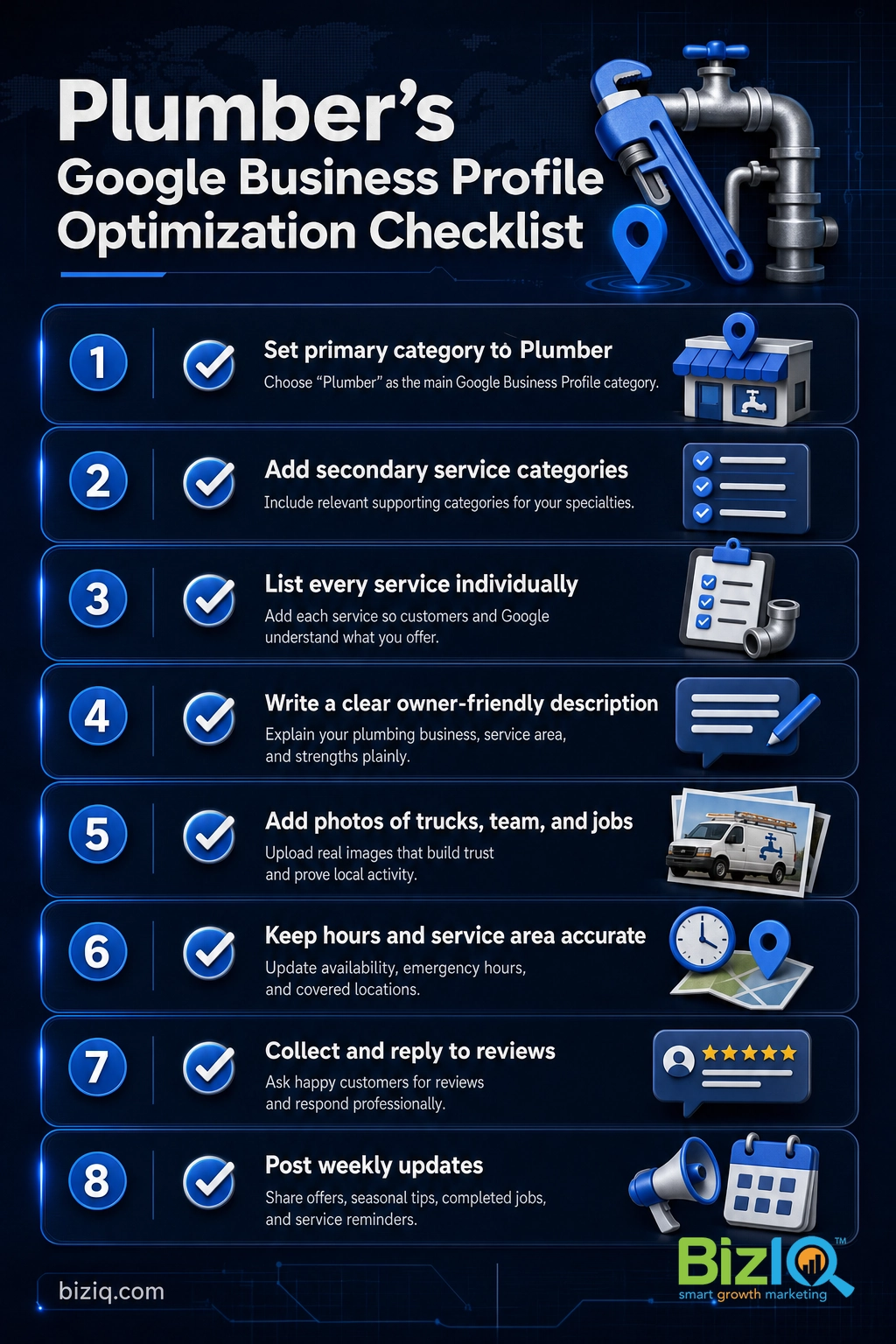
Keep your primary category as Plumber, which carries the most ranking weight. Then add secondary categories for the specific services you offer, such as Drainage Service, Water Softening Equipment Supplier, Hot Water System Supplier, or Gasfitter. Only add categories for work you genuinely do. Picking the right mix is worth getting right, so see our full breakdown of the best Google Business Profile categories.
Fill out services and the description
List each service individually (drain cleaning, water heater repair, repiping, leak detection, sewer line, fixture installation, and so on). In the business description, write plainly for a homeowner: what you do, the areas you serve, and what makes you reliable, such as upfront pricing or same-day service. Write it to be read by a person, not stuffed with keywords.
Add photos, and keep adding them
Photos are one of the easiest wins plumbers ignore. Upload clear shots of your trucks, your team, before-and-after jobs, and your logo. Fresh photos signal to Google that the profile is active, and they reassure customers that you are a real, established business.
Source: Google.
Use Google Posts to stay active
Posts are short updates that appear on your profile, like a seasonal reminder to winterize pipes, a note about a current offer, or a recently completed job. Posting every week or two is a simple, free way to show Google and customers that your business is active and attentive.
Reviews: Your Reputation Engine
For a plumber, reviews do two jobs at once. They are a direct ranking factor in local search, and they are the deciding trust signal for a homeowner choosing between you and the next result. A steady stream of recent, genuine reviews beats a big pile of old ones.
The system that works is simple: ask every happy customer at the moment the job is finished, make it effortless with a short review link by text or email, and reply to every review, good or bad. A calm, professional reply to a tough review often wins more trust than a perfect rating. For the full playbook, see how to get more Google reviews and how to respond to them.
Reviews are the one ranking factor you earn one customer at a time, which is exactly why they are so hard for a competitor to fake or buy their way past. A plumber who makes review requests a standard part of closing out every job builds an advantage that compounds month after month. (For a real-world example, BizIQ has earned a 4.6-star rating from 1,000+ Google reviews using this same discipline.)
Real results for real local businesses
How BizIQ clients turned their Google presence into customers.
Holloway Construction
Demolition & excavation — Jonesborough, TN
Down to their last $2,500 with no online presence, Holloway Construction had BizIQ launch a website in under 24 hours and optimize their Google Business Profile so customers could find them — and made $30,000 in 24 hours.
“BizIQ saved my business.” — Mark Holloway, Owner
Lines Sunscreens
Sun screens & shades — Arizona (since 1974)
This since-1974 family shop had relied on a street sign and word of mouth. A modern new website from BizIQ built a real online presence — and a significant surge of new customers.
“BizIQ goes above and beyond!” — Debbie, Lines Sunscreens
How Plumbers Rank in the Local Map Pack
Google is open about what decides local ranking. It comes down to three factors, and everything above feeds into them:
| Ranking factor | What it means for a plumber |
|---|---|
| Relevance | How well your profile matches the search. Driven by your category (Plumber), your services, and your description. |
| Distance | How close you are to the searcher. You cannot move, but an accurate service area tells Google where you genuinely work. |
| Prominence | How well known and trusted you are. Driven by reviews, photos, posts, a consistent NAP across the web, and links from other sites. |
Source: Google Business Profile Help.
You cannot control distance, so relevance and prominence are where you win. That is the whole point of keeping your profile complete and your reviews flowing. Local search engine optimization (SEO), the practice of improving where you show up in local results, is largely the work of strengthening those two factors over time. To see how you currently stack up, read how to check your Google Business ranking, and if you want a partner to handle it, our local SEO services are built for exactly this.
See how BizIQ markets plumbing companies
Common Mistakes Plumbers Make
Most plumbing profiles underperform for the same handful of avoidable reasons. Fix these and you are ahead of most of your local competition.
The myth: “Adding my city and services to my business name will help me rank.” It will not, and it can get you penalized. Stuffing your business name with “Phoenix Emergency Plumber 24/7” violates Google’s guidelines and risks a suspension that pulls you off the map entirely. Your name field is for your real business name only. Rank with your category, service area, reviews, and photos instead, not by gaming the name.
Other frequent mistakes:
- Leaving the profile unverified, which means it cannot rank at all.
- Inconsistent NAP across your website and directories, which erodes Google’s trust.
- The wrong primary category, such as a general “Contractor” instead of Plumber.
- Letting reviews go stale or never replying to them.
- No photos, which makes a profile look abandoned.
- Creating a duplicate instead of claiming the existing listing.
Do You Need a Website Too?
You can run and rank a Google Business Profile with no website at all, and Google even lets you build a basic free site from your profile. For a plumber just getting started, that is a fine place to begin. But a real website gives Google more to trust, gives you room to show your services and service areas in depth, and gives customers more reasons to choose you over a bare listing.
In practice, a profile plus a simple, fast website almost always out-performs a profile alone. If you are weighing your options, read can you use Google Business without a website and what a Google Business website actually is. For full profile setup and ongoing management, BizIQ offers Google Business Profile management for local service businesses.
We are very happy
“BizIQ has helped our business so much! They promised and delivered! We are very happy with their service, our web presence and all the follow up support we get!”
— CharLee B.
Highly recommend BizIQ
“Our business recently hired BizIQ to create our website. They have created the best website we have ever had. We have been impressed by their customer service and how quickly they do…”
— Norman S.
Remarkable job
“Our Client Success Manager has done a remarkable job building our website. Her professionalism and knowledge is great. I never dreamed my business could look so good on a website. All…”
— Michael C.