
Here is the short answer: upload your Google Business Profile (GBP) photos at 720 by 720 pixels in JPG or PNG, keep each file between 10 KB and 5 MB, and your logo, cover photo, posts, and gallery shots will stay sharp instead of blurry or awkwardly cropped. GBP is the free business listing that appears in Google Search and Google Maps (you may still hear it called Google My Business, or GMB). This guide gives you the exact recommended size and shape for every photo slot, so your profile looks professional the moment a nearby customer finds you.
- Google officially recommends 720 x 720 pixels for Business Profile photos, with a 250 x 250 px minimum, in JPG or PNG, and a file size of 10 KB to 5 MB.
- Your logo and profile picture work best as 1:1 squares; your cover photo as a 16:9 landscape at 1024 x 576 px.
- Post (Update) images look best at 1200 x 900 px (4:3) so they are not trimmed.
- Business Profiles with photos get 42% more requests for directions and 35% more website clicks than profiles without them.
- Match the aspect ratio first: the exact pixel count matters less than the shape and a sharp, well-lit image.
What’s in This Guide
Quick Answer: Every Google Business Profile Photo Size
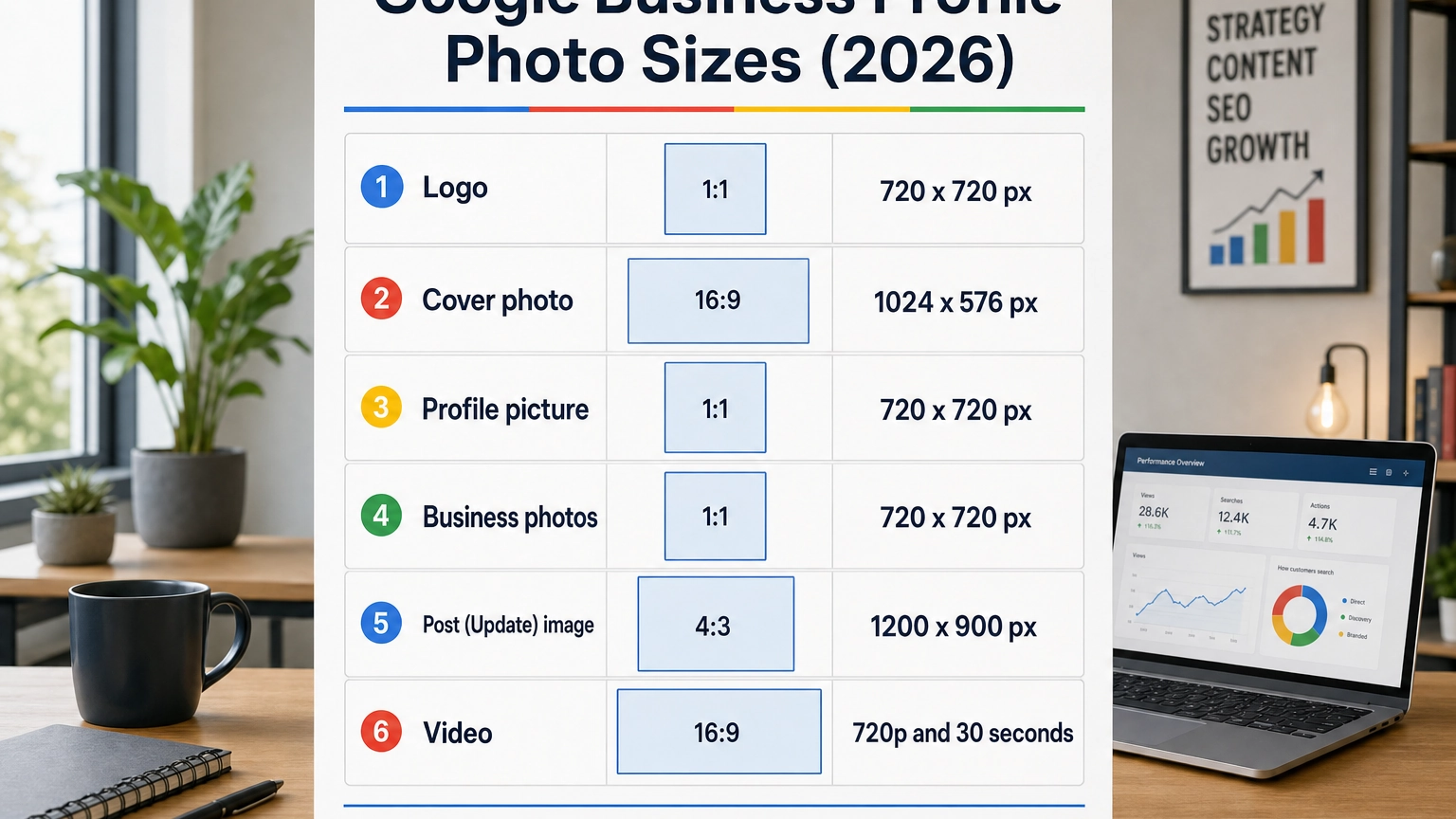
Use this table as your one-screen reference. The pixel sizes are the recommended working dimensions local businesses have settled on; the shape (aspect ratio) is the part you really cannot get wrong, because that is what controls how Google crops the image.
| Photo slot | Shape | Recommended size | Minimum size | Where it shows |
|---|---|---|---|---|
| Logo | 1:1 (square) | 720 x 720 px | 250 x 250 px | Next to your business name in Search and Maps |
| Cover photo | 16:9 (landscape) | 1024 x 576 px | 480 x 270 px | Large banner near the top of your profile |
| Profile / identity picture | 1:1 (square) | 720 x 720 px | 250 x 250 px | Your main profile thumbnail |
| Business photos (exterior, interior, team, product) | 1:1 (square) | 720 x 720 px | 400 x 300 px | Your photo gallery, Search, and Maps |
| Post (Update) image | 4:3 (landscape) | 1200 x 900 px | 400 x 300 px | Inside the Updates / posts on your profile |
| Video | 16:9 | 720p or higher | 30 seconds or less | Your photo and video gallery |
Every photo type shares the same file rules: JPG or PNG, 10 KB to 5 MB.
Source: Google Business Profile Help
That kind of lift is exactly why it pays to get every photo sized and uploaded the right way the first time, rather than fixing a blurry profile later.

The Only Photo Spec Google Actually Publishes
Here is something most size guides will not tell you: Google publishes exactly one set of photo requirements, and it is not a long list of per-slot dimensions. According to Google’s own Business Profile Help, every photo should be:
- Format: JPG or PNG
- File size: between 10 KB and 5 MB
- Recommended resolution: 720 pixels tall by 720 pixels wide
- Minimum resolution: 250 pixels tall by 250 pixels wide
- Quality: in focus, well lit, and without heavy filters or major edits
That is it. The separate logo, cover, and post dimensions you see in the table above (and across the web) are field-tested recommendations from the local-SEO community, not numbers Google hands out. They matter because they match the shape Google uses in each spot, so your image fills the frame instead of being stretched or trimmed.
“I have to hit an exact pixel size or Google will reject my photo.” Not true. Google only enforces the format, the 10 KB to 5 MB file size, and the 250 x 250 px minimum. Upload a sharp, correctly-shaped image that clears those rules and you are fine. The recommended sizes just keep the result crisp.
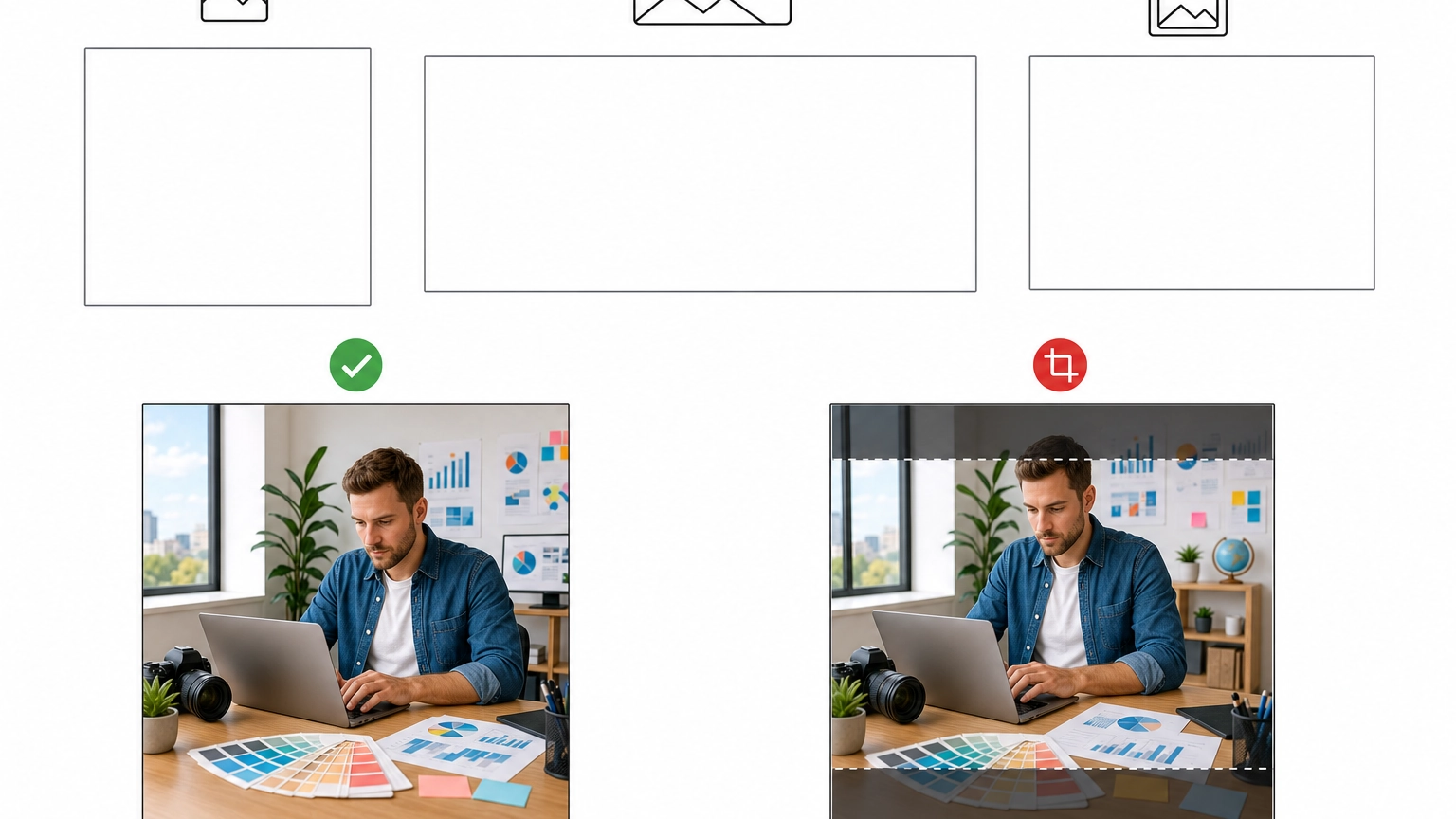
So the single most useful habit is to get the aspect ratio right before you upload: a square for logos and gallery photos, a 16:9 landscape for your cover, and a 4:3 landscape for posts. Match the shape and Google has nothing to crop.
Source: Google Business Profile Help
Logo Size: 720 x 720 px, Square
Your logo sits next to your business name across Search and Maps, so it is often the first thing a customer sees. Keep it a 1:1 square at a recommended 720 x 720 pixels (250 x 250 px minimum). Center the mark and leave a little breathing room around it, because Google may display the logo inside a circle or a rounded square depending on the surface. A logo that runs edge to edge can get its corners clipped.
If your only logo file is a wide, horizontal lockup, create a compact square version for GBP. A cramped or off-center logo reads as a less established business, which is the opposite of what you want in a local search result.
Cover Photo Size: 1024 x 576 px, 16:9
The cover photo is the wide banner near the top of your profile. Upload it as a 16:9 landscape image at 1024 x 576 pixels (480 x 270 px is a workable minimum). This is your chance to show the storefront, the team, or the finished work that makes someone choose you, so make it a genuine, high-quality shot of your business rather than a generic stock photo.
Google does not always display your cover photo as the main image. It often chooses the photo it thinks represents your business best, which can even be a customer upload. The fix is to keep adding strong, recent photos of your own so the best candidate is always yours.
Profile and Business Photos: Keep Them Square
Your profile (identity) picture and the everyday business photos in your gallery, the exterior, interior, team, and product or project shots, all do best as 1:1 squares at 720 x 720 pixels. Business photos will still work down to about 400 x 300 px, but squares crop most predictably across Google’s layouts.
Think in categories when you build your gallery: an exterior shot so customers recognize your building, interior shots so they know what to expect inside, team photos that build trust, and product or finished-work photos that show what you deliver. A deep, current gallery gives Google more to show and gives customers more reasons to call. Once your photos are live, you can even add location data to your photos before you upload them to reinforce where you operate.
Real results for real local businesses
How BizIQ clients turned their Google presence into customers.
Holloway Construction
Demolition & excavation — Jonesborough, TN
Down to their last $2,500 with no online presence, Holloway Construction had BizIQ launch a website in under 24 hours and optimize their Google Business Profile so customers could find them — and made $30,000 in 24 hours.
“BizIQ saved my business.” — Mark Holloway, Owner
A.R.S. Video Inc
Film & audio conversion — Tallmadge, OH
After rebuilding a tangled site structure, A.R.S. Video reclaimed their rankings — over 2,000 more web visits and an 88% increase in sessions.
Post (Update) Image Size: 1200 x 900 px, 4:3
Google Business Profile posts, sometimes called Updates, are the short announcements, offers, and news items that appear on your profile. Attach images at 1200 x 900 pixels in a 4:3 landscape ratio (400 x 300 px minimum) so the image fills the post space without the top and bottom being cut off. A square image will still work here, but 4:3 matches the post frame most closely.
Posting regularly keeps your profile active, which is exactly the kind of freshness local search rewards. If you want those updates to go out on a schedule instead of one at a time, here is how to schedule Google Business Profile posts in advance.
Video Specs: Short, Sharp, and Horizontal
Video lives in the same gallery as your photos and is a quick way to stand out. The specs most sources agree on are a clip of 30 seconds or less at 720p resolution or higher. File-size limits have shifted over time, so keep your clip well under the cap and check the current limit in Google’s help center before you upload. A steady, well-lit 20-second walkthrough of your space or a finished job usually outperforms a longer, shakier one.
Source: BrightLocal’s Business Profile video guide
How to Upload Photos (and Replace a Bad One)
Adding photos takes a minute once your profile is verified:
- Open your Business Profile from Google Search or Maps, or sign in at the Google Business Profile manager.
- Select Photos (or Add photo), then choose the category: Logo, Cover, or the type of business photo you are adding.
- Upload your correctly-sized file and save. Business photos usually appear quickly, though video can take up to 24 hours to process.
Removing a bad photo is just as important as adding good ones. You can delete photos you uploaded yourself at any time. Customer-submitted photos are different, and there is a specific process for removing a customer photo from your profile when one does not represent your business well. For the questions that come up most often, our Google Business Profile FAQ is a good next stop.
Source: Google Business Profile Help
Getting every photo sized and uploaded correctly is the kind of detail that quietly separates a profile customers trust from one they scroll past. If you would rather have it handled end to end, our team sets up and optimizes profiles every day.
Common Photo Mistakes That Hurt Your Profile
Most photo problems on a Business Profile come down to a handful of avoidable errors:
- Uploading images that are too small. Below the recommended resolution, Google stretches the photo and it turns soft and pixelated.
- Using the wrong shape. A tall portrait photo in a slot built for a square or a 16:9 cover gets cropped in ways you cannot control.
- Heavy filters or added text. Google wants photos that look real. Over-edited images or ones plastered with promotional text can be rejected.
- Letting the gallery go stale. A profile with three photos from two years ago signals a business that may not be active. Add fresh photos regularly.
The pixel count is the part everyone obsesses over, but the real win is simpler: match the shape, upload something sharp and genuine, and keep adding to it. A profile that pairs correct sizing with a steady stream of real photos is the one that earns the clicks and the calls. It is the same discipline that helps our clients hold a 4.6-star rating across 1,000+ Google reviews.
The right job
“BizIQ is providing the data my business needs to grow. I can tell from customer leads that they are doing the right job. My Client Success Manager is providing the skill and patience I…”
— Mark B.
Best business decision
“Going with BizIQ was the best business decision I've ever made! Our Client Success Manager does a fantastic job keeping our web presence up-to-date and keeping us informed about our…”
— Harry J.
Worth every penny!
“BizIQ is awesome! Our Client Success Manager goes above and beyond to meet our needs! We've had increased business since implementing our website. Plus our Google presence has gotten…”
— Amy A.
Google Business Profile Photo Size FAQs
What size should a Google Business Profile photo be?
What is the Google Business Profile cover photo size?
What size is the Google Business Profile logo and profile picture?
What size should Google Business Profile post images be?
What file formats and file sizes does Google accept?
Why do my Google Business Profile photos look blurry or cropped?
How many photos should I add to my Google Business Profile?
Make Your Photos Work for You
Correctly sized photos are one piece of a profile that actually pulls in local customers. The rest is a complete, active, and well-optimized listing. If you want a partner to manage your Business Profile or your wider local SEO, BizIQ has helped small businesses grow online since 2013.
See BizIQ’s Google Business Profile management
Sources: Photo format, file-size, and resolution requirements from Google Business Profile Help. Per-slot recommended dimensions and aspect ratios from SEMrush’s Business Profile photo-size guide. Video specifications from BrightLocal’s Business Profile video guide. Visibility and consideration figures published by Google and Google / Ipsos.